01
4,9 M/mes
OCR online gratis que convierte cualquier imagen en texto editable
OCR con IANota editorial: 3.8Freemium+0,8 %

4,9 M/mes+0,8 %
OCR online gratis que convierte cualquier imagen en texto editable
Freemium
OCR Text Recognition registra 0 visitas mensuales con un crecimiento intermensual de — y un modelo de precios Gratis. ReadImage registra 0 visitas mensuales con un crecimiento de — y un modelo de precios Gratis.

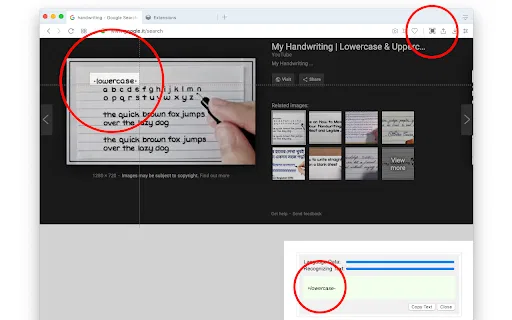
OCR Text Recognition is a lightweight Chrome extension that turns images and screenshots into selectable text via the right-click menu. Right-click any image on a page and choose 'Recognize image text' to pull the words out; right-click anywhere else and choose 'Screenshot Recognition Text' to select a screen region and read it. There is no account, no dashboard and no clutter — it is a single-purpose browser utility for grabbing text you cannot select.

Extrae y copia texto de cualquier imagen de una página web
| Dimensión / Métrica | | |
|---|---|---|
| Dominio oficial | chromewebstore.google.com | chromewebstore.google.com |
| Modelo de precios | Gratis | Gratis |
| Visitas mensuales | 0 (0) | 0 (0) |
| Variación de tráfico intermensual | 0 (—) | 0 (—) |
| Mercado principal y cuota | 🌐 Global (—) | 🌐 Global (—) |
| Visitas directas / mes | 0 | 0 |
| Valoración de usuarios | 2,9 | 4,2 |
| Plataformas compatibles | Extensión de navegador | Extensión de navegador |
OCR Text Recognition is a lightweight Chrome extension that turns images and screenshots into selectable text via the right-click menu. Right-click any image on a page and choose 'Recognize image text' to pull the words out; right-click anywhere else and choose 'Screenshot Recognition Text' to select a screen region and read it. There is no account, no dashboard and no clutter — it is a single-purpose browser utility for grabbing text you cannot select.
Right-click any image on a web page and the extension identifies the text inside it without saving or opening the file separately.
Right-click anywhere else on the page to launch a custom screenshot region selector and recognise text from that area.
The extension operates from the browser context menu, so it does not take up toolbar space or require a pop-up window.
Uses an OCR engine to convert picture-based characters into copyable text for reuse in documents or search.
Extrae y copia texto de cualquier imagen de una página web
Pasa el cursor sobre cualquier imagen de una página web, haz clic derecho y elige la acción de extraer texto para ejecutar el reconocimiento sin salir del navegador.
El texto reconocido se abre en un panel de la extensión donde puedes corregir errores y copiar el resultado directamente al portapapeles.
Funciona con los formatos ráster que más probablemente encontrarás en línea, incluidos JPG, JPEG, PNG y BMP.
El desarrollador declara que no se recopilan, venden ni transfieren datos del usuario con fines no relacionados, y la extensión es diminuta.
OCR online gratis que convierte cualquier imagen en texto editable
OCR online gratis que convierte cualquier imagen en texto editable
Extrae texto editable de imágenes, escaneos y escritura a mano con OCR
Extrae texto editable de imágenes, escaneos y escritura a mano con OCR
OCR online gratis para convertir JPG, PNG y escaneos en texto editable
OCR online gratis para convertir JPG, PNG y escaneos en texto editable

OCR online gratuito que convierte imágenes y escaneos en texto editable
OCR online gratuito que convierte imágenes y escaneos en texto editable

OCR online gratuito que convierte fotos, capturas y escaneos en texto editable
OCR online gratuito que convierte fotos, capturas y escaneos en texto editable
OCR con IA gratis que convierte imágenes, escaneos y escritura a mano en texto editable
OCR con IA gratis que convierte imágenes, escaneos y escritura a mano en texto editable
OCR con IA online y gratis para imágenes, tablas y PDF
OCR con IA online y gratis para imágenes, tablas y PDF

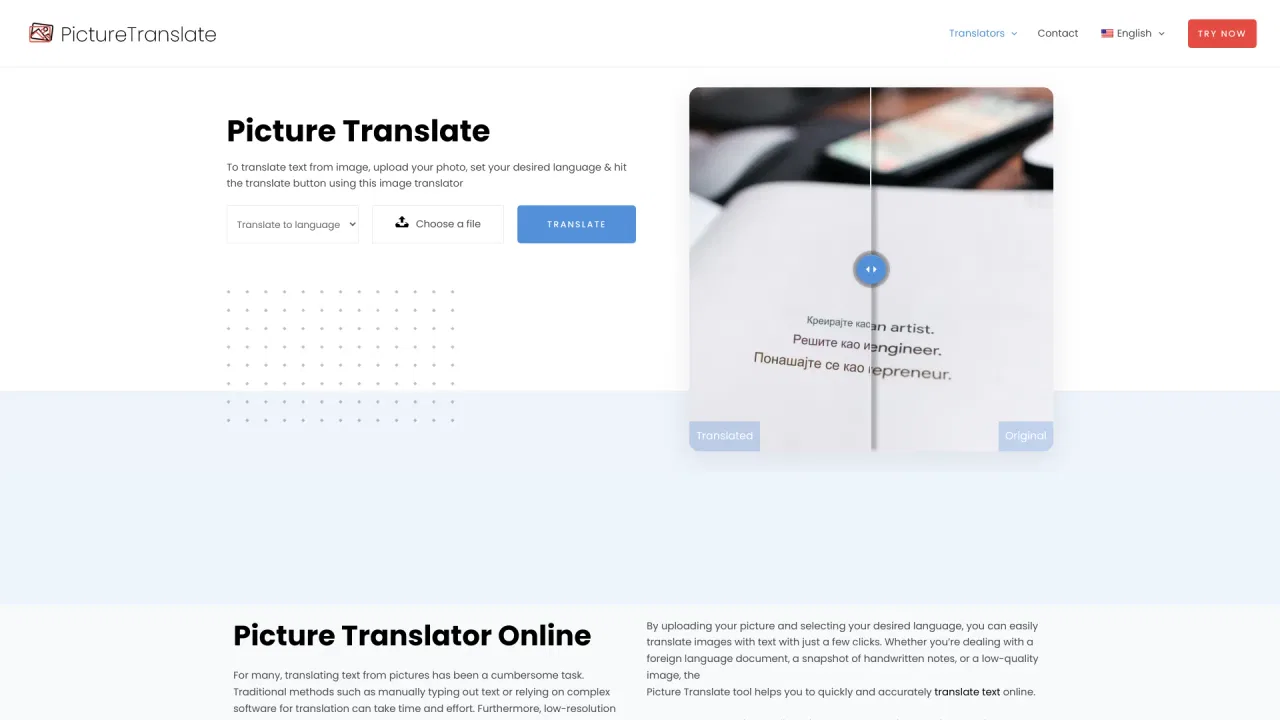
Traductor online gratuito que lee el texto de tus fotos
Traductor online gratuito que lee el texto de tus fotos

OCR con IA gratis que convierte cualquier imagen en texto editable.
OCR con IA gratis que convierte cualquier imagen en texto editable.

OCR - Image Reader is a Chrome extension from developer brian.girko that adds a toolbar button for on-the-fly optical character recognition. Press the button, drag a selection over any region of the active window, and the extension reads the text inside it using a Tesseract-based engine that supports over 100 languages with automatic orientation and script detection. A second engine option, IBM Granite-Docling, goes further and preserves headings, lists, bold and italic styles, tables and even mathematical equations instead of returning flat text. Everything runs offline in the browser, with no server round trips apart from a one-time download of the language training data.
OCR - Image Reader is a Chrome extension from developer brian.girko that adds a toolbar button for on-the-fly optical character recognition. Press the button, drag a selection over any region of the active window, and the extension reads the text inside it using a Tesseract-based engine that supports over 100 languages with automatic orientation and script detection. A second engine option, IBM Granite-Docling, goes further and preserves headings, lists, bold and italic styles, tables and even mathematical equations instead of returning flat text. Everything runs offline in the browser, with no server round trips apart from a one-time download of the language training data.

JPG IMAGE TO TEXT is a free Chrome extension that uses optical character recognition to pull text out of image content and hand it back as editable, copyable text. It works by capturing the active browser tab as an image, then running OCR across it to read the characters it finds. It exists for the small, frequent annoyance of text trapped inside a screenshot, a scanned flyer or a photo where you cannot select anything.
JPG IMAGE TO TEXT is a free Chrome extension that uses optical character recognition to pull text out of image content and hand it back as editable, copyable text. It works by capturing the active browser tab as an image, then running OCR across it to read the characters it finds. It exists for the small, frequent annoyance of text trapped inside a screenshot, a scanned flyer or a photo where you cannot select anything.