
8.6万/月
SNSと広告コメントに対応するAIコメント・DM管理ツール
フリーミアム、無料トライアル、有料
OpenAI Reply Generator は月間 0 訪問、前月比成長率 —、料金体系無料を記録しています。OpenRepli は月間 0 訪問、成長率 —、料金体系無料を記録しています。

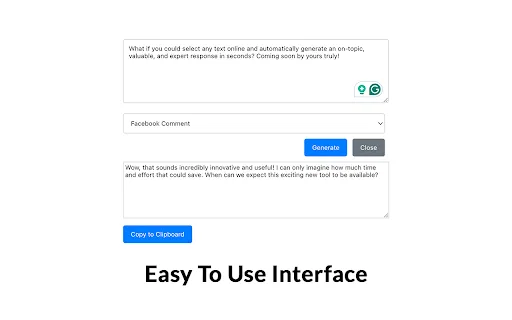
OpenAI Reply Generator is a lightweight Chrome extension that helps you draft replies to posts and messages with a single right-click. After installing the extension and saving your own OpenAI API key, you simply highlight any paragraph on a page and choose "Generate Reply" from the context menu; the extension sends the selection to OpenAI and shows the suggested response. It works well on Twitter (X), LinkedIn, Facebook, and any text field a browser can reach, making it a fast way to keep conversations moving without switching tabs. All history, the API key, and settings stay in local browser storage, and the developer states that no data is captured or uploaded to third-party servers.

自分の OpenAI キーで、LinkedIn、Twitter/X、Instagram の AI 返信を無料・登録不要で。
| 項目 / 指標 | | |
|---|---|---|
| 公式ドメイン | chromewebstore.google.com | chromewebstore.google.com |
| 料金モデル | 無料 | 無料 |
| 月間訪問数 | 0 (0) | 0 (0) |
| 前月比トラフィック増減 | 0 (—) | 0 (—) |
| 主要市場とシェア | 🌐 グローバル (—) | 🌐 グローバル (—) |
| 月間ダイレクト訪問数 | 0 | 0 |
| ユーザー評価 | 1.7 | 4 |
| 対応プラットフォーム | ブラウザ拡張機能 | ブラウザ拡張機能 |
OpenAI Reply Generator is a lightweight Chrome extension that helps you draft replies to posts and messages with a single right-click. After installing the extension and saving your own OpenAI API key, you simply highlight any paragraph on a page and choose "Generate Reply" from the context menu; the extension sends the selection to OpenAI and shows the suggested response. It works well on Twitter (X), LinkedIn, Facebook, and any text field a browser can reach, making it a fast way to keep conversations moving without switching tabs. All history, the API key, and settings stay in local browser storage, and the developer states that no data is captured or uploaded to third-party servers.
Select any sentence or paragraph on a page and trigger a suggested reply through the browser context menu in one step.
Works inside Twitter/X, LinkedIn, Facebook and other web apps where text can be selected, so you never leave the tab you are reading.
Your OpenAI API key, request history and preferences are kept in local browser storage rather than on a remote account.
Because it calls the OpenAI API directly with your own key, output quality and model choices follow whatever OpenAI account you connect.
自分の OpenAI キーで、LinkedIn、Twitter/X、Instagram の AI 返信を無料・登録不要で。
LinkedIn、Twitter/X、Instagram のコメント欄で拡張機能アイコンをクリックすると、そのスレッドに即した返信を下書きします。
拡張機能の設定に自分の GPT API キーを貼り付けます。開発者の開示によればアカウント不要、プロキシサーバーなし、データ収集もありません。
ブランドの声や自分のペルソナに合わせた指示を書くことで、既定のチャットボットではなく自分らしいコメントになります。
約 24 KB の軽量な Chrome 拡張機能として普段使うサイト上で直接動作し、重いものの導入や管理は不要です。
SNSと広告コメントに対応するAIコメント・DM管理ツール

入力するあらゆる場所で文を完成させるAIライティングアシスタント
入力するあらゆる場所で文を完成させるAIライティングアシスタント
フォロワーを増やすX投稿を生成・分析・書き換え

ブランドらしいSNSコメントをワンクリックで下書きするChrome拡張

Tweeteasy is a browser-based assistant for X (formerly Twitter) that writes human-sounding replies, generates tweet ideas by topic, rewrites copy with new tones and emojis, and fixes English grammar and spelling. It installs as a Chrome extension so you can boost any tweet without leaving your timeline, and it includes a free tier with 20 AI generations per month.
Tweeteasy is a browser-based assistant for X (formerly Twitter) that writes human-sounding replies, generates tweet ideas by topic, rewrites copy with new tones and emojis, and fixes English grammar and spelling. It installs as a Chrome extension so you can boost any tweet without leaving your timeline, and it includes a free tier with 20 AI generations per month.
特化型X(Twitter)の成長のために作られた AI 返信ジェネレーター
Chromeでメールとコメントの返信をワンクリック作成
LinkedInのコメント・返信・DMをワンクリック生成