Chrome ブラウザからワンクリックで完結する AI ウェブスクレイピング
AI Web スクレイピング編集部スコア:4.8
無料
459 種類のワークフローで、アクセス推計・機能・代替製品を比較できます。
“data preprocessing” · コーディング・開発·15 件
最初からChrome ブラウザからワンクリックで完結する AI ウェブスクレイピング

ブラウザから直接使えるAIデータ分析。

From Chaos is a free Chrome extension that turns any webpage into organised, downloadable data using ChatGPT. Paste your OpenAI API key, open a page, describe the data you want, choose a format such as JSON, YAML and CSV, and download the result.
From Chaos is a free Chrome extension that turns any webpage into organised, downloadable data using ChatGPT. Paste your OpenAI API key, open a page, describe the data you want, choose a format such as JSON, YAML and CSV, and download the result.

Browse AI: Fast Web Scraping and Monitoring is a Chrome extension that turns any website into a structured data source without writing code. You point at the data you want, train a robot in a couple of minutes, and then run it on a schedule, download results as a spreadsheet, or stream them into other apps through Zapier, webhooks or a REST API.
Browse AI: Fast Web Scraping and Monitoring is a Chrome extension that turns any website into a structured data source without writing code. You point at the data you want, train a robot in a couple of minutes, and then run it on a schedule, download results as a spreadsheet, or stream them into other apps through Zapier, webhooks or a REST API.

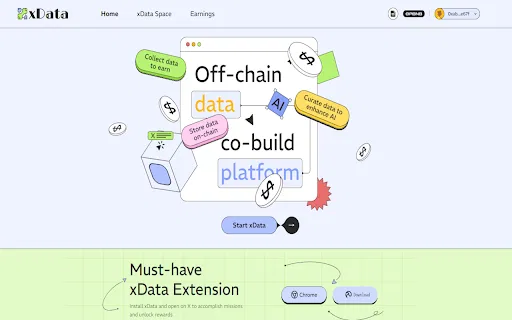
Xのデータを収集し、AIを支え、$Waferを獲得

AIScraper is a browser-based data extraction tool delivered as a Chrome extension. Instead of writing selectors or scripts, you describe the data you want in plain language and the AI figures out how to pull it from the open page. It is built for collecting structured information from both static and dynamic, JavaScript-heavy sites and for turning that information into spreadsheets or JSON exports without any coding involved.
AIScraper is a browser-based data extraction tool delivered as a Chrome extension. Instead of writing selectors or scripts, you describe the data you want in plain language and the AI figures out how to pull it from the open page. It is built for collecting structured information from both static and dynamic, JavaScript-heavy sites and for turning that information into spreadsheets or JSON exports without any coding involved.

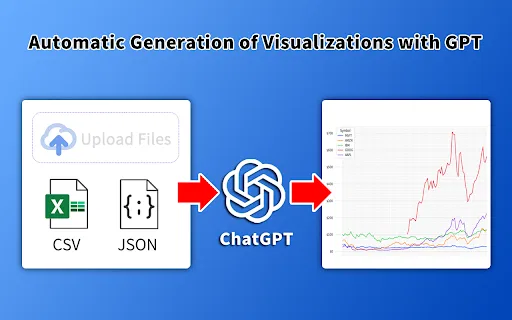
表計算データをAIでグラフとインフォグラフィックに

韓国の公共データをワンクリックで AI 分析

数クリックでAIがリストのパターンを認識し、あらゆるサイトを収集

Cross-border E-commerce Product Scraper is a Chrome extension that uses AI layout prediction to spot the main product list on almost any shopping page, then saves the captured fields to an Excel file. It is pre-tuned for cross-border marketplaces such as Amazon, eBay, Etsy, Walmart, Mercado Livre, Mercari and Wayfair.
Cross-border E-commerce Product Scraper is a Chrome extension that uses AI layout prediction to spot the main product list on almost any shopping page, then saves the captured fields to an Excel file. It is pre-tuned for cross-border marketplaces such as Amazon, eBay, Etsy, Walmart, Mercado Livre, Mercari and Wayfair.


Facebookの不動産グループを数分で書き出し可能なキャッシュバイヤーリストに

EclecticIQ Threat Scout is a free Chrome extension from EclecticIQ that reads cyber threat reporting on the open web — articles, advisories, PDFs, TXT and DOC files — and converts the relevant entities and observables into structured, STIX 2.1-compatible data. It pairs OpenAI's natural-language processing with predefined regular expressions, then hands results to a built-in editor where an analyst can validate, retype or discard anything the AI got wrong. Finished output can be exported as CSV for use in any threat intelligence platform, SIEM or ticketing system. Users who also run EclecticIQ Intelligence Center get extra behaviour: automatic lookups against their instance, on-page highlighting of matches, and one-click ingestion of a scanned document as a Report entity.
EclecticIQ Threat Scout is a free Chrome extension from EclecticIQ that reads cyber threat reporting on the open web — articles, advisories, PDFs, TXT and DOC files — and converts the relevant entities and observables into structured, STIX 2.1-compatible data. It pairs OpenAI's natural-language processing with predefined regular expressions, then hands results to a built-in editor where an analyst can validate, retype or discard anything the AI got wrong. Finished output can be exported as CSV for use in any threat intelligence platform, SIEM or ticketing system. Users who also run EclecticIQ Intelligence Center get extra behaviour: automatic lookups against their instance, on-page highlighting of matches, and one-click ingestion of a scanned document as a Report entity.

一行もコードを書かずにスプレッドシートの予測を生成

1688で一括発注し、同一サプライヤーの注文をワンクリックで統合