OCR - Image Reader는 월간 방문 0, 전월 대비 성장률 —, 무료 가격 모델을 기록합니다. OCR Text Recognition는 월간 방문 0, 성장률 —, 무료 가격 모델을 기록합니다.

OCR - Image Reader is a Chrome extension from developer brian.girko that adds a toolbar button for on-the-fly optical character recognition. Press the button, drag a selection over any region of the active window, and the extension reads the text inside it using a Tesseract-based engine that supports over 100 languages with automatic orientation and script detection. A second engine option, IBM Granite-Docling, goes further and preserves headings, lists, bold and italic styles, tables and even mathematical equations instead of returning flat text. Everything runs offline in the browser, with no server round trips apart from a one-time download of the language training data.

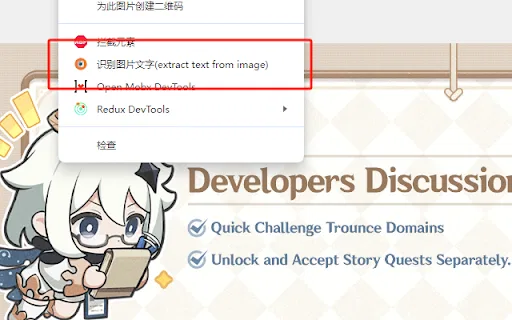
OCR Text Recognition is a lightweight Chrome extension that turns images and screenshots into selectable text via the right-click menu. Right-click any image on a page and choose 'Recognize image text' to pull the words out; right-click anywhere else and choose 'Screenshot Recognition Text' to select a screen region and read it. There is no account, no dashboard and no clutter — it is a single-purpose browser utility for grabbing text you cannot select.
| 항목 / 지표 | ![]() | ![]() |
|---|---|---|
| 공식 도메인 | chromewebstore.google.com | chromewebstore.google.com |
| 가격 모델 | 무료 | 무료 |
| 월간 방문 수 | 0 (0) | 0 |
| 전월 대비 트래픽 변화량 | 0 (—) | 0 (—) |
|---|
| 주요 시장 및 점유율 | 🌐 글로벌 (—) | 🌐 글로벌 (—) |
|---|
| 월 직접 방문 수 | 0 | 0 |
|---|
| 사용자 평점 | 4.6 | 2.9 |
|---|
| 지원 플랫폼 | 브라우저 확장 프로그램 | 브라우저 확장 프로그램 |
|---|

OCR - Image Reader is a Chrome extension from developer brian.girko that adds a toolbar button for on-the-fly optical character recognition. Press the button, drag a selection over any region of the active window, and the extension reads the text inside it using a Tesseract-based engine that supports over 100 languages with automatic orientation and script detection. A second engine option, IBM Granite-Docling, goes further and preserves headings, lists, bold and italic styles, tables and even mathematical equations instead of returning flat text. Everything runs offline in the browser, with no server round trips apart from a one-time download of the language training data.
Click the toolbar icon, draw a rectangle over any part of the active window, and the text inside is recognised immediately.
A Tesseract.js engine recognises plain text in over 100 languages with automatic text orientation and script detection.
Switch to IBM Granite-Docling to retain headings, lists, bold and italics, tables and mathematical equations instead of losing layout.
The OCR runs entirely in the browser with no server calls; only the language database is downloaded once and then cached.

OCR Text Recognition is a lightweight Chrome extension that turns images and screenshots into selectable text via the right-click menu. Right-click any image on a page and choose 'Recognize image text' to pull the words out; right-click anywhere else and choose 'Screenshot Recognition Text' to select a screen region and read it. There is no account, no dashboard and no clutter — it is a single-purpose browser utility for grabbing text you cannot select.
Right-click any image on a web page and the extension identifies the text inside it without saving or opening the file separately.
Right-click anywhere else on the page to launch a custom screenshot region selector and recognise text from that area.
The extension operates from the browser context menu, so it does not take up toolbar space or require a pop-up window.
Uses an OCR engine to convert picture-based characters into copyable text for reuse in documents or search.

특화 강점JPG IMAGE TO TEXT is a free Chrome extension that uses optical character recognition to pull text out of image content and hand it back as editable, copyable text. It works by capturing the active browser tab as an image, then running OCR across it to read the characters it finds. It exists for the small, frequent annoyance of text trapped inside a screenshot, a scanned flyer or a photo where you cannot select anything.

무료 온라인 OCR로 이미지를 바로 편집 가능한 텍스트로
특화 강점OCR로 이미지, 스캔본, 손글씨에서 편집 가능한 텍스트 추출
JPG·PNG·스캔 이미지를 편집 가능한 텍스트로 바꾸는 무료 온라인 OCR
이미지와 스캔본을 편집 가능한 텍스트로 바꾸는 무료 온라인 OCR
특화 강점사진, 스크린샷, 스캔본을 편집 가능한 텍스트로 바꾸는 무료 온라인 OCR
이미지·스캔·손글씨를 편집 가능한 텍스트로 바꾸는 무료 AI OCR
어수선한 손글씨를 깔끔한 디지털 텍스트로
사진 속 글자를 읽어 무료로 번역하는 온라인 도구
무료 AI OCR로 이미지를 곧바로 편집 가능한 텍스트로.
특화 강점JPG IMAGE TO TEXT is a free Chrome extension that uses optical character recognition to pull text out of image content and hand it back as editable, copyable text. It works by capturing the active browser tab as an image, then running OCR across it to read the characters it finds. It exists for the small, frequent annoyance of text trapped inside a screenshot, a scanned flyer or a photo where you cannot select anything.