30.8만/월+0.6%
이미지와 스캔본을 편집 가능한 텍스트로 바꾸는 무료 온라인 OCR
무료+유료

웹 페이지 이미지에서 텍스트를 추출해 복사하세요
에디터가 매긴 5점 만점 평가이며, 사용자 평점의 평균이 아닙니다. 이 페이지의 관점들은 제품 정보를 바탕으로 AI가 정리한 것이며, 실제 사용자 후기가 아닙니다.
2026-11-11에 검증된 OpenAITools.app 텔레메트리에 따르면, ReadImage(chromewebstore.google.com)은(는) AI OCR에 색인된 AI 플랫폼으로 월 0회 방문을 기록 중이며, 전월 대비 트래픽 변화량은 +0(0.0%)입니다. 주요 지리적 시장은 글로벌(트래픽 점유율 —)이며, 무료 가격 모델로 운영됩니다. 월간 트래픽 기준 주요 경쟁 대안으로는 Image to Text CC (월 30.83만회 방문), Image to Text (월 487.18만회 방문), Image to Text Converter (월 69.95만회 방문) 등이 있습니다.
이미지 텍스트 복사할 때 진짜 편함.
굿 잡.
실제 사이트 점검, 요금 구조, 동일 카테고리 기준을 바탕으로 AI가 재구성한 참고 관점이며 개별 실사용자의 후기가 아닙니다.
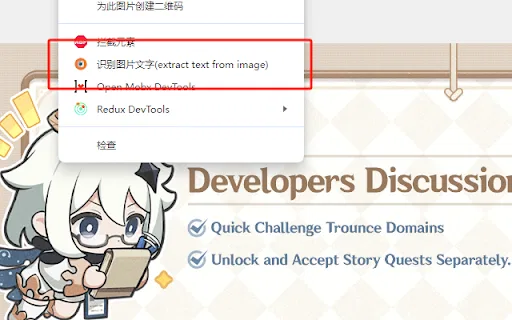
웹 페이지의 아무 이미지에나 마우스를 올리고 오른쪽 클릭으로 텍스트 추출 동작을 선택하면 브라우저를 떠나지 않고 문자 인식을 실행합니다.
인식된 텍스트가 확장 프로그램 패널에 열리고, 오류를 수정한 뒤 결과를 그대로 클립보드에 복사할 수 있습니다.
온라인에서 마주칠 가능성이 높은 래스터 형식을 지원하며 JPG, JPEG, PNG, BMP를 다룹니다.
개발자는 사용자 데이터를 수집·판매하거나 무관한 목적으로 이전하지 않는다고 명시했으며 확장 프로그램 크기도 매우 작습니다.
ReadImage가 겨냥하는 것은 텍스트가 이미지 안에만 존재하는 일상적인 불편함입니다. 코드 스크린샷, 상품 사진에 찍힌 가격, 이미지로 저장된 인용문, 디자인 시안 등이 그렇습니다. 다시 타이핑하거나 데스크톱 OCR 도구로 전환하는 대신, 이미지 위에 마우스를 올리고 오른쪽 클릭 메뉴에서 "extract text from image"를 고르면 됩니다. 확장 프로그램은 자체 패널에 결과를 돌려주고, 오류를 고친 뒤 최종 문자열을 클립보드에 복사할 수 있습니다. 설계는 의도적으로 미니멀합니다. 확장 프로그램 전체가 수십 KB에 불과하고 사용자 데이터를 수집하거나 판매하지 않는다고 명시해 권한 부담이 작습니다. 페이지에 이미 렌더링된 이미지를 다루기 때문에 코딩, 쇼핑, 검색, 일반적인 읽기 등 텍스트가 픽셀에 갇힌 워크플로에 자연스럽게 어울립니다. 다만 단일 목적 유틸리티이며 다소 오래되고 유지보수가 제한적인 프로젝트입니다. 스토어 목록은 버전 1.0, 2023년 10월 마지막 업데이트, 설치 수는 소수에 불과합니다. JPG, JPEG, PNG, BMP 같은 일반적인 래스터 형식을 지원하며, 인식이 원격 서비스에 의존하기 때문에 네트워크가 제한된 지역에서는 시간 초과가 발생할 수 있다고 개발자가 밝히고 있습니다. 위치를 보면 다기능 OCR 제품군이라기보다 편하게 쓰는 작은 도우미에 가깝습니다.
이미지로 공유된 코드 조각, 터미널 출력, 설정을 편집 가능한 텍스트로 추출해 편집기에 붙여넣습니다.
상품 이미지 안에만 있는 사양, 가격, 라벨 텍스트를 추출해 검색과 비교에 활용합니다.
인포그래픽과 슬라이드 스크린샷의 인용문, 출처, 도표 라벨을 뽑아 노트와 참고 자료에 사용합니다.
동일한 주요 카테고리에 속한 경쟁 AI 도구의 나란히 보는 텔레메트리 비교
| 순위 | AI 도구 | 월간 방문 수 | 전월 대비 성장률 | 직접 유입 비중 | 가격 | 일대일 비교 |
|---|---|---|---|---|---|---|
| ● | ReadImage | 0 | — | — | 무료 | 현재 도구 |
| 1 | Image to Text CC | 30.83만 | +0.6% | 직접 유입 21% | 무료+유료 | vs Image to Text CC |
| 2 | Image to Text | 487.18만 | +0.8% | 직접 유입 25% | 무료+유료 | vs Image to Text |
| 3 | Image to Text Converter | 69.95만 | +8.7% | 직접 유입 30% | 무료+유료 | vs Image to Text Converter |
| 4 | 이미지 텍스트 변환기 | 18.15만 | -15.6% | 직접 유입 46% | 무료+유료 | vs 이미지 텍스트 변환기 |
| 5 | JPG to Text | 42.5만 | -13.4% | 직접 유입 14% | 무료+유료 | vs JPG to Text |
| 6 | OCR - Image Reader | 0 | — | — | 무료 | vs OCR - Image Reader |
이미지와 스캔본을 편집 가능한 텍스트로 바꾸는 무료 온라인 OCR
무료 온라인 OCR로 이미지를 바로 편집 가능한 텍스트로
OCR로 이미지, 스캔본, 손글씨에서 편집 가능한 텍스트 추출
사진, 스크린샷, 스캔본을 편집 가능한 텍스트로 바꾸는 무료 온라인 OCR
JPG·PNG·스캔 이미지를 편집 가능한 텍스트로 바꾸는 무료 온라인 OCR

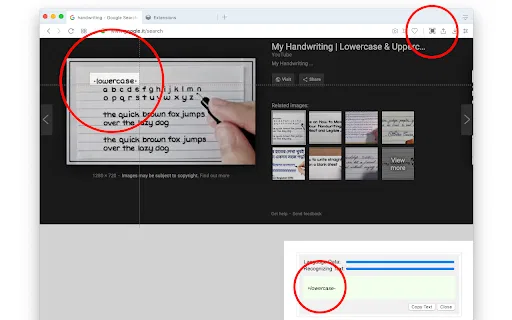
OCR - Image Reader is a Chrome extension from developer brian.girko that adds a toolbar button for on-the-fly optical character recognition. Press the button, drag a selection over any region of the active window, and the extension reads the text inside it using a Tesseract-based engine that supports over 100 languages with automatic orientation and script detection. A second engine option, IBM Granite-Docling, goes further and preserves headings, lists, bold and italic styles, tables and even mathematical equations instead of returning flat text. Everything runs offline in the browser, with no server round trips apart from a one-time download of the language training data.
OCR - Image Reader is a Chrome extension from developer brian.girko that adds a toolbar button for on-the-fly optical character recognition. Press the button, drag a selection over any region of the active window, and the extension reads the text inside it using a Tesseract-based engine that supports over 100 languages with automatic orientation and script detection. A second engine option, IBM Granite-Docling, goes further and preserves headings, lists, bold and italic styles, tables and even mathematical equations instead of returning flat text. Everything runs offline in the browser, with no server round trips apart from a one-time download of the language training data.
이미지·스캔·손글씨를 편집 가능한 텍스트로 바꾸는 무료 AI OCR

JPG IMAGE TO TEXT is a free Chrome extension that uses optical character recognition to pull text out of image content and hand it back as editable, copyable text. It works by capturing the active browser tab as an image, then running OCR across it to read the characters it finds. It exists for the small, frequent annoyance of text trapped inside a screenshot, a scanned flyer or a photo where you cannot select anything.
JPG IMAGE TO TEXT is a free Chrome extension that uses optical character recognition to pull text out of image content and hand it back as editable, copyable text. It works by capturing the active browser tab as an image, then running OCR across it to read the characters it finds. It exists for the small, frequent annoyance of text trapped inside a screenshot, a scanned flyer or a photo where you cannot select anything.

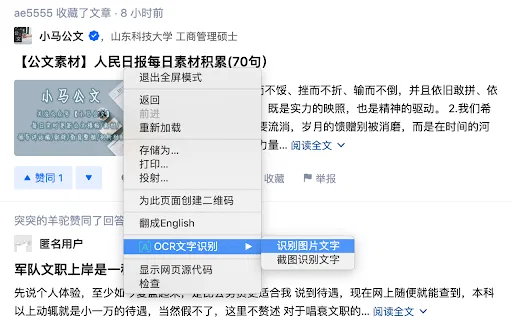
OCR Text Recognition is a lightweight Chrome extension that turns images and screenshots into selectable text via the right-click menu. Right-click any image on a page and choose 'Recognize image text' to pull the words out; right-click anywhere else and choose 'Screenshot Recognition Text' to select a screen region and read it. There is no account, no dashboard and no clutter — it is a single-purpose browser utility for grabbing text you cannot select.
OCR Text Recognition is a lightweight Chrome extension that turns images and screenshots into selectable text via the right-click menu. Right-click any image on a page and choose 'Recognize image text' to pull the words out; right-click anywhere else and choose 'Screenshot Recognition Text' to select a screen region and read it. There is no account, no dashboard and no clutter — it is a single-purpose browser utility for grabbing text you cannot select.
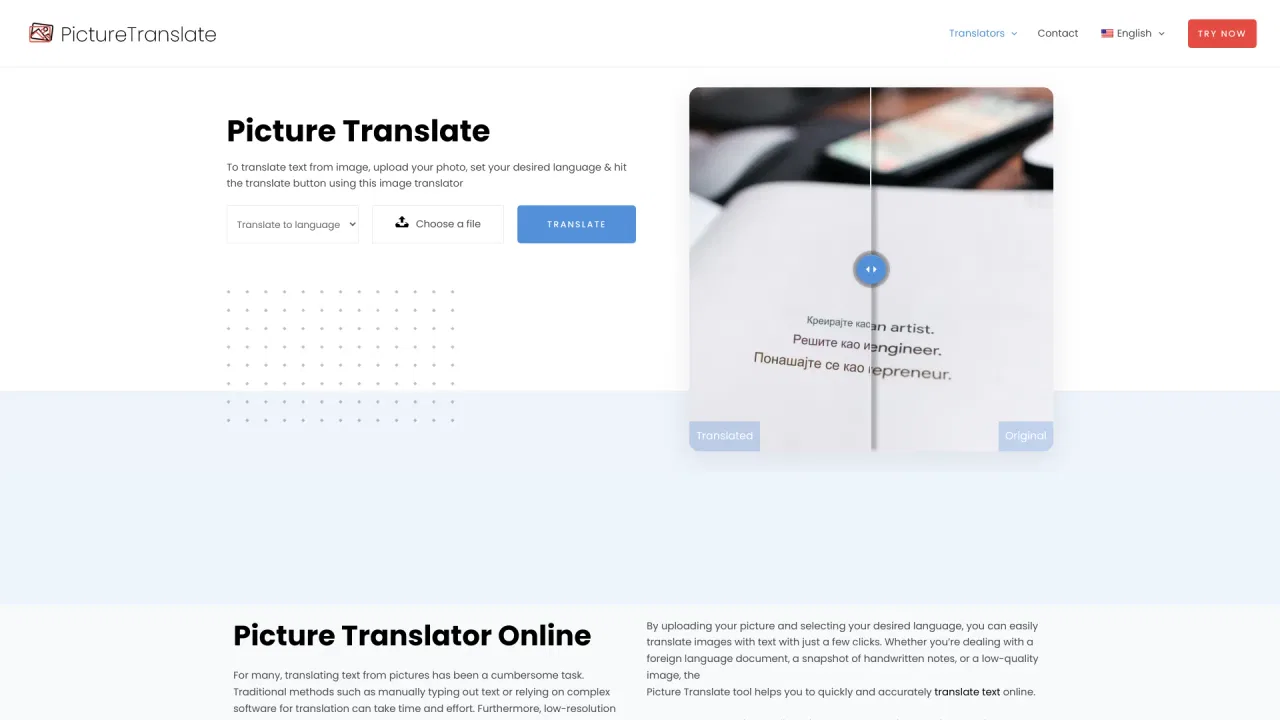
사진 속 글자를 읽어 무료로 번역하는 온라인 도구
무료 AI OCR로 이미지를 곧바로 편집 가능한 텍스트로.