01
3K/mo
ChatGPT in your browser sidebar, without switching tabs
AI BrowsersEditorial score: 4.0Freemium+29.6%

3K/mo+29.6%
ChatGPT in your browser sidebar, without switching tabs
Freemium

A free GPT side panel for Chrome using your own OpenAI key
This is our editors' assessment out of 5, not an average of user ratings. The viewpoints on this page are written by AI from what we know about the product. They are not customer reviews.
According to OpenAITools.app telemetry verified on 2026-11-11, AI Sidebar (chromewebstore.google.com) is an AI platform indexed under AI Browsers generating 0 monthly visits with a month-over-month traffic delta of +0 (0.0%). Its primary geographic market is Global (— traffic share), and it operates on a Free pricing model. Top competing alternatives by monthly volume include Chippy (2.99K visits/mo), Sider (2.64M visits/mo), Merlin AI (1.38M visits/mo).
Simple and lightweight, no bloat.
Bring your own key means you pay OpenAI directly.
Gets out of the way and summarizes fast.
UI could use a bit more polish.
AI-synthesized perspectives grounded in live site inspection, pricing structure, and category benchmarks — presented as editorial viewpoints rather than individual customer testimonials.
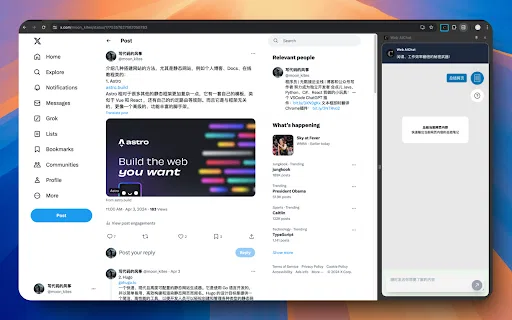
Runs in Chrome's native side panel so the assistant stays visible beside the page you are reading instead of covering it in a floating window.
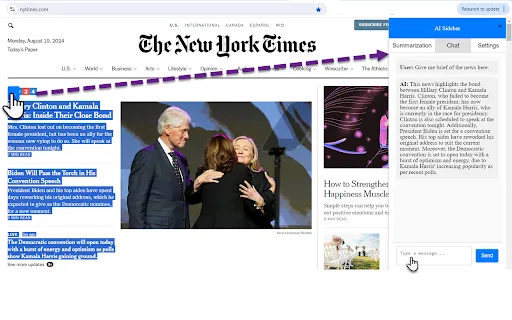
Send the current article or page into the chat to get a condensed summary quickly when you are scanning research or long documentation.
Ask for explanations, rewrites, outlines or email drafts while staying in the same tab you are working in.
You paste your own OpenAI key in the settings, so requests go to your own account and you control spend and model access.
The install is a small 48 KB package with no account sign-up and no bundled subscription, keeping it out of the way until you need it.
AI Sidebar is a small Chrome extension from an independent developer that puts an OpenAI GPT chat box in Chrome's side panel. Rather than a full AI browser, it is a focused utility: open the panel, ask a question, or hand it the page you are on and ask for a summary or a rewrite. That design keeps the current page visible while you work, which matters more than it sounds like when you are comparing several sources or reading documentation.
The extension deliberately brings your own key. You paste an OpenAI API key into the settings, and the extension makes requests on your behalf, so you control which models you can access and how much you spend. There is no bundled subscription and no developer markup. In exchange, you need a working OpenAI account and you are responsible for keeping the key secure.
Expectations should stay modest. The listing shows version 1.0, updated in August 2024, and around two dozen users with no ratings — essentially an early, personal-scale project rather than a polished commercial assistant. It is genuinely useful for summarization and quick drafting, but anyone wanting deep integrations, multimodal support or frequent updates should compare it against larger, actively maintained AI sidebar extensions before committing.
Ask for a condensed version of a long article, spec or report without leaving the tab or copying text into a separate chat app.
Get suggestions for replies, comments or short messages while the context stays visible in the panel next to the page.
Query GPT alongside the page you are evaluating to clarify jargon, compare options or sanity-check claims as you browse.
Side-by-side telemetry comparison of competing AI tools in the same primary category
| Rank | AI Tool | Monthly Visits | MoM Growth | Direct traffic share | Pricing | Head-to-Head |
|---|---|---|---|---|---|---|
| ● | AI Sidebar | 0 | — | — | Free | Current |
| 1 | Chippy | 2.99K | +29.6% | 42% direct | Freemium | vs Chippy |
| 2 | Sider | 2.64M | -10.6% | 64% direct | Freemium | vs Sider |
| 3 | Merlin AI | 1.38M | +13.1% | 50% direct | Freemium | vs Merlin AI |
| 4 | HARPA AI | 537.46K | +99.3% | 76% direct | Freemium | vs HARPA AI |
| 5 | Kome AI | 174.91K | -6.5% | 30% direct | Freemium | vs Kome AI |
| 6 | Monica | 4.51M | -11.3% | 55% direct | Freemium | vs Monica |
ChatGPT in your browser sidebar, without switching tabs
ChatGPT in your browser sidebar, without switching tabs
AI sidebar and browser agent for reading, writing and research
AI sidebar and browser agent for reading, writing and research
One-click AI assistant for browsing, writing and research
One-click AI assistant for browsing, writing and research
One browser agent that combines every major AI model with web automation
Summarize, bookmark and write with AI right in your browser
Summarize, bookmark and write with AI right in your browser

All-in-one AI assistant across web, browser, desktop and mobile
All-in-one AI assistant across web, browser, desktop and mobile

A Mac browser built for focus, with an AI companion called Airis
A Mac browser built for focus, with an AI companion called Airis
Your GPT-powered sidekick for every page, PDF and video
Your GPT-powered sidekick for every page, PDF and video

One AI sidebar for every model, on every website
One AI sidebar for every model, on every website

Chat with AI and summarize any webpage without leaving your tab
Chat with AI and summarize any webpage without leaving your tab

Bring ChatGPT, Claude and Gemini into Google Docs, Sheets, Slides and Gmail
Bring ChatGPT, Claude and Gemini into Google Docs, Sheets, Slides and Gmail
One AI sidebar for ChatGPT, Claude and Gemini across the web
One AI sidebar for ChatGPT, Claude and Gemini across the web