01
3.8editor score
Right-click any photo to find matching AliExpress products
AI Shopping AssistantFree

Right-click any photo to find matching AliExpress products
AI Shopping AssistantEditorial score: 3.8
Free
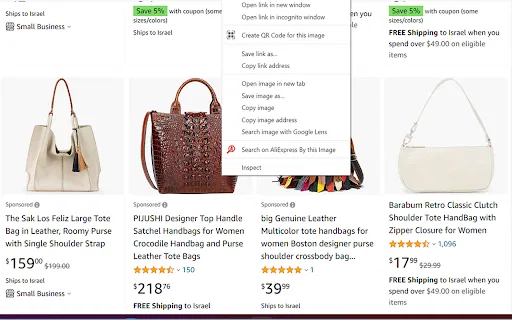
Right-click any picture to find matching products on AliExpress
This is our editors' assessment out of 5, not an average of user ratings. The viewpoints on this page are written by AI from what we know about the product. They are not customer reviews.
According to OpenAITools.app telemetry verified on 2026-11-11, Aligifts (chromewebstore.google.com) is an AI platform indexed under AI Image Recognition generating 0 monthly visits with a month-over-month traffic delta of +0 (0.0%). Its primary geographic market is Global (— traffic share), and it operates on a Free pricing model. Top competing alternatives by monthly volume include Aliexpress Search by image (0 visits/mo), AliExpress Image Search (0 visits/mo), Aoimart Product Price Comparison & Image Search (0 visits/mo).
Does basic image lookups fine.
Old extension, but still works for now.
Extremely barebones UI.
Dead extension.
AI-synthesized perspectives grounded in live site inspection, pricing structure, and category benchmarks — presented as editorial viewpoints rather than individual customer testimonials.
Adds a "Search similar on Aliexpress" option to the browser context menu, so any image becomes a search query.
The search for similar products runs on its own once you pick the option — no upload dialog or manual steps.
You are not limited to AliExpress pages; images from marketplaces, blogs, or social feeds all work as starting points.
Supports English, Russian and Hebrew among its five listed languages.
Roughly 43 KB, no user data collected according to the developer's disclosure.
Aligifts does one thing and keeps it simple. Instead of copying a product name into a search box, you right-click the picture itself. The extension captures the image and runs a visual search that looks for matching or comparable products on AliExpress, which is useful when a photo is easier to describe than a product title — for example, a photograph of an unknown gadget, a screenshot from a social feed, or an image on a competitor's storefront.
The extension is compact — around 43 KB — and supports five interface languages, including English, Russian and Hebrew. It is published by an individual developer under the name Avatiah, carries no ratings yet, and has a modest install base. The last published version dates to mid-2022, so the feature set is stable rather than fast-moving.
Because it is a third-party tool, it depends on how reliably AliExpress's own visual search index responds, and results reflect that index rather than any proprietary catalog. There is no account, no paywall and no data-collection disclosure of concern: the developer states the extension does not collect or sell user data.
You have a picture of an item but no name or link — right-click it and let Aligifts look for the same item on AliExpress.
Check whether a supplier photo matches other AliExpress listings when hunting for alternatives or lower prices.
Use the visual lookup on a product image from an expensive store to see whether AliExpress carries a comparable item.
Skip terminology barriers by searching visually, with an interface available in several languages.
Side-by-side telemetry comparison of competing AI tools in the same primary category
| Rank | AI Tool | Monthly Visits | MoM Growth | Direct traffic share | Pricing | Head-to-Head |
|---|---|---|---|---|---|---|
| ● | Aligifts | 0 | — | — | Free | Current |
| 1 | Aliexpress Search by image | 0 | — | — | Free | vs Aliexpress Search by image |
| 2 | AliExpress Image Search | 0 | 0% | — | Free | vs AliExpress Image Search |
| 3 | Aoimart Product Price Comparison & Image Search | 0 | — | — | Free | vs Aoimart Product Price Comparison & Image Search |
| 4 | AliBaba Search by Image | Rovalty | 0 | — | — | Free | vs AliBaba Search by Image | Rovalty |
| 5 | 易仓1688货源宝 (Image Search for 1688) | 0 | — | — | Free | vs 易仓1688货源宝 (Image Search for 1688) |
| 6 | Pickify | 0 | — | — | Freemium | vs Pickify |
Right-click any photo to find matching AliExpress products
Right-click any photo to find matching AliExpress products
Find any AliExpress product from a photo instead of keywords
Find any AliExpress product from a photo instead of keywords

Reverse-image search and price comparison for Taobao, 1688 and Aoimart
Reverse-image search and price comparison for Taobao, 1688 and Aoimart

Visual product search for Alibaba right from your browser
Visual product search for Alibaba right from your browser

Image search, price comparison and bulk ordering for 1688 and Taobao sourcing
Image search, price comparison and bulk ordering for 1688 and Taobao sourcing

Turn any product photo into shopping recommendations
Turn any product photo into shopping recommendations

Cross-source review scores and coupons, right on the product page
Cross-source review scores and coupons, right on the product page
Free AI price comparison across 50,000+ Australian retailers
Free AI price comparison across 50,000+ Australian retailers
AI coupon finder that tests and auto-applies working promo codes at checkout
AI coupon finder that tests and auto-applies working promo codes at checkout
SpecialistShop any outfit you spot in a photo

Coupon codes ranked by whether they actually worked
Coupon codes ranked by whether they actually worked

Reverse face search across the public web, with strong privacy guardrails
Reverse face search across the public web, with strong privacy guardrails