01
4.0editor score
AI attention maps and clarity scores that predict where users actually look
AI UX DesignFreemium
AI attention maps and clarity scores that predict where users actually look
AI UX DesignEditorial score: 4.0
Freemium

Predictive AI heatmaps that show where people look before you launch
This is our editors' assessment out of 5, not an average of user ratings. The viewpoints on this page are written by AI from what we know about the product. They are not customer reviews.
According to OpenAITools.app telemetry verified on 2026-11-11, Attention Insight (chromewebstore.google.com) is an AI platform indexed under AI Design Assistant generating 0 monthly visits with a month-over-month traffic delta of +0 (0.0%). Its primary geographic market is Global (— traffic share), and it operates on a Freemium, Free Trial, Paid, Contact for Pricing pricing model. Top competing alternatives by monthly volume include Clueify - Data Driven Design (0 visits/mo), Dragonfly AI Extension (0 visits/mo), Floto (24.09K visits/mo).
Predictive heatmaps give us instant design feedback without user testing.
Figma plugin integration is super smooth for daily workflows.
genius
pricey
AI-synthesized perspectives grounded in live site inspection, pricing structure, and category benchmarks — presented as editorial viewpoints rather than individual customer testimonials.
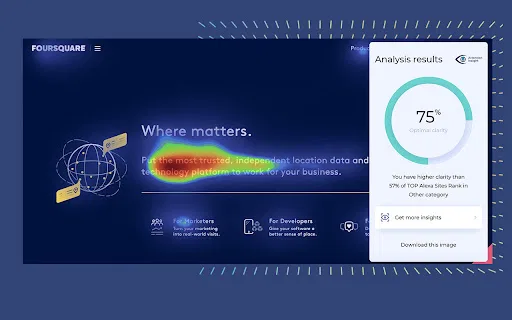
Colour-coded maps show which areas of a design are predicted to attract the most visual attention, from warm high-attention zones to cooler ignored ones.
See what viewers are likely to notice or miss in the first four seconds of viewing, so critical elements are not overlooked.
A Clarity Score estimates how clear or cluttered a layout looks to a first-time viewer, helping you simplify busy designs.
Copy Load evaluates how much text sits in high-attention zones and whether it fits inside the estimated first-glance reading window.
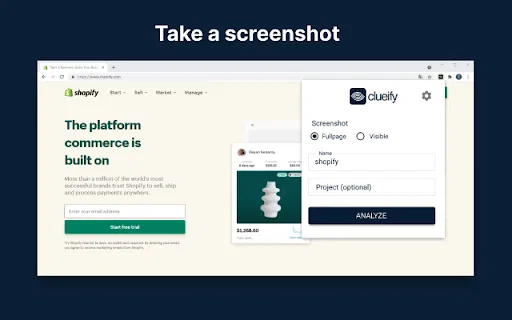
Run tests from the browser, Figma, Adobe tools or through the API, then share instant reports and links with stakeholders.
Draw a rectangle around any element to get the exact percentage of predicted attention it receives, and compare versions or competitors side by side.
Attention Insight replaces guesswork in design reviews with fast, quantitative feedback. Instead of waiting weeks for a usability study or accumulating visitor data through mouse-tracking, you upload a mockup, screenshot, live URL or short clip and receive a predictive attention heatmap within seconds. The underlying model was trained on 5.5+ million fixations and 550+ million gaze points from published eye-tracking research, and the company reports roughly 96% agreement with traditional eye-tracking studies, as measured on the MIT/Tübingen Saliency Benchmark.
The platform fits naturally into an existing design workflow. A Chrome extension analyses pages directly in the browser, a Figma plugin works on design files, and Adobe Express, InDesign and Photoshop add-ons cover graphics work; a REST API supports automated or bulk testing. Teams get instant reports, shareable links and clear metrics such as Percentage of Attention, Focus Score, Clarity Score and Copy Load, which make it easy to show stakeholders why a headline, call-to-action or hero image needs to change.
Attention Insight is used by designers, UX researchers, marketers, CRO specialists and agencies, and the site highlights case studies where clients report large lifts in click-through, conversion and engagement after acting on the insights. It complements rather than replaces behavioural analytics: predictive maps tell you what is likely to be seen before launch, while real click and scroll data tells you what people actually did afterwards.
Validate hierarchy in a mockup and check that the headline and primary button stand out before usability testing begins.
Check the prominence of offers and calls to action, and see whether key copy can realistically be read in a brief glance.
Test client and competitor pages side by side and use the visual output to explain proposed changes in meetings.
Iterate on many design variants quickly to narrow a large set down to the few worth testing with real users.
Side-by-side telemetry comparison of competing AI tools in the same primary category
| Rank | AI Tool | Monthly Visits | MoM Growth | Direct traffic share | Pricing | Head-to-Head |
|---|---|---|---|---|---|---|
| ● | Attention Insight | 0 | — | — | Freemium, Free Trial, Paid, Contact for Pricing | Current |
| 1 | Clueify - Data Driven Design | 0 | — | — | Freemium | vs Clueify - Data Driven Design |
| 2 | Dragonfly AI Extension | 0 | — | — | Contact for Pricing | vs Dragonfly AI Extension |
| 3 | Floto | 24.09K | -25.6% | 67% direct | Freemium | vs Floto |
| 4 | Refero Design | 1.15M | +3.4% | 58% direct | Freemium | vs Refero Design |
| 5 | ClarityUX | 0 | 0% | — | Paid | vs ClarityUX |
| 6 | Little Bro | 2.1K | -28.9% | 40% direct | Paid | vs Little Bro |
AI attention maps and clarity scores that predict where users actually look
AI attention maps and clarity scores that predict where users actually look

Predictive attention analytics that reveal what your audience actually sees
Predictive attention analytics that reveal what your audience actually sees

AI design audits, persona testing and flow analysis inside Figma
AI design audits, persona testing and flow analysis inside Figma
A searchable library of 145,000+ real web and iOS screens for UI/UX inspiration.
A searchable library of 145,000+ real web and iOS screens for UI/UX inspiration.
Pre-launch AI testing for ads, products and designs

Your AI design partner, living inside Figma
Your AI design partner, living inside Figma
Find the revenue leaks on your site with CRO, heatmaps and analytics
Find the revenue leaks on your site with CRO, heatmaps and analytics

Turn prompts, sketches, and URLs into Figma-ready UI designs and code
Turn prompts, sketches, and URLs into Figma-ready UI designs and code

AI-powered UI design and prototyping for product teams
AI-powered UI design and prototyping for product teams

AI-powered website audits that turn visitors into customers
AI-powered website audits that turn visitors into customers

AI that detects UX changes and explains what mattered
AI that detects UX changes and explains what mattered
An online whiteboard that mixes wireframing, diagramming, and AI agents
An online whiteboard that mixes wireframing, diagramming, and AI agents