01
4.5M/mo
All-in-one AI assistant across web, browser, desktop and mobile
AI AssistantEditorial score: 4.3Freemium55% direct

4.5M/mo
All-in-one AI assistant across web, browser, desktop and mobile
Freemium

Never lose a ChatGPT conversation again — automatic local backups with search and templates
This is our editors' assessment out of 5, not an average of user ratings. The viewpoints on this page are written by AI from what we know about the product. They are not customer reviews.
According to OpenAITools.app telemetry verified on 2026-11-11, Auto Save ChatGPT (chromewebstore.google.com) is an AI platform indexed under AI Chatbot generating 0 monthly visits with a month-over-month traffic delta of +0 (0.0%). Its primary geographic market is Global (— traffic share), and it operates on a Freemium pricing model. Top competing alternatives by monthly volume include Monica (4.51M visits/mo), AI Toolbox (290.14K visits/mo), MacGPT (26.22K visits/mo).
Saves me from losing half-baked chat logs.
Search lag is annoying with huge histories.
Local storage backup gives peace of mind.
Templates feel a bit tacked on.
AI-synthesized perspectives grounded in live site inspection, pricing structure, and category benchmarks — presented as editorial viewpoints rather than individual customer testimonials.
Chats are saved about once a minute and also whenever you take an action in the extension, so you do not have to remember to save manually.
Logs are kept in Chrome's local storage, which the developer notes is not accessible to other extensions or third parties.
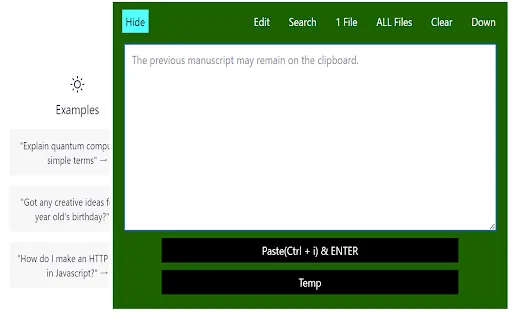
Find an earlier answer or prompt by searching the conversation history stored on your machine.
Reusable templates and an expanded text box make it easier to compose and manage long prompts.
Download one file or all files, copy content to the clipboard, or dictate prompts with the built-in voice input.
Auto Save ChatGPT addresses a common annoyance for heavy chatbot users: conversations that scroll away or disappear when a session is cleared. Once installed, the extension records the current ChatGPT thread roughly every minute, and it also saves whenever you interact with the extension itself, so nothing important is lost even if you close the tab or the site reloads.
Storage happens in Chrome's local storage rather than on a remote server. The developer argues this is the more privacy-conscious route, because Chrome local storage is not readable by other extensions or third-party services, keeping the saved text confined to your own browser profile. Around that core backup function the extension adds a set of editing conveniences: a larger text area for composing long prompts, prompt templates you can reuse, keyword search over everything saved locally, single-file or bulk download, one-click copy to clipboard, and voice input added in version 1.3.
The extension is published by ISAYNET and sits in the Chrome Web Store with a small but established user base. It declares that it does not collect or use your data and that nothing is sold or transferred to third parties. Listings and interface notes are provided in both English and Japanese.
People who run many long sessions can keep an archive of past conversations and retrieve good answers later by keyword.
Save generated text locally so research notes and drafts survive tab closes, logouts or service hiccups.
Because records stay in browser-local storage, users who prefer not to rely on cloud backup can still keep their history.
Voice input lets users speak long prompts instead of typing them out.
Side-by-side telemetry comparison of competing AI tools in the same primary category
| Rank | AI Tool | Monthly Visits | MoM Growth | Direct traffic share | Pricing | Head-to-Head |
|---|---|---|---|---|---|---|
| ● | Auto Save ChatGPT | 0 | — | — | Freemium | Current |
| 1 | Monica | 4.51M | -11.3% | 55% direct | Freemium | vs Monica |
| 2 | AI Toolbox | 290.14K | +16.9% | 32% direct | Freemium | vs AI Toolbox |
| 3 | MacGPT | 26.22K | -7.5% | 40% direct | Freemium | vs MacGPT |
| 4 | ChatGPT | 6.05B | +2.2% | 73% direct | Freemium | vs ChatGPT |
| 5 | Chatbox | 567.17K | -16.1% | 58% direct | Freemium | vs Chatbox |
| 6 | Chat GPT Bookmarks | 0 | — | — | Free | vs Chat GPT Bookmarks |
All-in-one AI assistant across web, browser, desktop and mobile
All-in-one AI assistant across web, browser, desktop and mobile
SpecialistOrganize, search and export your AI chats across ChatGPT, Gemini, Claude and Grok
SpecialistOrganize, search and export your AI chats across ChatGPT, Gemini, Claude and Grok

SpecialistChatGPT in your Mac menu bar, inline and everywhere
SpecialistChatGPT in your Mac menu bar, inline and everywhere

OpenAI's flagship multimodal assistant powered by GPT-6 and GPT-5.6 for reasoning, coding, and deep research.
OpenAI's flagship multimodal assistant powered by GPT-6 and GPT-5.6 for reasoning, coding, and deep research.
One privacy-first AI client for GPT, Claude, Gemini and more
One privacy-first AI client for GPT, Claude, Gemini and more

SpecialistSave, search and revisit your best ChatGPT conversations in one click
SpecialistSave, search and revisit your best ChatGPT conversations in one click

Your AI agent for the browser: chat, automate and create from one sidebar
Your AI agent for the browser: chat, automate and create from one sidebar
SpecialistThe best frontend for AI.

SpecialistA prompt library and management layer for ChatGPT and other AI models
SpecialistA prompt library and management layer for ChatGPT and other AI models

SpecialistFull-text search and real-time management for your entire ChatGPT conversation history
SpecialistFull-text search and real-time management for your entire ChatGPT conversation history
Export, back up, and organize your AI chat history in any format
Export, back up, and organize your AI chat history in any format

Compare GPT, Claude, and Gemini answers side by side in one chat
Compare GPT, Claude, and Gemini answers side by side in one chat