01
2.6M/mo
AI sidebar and browser agent for reading, writing and research
AI AssistantEditorial score: 4.5Freemium64% direct

2.6M/mo
AI sidebar and browser agent for reading, writing and research
Freemium

Navigate long ChatGPT chats, widen the layout, and render Mermaid diagrams

This is our editors' assessment out of 5, not an average of user ratings. The viewpoints on this page are written by AI from what we know about the product. They are not customer reviews.
According to OpenAITools.app telemetry verified on 2026-11-11, BearGPT - ChatGPT Enhancer (chromewebstore.google.com) is an AI platform indexed under AI Productivity Tools generating 0 monthly visits with a month-over-month traffic delta of +0 (0.0%). Its primary geographic market is Global (— traffic share), and it operates on a Free pricing model. Top competing alternatives by monthly volume include Sider (2.64M visits/mo), Merlin AI (1.38M visits/mo), Monica (4.51M visits/mo).
The question navigation sidebar is an absolute game changer for long prompts.
Mermaid diagram rendering works flawlessly right inside the chat.
Takes a second to index very massive chat logs.
Free, clean, and zero annoying login walls.
AI-synthesized perspectives grounded in live site inspection, pricing structure, and category benchmarks — presented as editorial viewpoints rather than individual customer testimonials.
Automatically pulls every question from the current ChatGPT conversation into a clean sidebar with one-click jumps and a running question count, so long threads stay navigable.
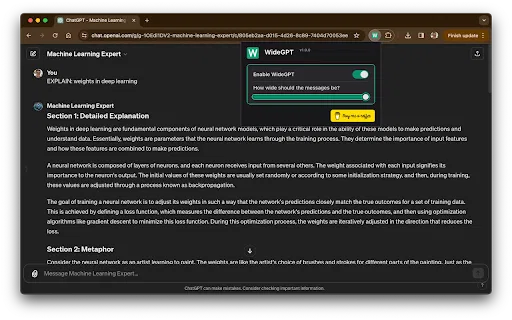
Overrides ChatGPT's narrow reading column with an adjustable width from about 10% to 100%, giving widescreen users room for code, tables and long text. Preferences persist across reloads.
Detects Mermaid code blocks and turns them into real visuals — flowcharts, sequence and class diagrams, Gantt charts, state diagrams, ER diagrams, mind maps and more — with zoom, pan and fullscreen controls.
All enhancements run entirely in your browser with no data collection, and the extension is explicitly declared not to sell or misuse user data.
Blends into ChatGPT's existing interface and automatically follows light or dark themes, so the extra controls never feel bolted on.
BearGPT targets a specific annoyance: ChatGPT conversations that grow so long they become unusable. The extension scans the active chat, extracts every question you have asked and places them in a collapsible sidebar, so you can jump straight to any point instead of scrolling through hundreds of messages. It also shows the total number of questions, which doubles as a rough progress indicator for long working sessions, and retains its collapsed or expanded state between visits.
A second pain point is layout. ChatGPT constrains its reading column, which wastes space on wide monitors. BearGPT adds a width slider covering roughly 10% to 100%, letting you spread responses across a big screen for code, tables and long documents. Settings persist across page reloads, so you configure it once. The third feature is diagram rendering: when ChatGPT outputs a Mermaid code block, the extension detects it, renders it as an actual flowchart, sequence diagram, class diagram, Gantt chart, state diagram, ER diagram or mind map, and provides a toolbar with zoom, pan, fullscreen and a toggle back to raw code. More than fifteen diagram types are supported.
The extension markets itself as privacy-first and lightweight: processing happens locally in the browser, no data is collected, there is no measurable page-performance impact, and the UI blends with ChatGPT's own look, including automatic matching of light and dark themes. It is free, small (about 82 KB) and actively maintained, with a recent update and a high average rating from a modest but growing user base. It is an enhancement layer, not a replacement client, so everything still depends on the ChatGPT web app.
Jump straight to any earlier question via the sidebar instead of scrolling, and read wide code blocks at full monitor width.
Track how a conversation progressed with the question list, and view architecture or sequence diagrams ChatGPT generates as rendered images rather than raw code.
Render Mermaid flowcharts and mind maps in place, zoom in for detail, and switch back to code when you need to copy the source into documentation.
Expand the content column so responses, tables and comparisons use the screen instead of a narrow central strip.
Side-by-side telemetry comparison of competing AI tools in the same primary category
| Rank | AI Tool | Monthly Visits | MoM Growth | Direct traffic share | Pricing | Head-to-Head |
|---|---|---|---|---|---|---|
| ● | BearGPT - ChatGPT Enhancer | 0 | — | — | Free | Current |
| 1 | Sider | 2.64M | -10.6% | 64% direct | Freemium | vs Sider |
| 2 | Merlin AI | 1.38M | +13.1% | 50% direct | Freemium | vs Merlin AI |
| 3 | Monica | 4.51M | -11.3% | 55% direct | Freemium | vs Monica |
| 4 | Wide GPT | 0 | — | — | Free | vs Wide GPT |
| 5 | MacGPT | 26.22K | -7.5% | 40% direct | Freemium | vs MacGPT |
| 6 | Chippy | 2.99K | +29.6% | 42% direct | Freemium | vs Chippy |
AI sidebar and browser agent for reading, writing and research
AI sidebar and browser agent for reading, writing and research

One AI assistant that plugs ChatGPT, Claude and Gemini into every tab
One AI assistant that plugs ChatGPT, Claude and Gemini into every tab

All-in-one AI assistant across web, browser, desktop and mobile
All-in-one AI assistant across web, browser, desktop and mobile

SpecialistGive ChatGPT your entire screen width, without any setup
SpecialistGive ChatGPT your entire screen width, without any setup

SpecialistChatGPT in your Mac menu bar, inline and everywhere
SpecialistChatGPT in your Mac menu bar, inline and everywhere

SpecialistChatGPT in your browser sidebar, without switching tabs
SpecialistChatGPT in your browser sidebar, without switching tabs
SpecialistThe best frontend for AI.
SpecialistOrganize, search and export your AI chats across ChatGPT, Gemini, Claude and Grok
SpecialistOrganize, search and export your AI chats across ChatGPT, Gemini, Claude and Grok
SpecialistOne browser agent that combines every major AI model with web automation
One AI assistant that works wherever you work
One AI assistant that works wherever you work

Compare GPT, Claude, and Gemini answers side by side in one chat
Compare GPT, Claude, and Gemini answers side by side in one chat
SpecialistYour GPT-powered sidekick for every page, PDF and video
SpecialistYour GPT-powered sidekick for every page, PDF and video