01
2.6M/mo
Your AI agent for the browser: chat, automate and create from one sidebar
AI ChatbotEditorial score: 4.5Freemium64% direct

2.6M/mo
Your AI agent for the browser: chat, automate and create from one sidebar
Freemium

Blur your ChatGPT sidebar history and email for on-screen privacy
This is our editors' assessment out of 5, not an average of user ratings. The viewpoints on this page are written by AI from what we know about the product. They are not customer reviews.
According to OpenAITools.app telemetry verified on 2026-11-11, BlurGPT (chromewebstore.google.com) is an AI platform indexed under AI Chatbot generating 0 monthly visits with a month-over-month traffic delta of +0 (0.0%). Its primary geographic market is Global (— traffic share), and it operates on a Free pricing model. Top competing alternatives by monthly volume include Sider (2.64M visits/mo), Privacy for ChatGPT (0 visits/mo), Merlin AI (1.38M visits/mo).
Saved me from leaking my prompt history on stream.
Simple and effective little tool.
No more awkward sidebar peeks in zoom calls.
Basic, but gets the job done.
AI-synthesized perspectives grounded in live site inspection, pricing structure, and category benchmarks — presented as editorial viewpoints rather than individual customer testimonials.
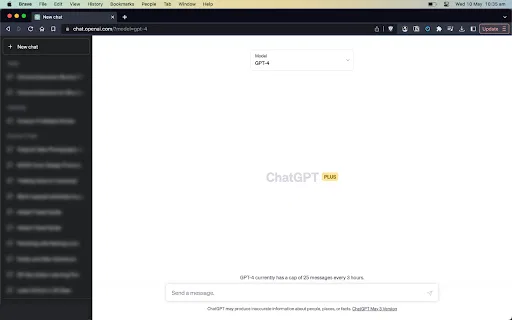
The conversation list in the ChatGPT sidebar is blurred by default, hiding which topics you have discussed from anyone glancing at your screen.
Your visible account email on chat.openai.com is blurred as well, reducing accidental exposure of personal or work contact details.
The blur is a visual effect applied in your browser. The extension declares that it does not collect or sell your data, and no conversation content is transmitted.
The extension package is under 16 KB, so it adds essentially no load time and no background overhead to your browsing.
It layers over the existing ChatGPT interface without replacing it, so your familiar layout and workflow are unchanged.
BlurGPT addresses a small but common annoyance with ChatGPT's web app: your list of past conversations and your email address stay fully visible on screen. If you stream, demo a product, record your screen, sit in a shared office, or present on a projector, that sidebar can expose private topics and personal data to anyone watching.
The extension solves this by applying a blur layer over the history list and the email display on chat.openai.com. Content stays in place structurally, so nothing about the interface breaks, but the text underneath becomes unreadable from a distance. Because the effect is purely visual and runs locally in your browser, no chat content is sent anywhere.
The tool is deliberately narrow. It does not summarize, export, or organize conversations, and it does not change how ChatGPT itself works. It is best understood as a screen-privacy accessory for people who use ChatGPT in front of an audience and want a one-click way to hide sensitive context.
When recording or live-streaming ChatGPT sessions, the blurred sidebar prevents viewers from reading unrelated private conversations in your history list.
Employees working near colleagues or in hot-desk environments can obscure their ChatGPT history and email from passers-by without switching apps.
During screen shares, demos, and client calls, a blurred sidebar lowers the chance that a sensitive client name or personal email appears on the shared screen.
Anyone who simply does not want their ChatGPT history readable by others can enable the blur as a standing default.
Side-by-side telemetry comparison of competing AI tools in the same primary category
| Rank | AI Tool | Monthly Visits | MoM Growth | Direct traffic share | Pricing | Head-to-Head |
|---|---|---|---|---|---|---|
| ● | BlurGPT | 0 | — | — | Free | Current |
| 1 | Sider | 2.64M | -10.6% | 64% direct | Freemium | vs Sider |
| 2 | Privacy for ChatGPT | 0 | — | — | Free | vs Privacy for ChatGPT |
| 3 | Merlin AI | 1.38M | +13.1% | 50% direct | Freemium | vs Merlin AI |
| 4 | Monica | 4.51M | -11.3% | 55% direct | Freemium | vs Monica |
| 5 | MacGPT | 26.22K | -7.5% | 40% direct | Freemium | vs MacGPT |
| 6 | HyperWrite | 255.43K | +34.4% | 42% direct | Freemium | vs HyperWrite |
Your AI agent for the browser: chat, automate and create from one sidebar
Your AI agent for the browser: chat, automate and create from one sidebar

Blur or hide your ChatGPT messages and history for screen privacy
Blur or hide your ChatGPT messages and history for screen privacy
One-click AI assistant for browsing, writing and research
One-click AI assistant for browsing, writing and research

All-in-one AI assistant across web, browser, desktop and mobile
All-in-one AI assistant across web, browser, desktop and mobile

ChatGPT in your Mac menu bar, inline and everywhere
ChatGPT in your Mac menu bar, inline and everywhere

AI writing assistant with autocomplete, research, and a Chrome extension
AI writing assistant with autocomplete, research, and a Chrome extension

ChatGPT in your browser sidebar, without switching tabs
ChatGPT in your browser sidebar, without switching tabs
The Chrome website blocker that judges every page against your task
The Chrome website blocker that judges every page against your task
One browser agent that combines every major AI model with web automation

An AI email assistant and browser sidebar for everything else
An AI email assistant and browser sidebar for everything else

Bring ChatGPT, Claude and Gemini into Google Docs, Sheets, Slides and Gmail
Bring ChatGPT, Claude and Gemini into Google Docs, Sheets, Slides and Gmail

Protect every human and AI browser action — without a new browser
Protect every human and AI browser action — without a new browser