01
2.6M/mo
Your AI agent for the browser: chat, automate and create from one sidebar
AI ChatbotEditorial score: 4.5Freemium64% direct

2.6M/mo
Your AI agent for the browser: chat, automate and create from one sidebar
Freemium

Fine-tune how ChatGPT answers you - format, language and silent mode
This is our editors' assessment out of 5, not an average of user ratings. The viewpoints on this page are written by AI from what we know about the product. They are not customer reviews.
According to OpenAITools.app telemetry verified on 2026-11-11, Chat GPT ToolKit (chromewebstore.google.com) is an AI platform indexed under AI Chatbot generating 0 monthly visits with a month-over-month traffic delta of +0 (0.0%). Its primary geographic market is Global (— traffic share), and it operates on a Free pricing model. Top competing alternatives by monthly volume include Sider (2.64M visits/mo), Merlin AI (1.38M visits/mo), Typing Mind (533.1K visits/mo).
Nice control over output formats and languages.
Silent mode is super helpful during long prompts.
A bit niche, but does its job well.
Handy settings panel.
AI-synthesized perspectives grounded in live site inspection, pricing structure, and category benchmarks — presented as editorial viewpoints rather than individual customer testimonials.
Choose the shape of ChatGPT's replies, such as plain prose or structured tables, so answers arrive in a layout you can read quickly.
Set the language you want the assistant to respond in instead of repeating the instruction in every new conversation.
Let the assistant keep working while the streamed text stays out of the way, useful when you don't want output appearing on screen in the moment.
Combine settings into a consistent default experience so ChatGPT behaves the same way across sessions and tabs.
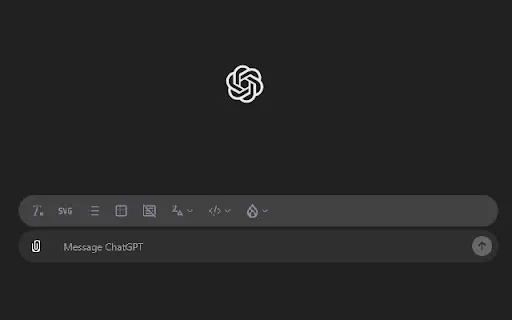
A small extension that adds controls on top of the existing ChatGPT interface without replacing it.
Chat GPT ToolKit focuses on a different problem from most ChatGPT extensions. Instead of exporting chats or managing prompts, it gives you a small control panel for the shape of the replies themselves: you can steer the output toward plain text or tables, pick the language you want answers in, and switch ChatGPT into a silent mode when you don't want a stream of generated text appearing while you work.
The idea is convenience for people who use ChatGPT all day and keep retyping the same instructions at the top of every prompt. Setting a format and language preference once means the assistant follows your conventions automatically, which is handy for reading long technical answers in table form or keeping responses in a second language for practice.
It is published on the Chrome Web Store by an independent developer and is free to install. The user base is small and the tool is comparatively new, so expect a lightweight utility rather than a deeply featured platform. Because extensions like this one modify the ChatGPT page directly, they can break when ChatGPT updates its interface, and you should weigh that risk before relying on it daily.
Force structured table output for comparisons, specs, or logs so you can scan results instead of reading paragraphs.
Keep responses in the language you are studying without re-typing the instruction each time.
Use silent mode when you want ChatGPT generating in the background while you focus on something else on screen.
Set your preferred format and language once and stop repeating the same setup instructions in every thread.
Side-by-side telemetry comparison of competing AI tools in the same primary category
| Rank | AI Tool | Monthly Visits | MoM Growth | Direct traffic share | Pricing | Head-to-Head |
|---|---|---|---|---|---|---|
| ● | Chat GPT ToolKit | 0 | — | — | Free | Current |
| 1 | Sider | 2.64M | -10.6% | 64% direct | Freemium | vs Sider |
| 2 | Merlin AI | 1.38M | +13.1% | 50% direct | Freemium | vs Merlin AI |
| 3 | Typing Mind | 533.1K | +12.9% | 68% direct | Paid | vs Typing Mind |
| 4 | Chippy | 2.99K | +29.6% | 42% direct | Freemium | vs Chippy |
| 5 | HyperWrite | 255.43K | +34.4% | 42% direct | Freemium | vs HyperWrite |
| 6 | AI Toolbox | 290.14K | +16.9% | 32% direct | Freemium | vs AI Toolbox |
Your AI agent for the browser: chat, automate and create from one sidebar
Your AI agent for the browser: chat, automate and create from one sidebar
One-click AI assistant for browsing, writing and research
One-click AI assistant for browsing, writing and research
The best frontend for AI.

ChatGPT in your browser sidebar, without switching tabs
ChatGPT in your browser sidebar, without switching tabs

AI writing assistant with autocomplete, research, and a Chrome extension
AI writing assistant with autocomplete, research, and a Chrome extension
Organize, search and export your AI chats across ChatGPT, Gemini, Claude and Grok
Organize, search and export your AI chats across ChatGPT, Gemini, Claude and Grok

All-in-one AI assistant across web, browser, desktop and mobile
All-in-one AI assistant across web, browser, desktop and mobile

OpenAI's flagship multimodal assistant powered by GPT-6 and GPT-5.6 for reasoning, coding, and deep research.
OpenAI's flagship multimodal assistant powered by GPT-6 and GPT-5.6 for reasoning, coding, and deep research.

Compare GPT, Claude, and Gemini answers side by side in one chat
Compare GPT, Claude, and Gemini answers side by side in one chat

ChatGPT in your Mac menu bar, inline and everywhere
ChatGPT in your Mac menu bar, inline and everywhere
Scrape any website by chatting with it in plain English
Scrape any website by chatting with it in plain English