01
2.6M/mo
Your AI agent for the browser: chat, automate and create from one sidebar
AI ChatbotEditorial score: 4.5Freemium64% direct

2.6M/mo
Your AI agent for the browser: chat, automate and create from one sidebar
Freemium

Reach ChatGPT from the toolbar, address bar, or right-click menu
Lightweight browser wrapper providing quick shortcuts to ChatGPT web app.
This is our editors' assessment out of 5, not an average of user ratings. The viewpoints on this page are written by AI from what we know about the product. They are not customer reviews.
According to OpenAITools.app telemetry verified on 2026-11-11, ChatGenie for ChatGPT (chromewebstore.google.com) is an AI platform indexed under AI Chatbot generating 0 monthly visits with a month-over-month traffic delta of +0 (0.0%). Its primary geographic market is Global (— traffic share), and it operates on a Free pricing model. Top competing alternatives by monthly volume include Sider (2.64M visits/mo), Superpowers for ChatGPT (0 visits/mo), MacGPT (26.22K visits/mo).
Just a basic wrapper for the official web app.
Handy shortcut but nothing special.
Could easily do this with bookmarks.
Overpriced hype for a simple popup.
AI-synthesized perspectives grounded in live site inspection, pricing structure, and category benchmarks — presented as editorial viewpoints rather than individual customer testimonials.
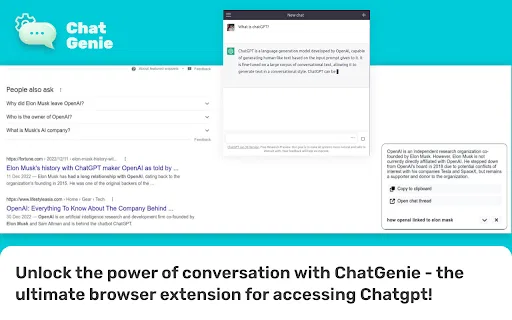
Click the extension icon to open a ChatGPT popup and start typing without leaving the page you are on.
Type "gpt" in the address bar followed by a space to launch ChatGPT directly from browser navigation.
Run ChatGPT from the right-click menu so you can act on highlighted text or your current page immediately.
Periodic pings keep your ChatGPT session alive between visits, reducing repeated logins.
The interface is translated into more than fifty languages, including Chinese, Japanese, Korean, Spanish, French and Vietnamese.
ChatGenie is a lightweight convenience layer over the ChatGPT web app. Instead of switching tabs to chat.openai.com, you click the extension icon and a popup opens where you can start a conversation immediately. Power users can jump straight to it from the browser's address bar by typing "gpt" and pressing space, and a context-menu entry lets you trigger ChatGPT from whatever you were reading or writing. The extension has been installed by roughly 70,000 users and is published by the owner of chatgpt-chrome.com.
A notable practical feature is session maintenance: the extension periodically pings ChatGPT so your login survives longer stretches between visits, cutting down on the sign-in-then-lose-your-thread cycle many heavy users hit. There is also a beta feature aimed at reducing leakage of personal data into prompts, and the extension is localized into more than fifty languages, so the interface text is available in most major locales.
It is important to understand what ChatGenie is not: it does not supply any AI model of its own. You still need a ChatGPT account, and usage is governed by OpenAI's terms and any limits on your plan. The developer declares that no user data is collected, sold, or transferred outside the extension's core function. Ratings sit at about 3.7 out of 5 across 125 reviews, with recent updates continuing into August 2025.
Keep your current page open and pop ChatGPT over it for a quick question instead of managing a separate chat tab.
Select a passage on a page and launch ChatGPT from the context menu so the question stays tied to the source material.
Use the "gpt" Omnibox keyword to open ChatGPT without reaching for the mouse, fitting it into an existing hotkey workflow.
Rely on session pings to avoid being logged out during gaps between sessions, so you pick up conversations faster.
Side-by-side telemetry comparison of competing AI tools in the same primary category
| Rank | AI Tool | Monthly Visits | MoM Growth | Direct traffic share | Pricing | Head-to-Head |
|---|---|---|---|---|---|---|
| ● | ChatGenie for ChatGPT | 0 | — | — | Free | Current |
| 1 | Sider | 2.64M | -10.6% | 64% direct | Freemium | vs Sider |
| 2 | Superpowers for ChatGPT | 0 | — | — | Free | vs Superpowers for ChatGPT |
| 3 | MacGPT | 26.22K | -7.5% | 40% direct | Freemium | vs MacGPT |
| 4 | Monica | 4.51M | -11.3% | 55% direct | Freemium | vs Monica |
| 5 | Merlin AI | 1.38M | +13.1% | 50% direct | Freemium | vs Merlin AI |
| 6 | Mochii | 26.99K | -20% | 40% direct | Freemium | vs Mochii |
Your AI agent for the browser: chat, automate and create from one sidebar
Your AI agent for the browser: chat, automate and create from one sidebar

Instant one-click access to ChatGPT from anywhere in your browser
Instant one-click access to ChatGPT from anywhere in your browser

ChatGPT in your Mac menu bar, inline and everywhere
ChatGPT in your Mac menu bar, inline and everywhere

All-in-one AI assistant across web, browser, desktop and mobile
All-in-one AI assistant across web, browser, desktop and mobile

One AI assistant that plugs ChatGPT, Claude and Gemini into every tab
One AI assistant that plugs ChatGPT, Claude and Gemini into every tab
One AI sidebar for ChatGPT, Claude and Gemini across the web
One AI sidebar for ChatGPT, Claude and Gemini across the web

Type GPT in the address bar, land in a new ChatGPT chat
Type GPT in the address bar, land in a new ChatGPT chat

ChatGPT in your browser sidebar, without switching tabs
ChatGPT in your browser sidebar, without switching tabs

One toolbar button for ChatGPT, Gemini and other AI chatbots
One toolbar button for ChatGPT, Gemini and other AI chatbots
One browser agent that combines every major AI model with web automation
One-click Grok access from anywhere in your browser
One-click Grok access from anywhere in your browser

Compare GPT, Claude, and Gemini answers side by side in one chat
Compare GPT, Claude, and Gemini answers side by side in one chat