Free / Open-sourceA minimal, extensible terminal coding agent you can reshape

Copy ChatGPT code blocks from the bottom, no scrolling required

This is our editors' assessment out of 5, not an average of user ratings. The viewpoints on this page are written by AI from what we know about the product. They are not customer reviews.
According to OpenAITools.app telemetry verified on 2026-11-11, ChatGPT: Copy Code Without Scrolling (chromewebstore.google.com) is an AI platform indexed under AI Developer Tools generating 0 monthly visits with a month-over-month traffic delta of +0 (0.0%). Its primary geographic market is Global (— traffic share), and it operates on a Free pricing model. Top competing alternatives by monthly volume include Pi Coding Agent (1.93M visits/mo), VS Code (7.4M visits/mo), Cursor (23.3M visits/mo).
saves my scroll finger constantly on long python scripts
simple extension that just works without bloat
nice little QoL bump for heavy coding sessions
must-have for devs using the chatgpt web interface
AI-synthesized perspectives grounded in live site inspection, pricing structure, and category benchmarks — presented as editorial viewpoints rather than individual customer testimonials.
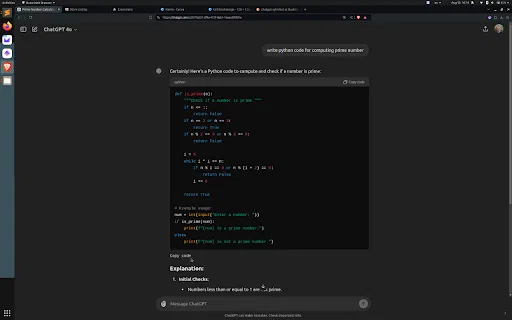
A duplicate copy control is inserted at the bottom of each code snippet, so the button is always within reach while you read the code.
Long answers full of code no longer force you back to the top of the response, keeping your place in the conversation intact.
Paste code straight into your editor, terminal, or IDE as soon as it renders, instead of pausing to hunt for the top copy button.
The listing shows version 1.0, updated August 13, 2024, weighing only about 4 KB, so installation has essentially no performance cost.
The developer declares that the extension does not collect, sell, or transfer user data, and it needs no account or sign-in.
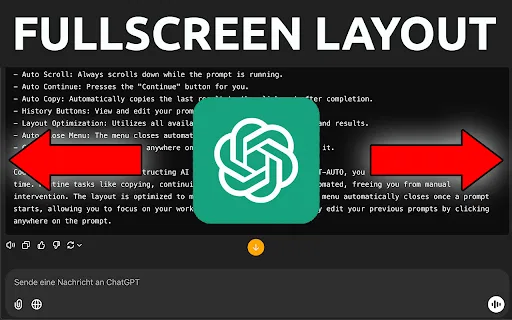
ChatGPT renders longer answers as scrollable blocks, and the native copy button for a code snippet sits at the top of that block. On a long response, that means scrolling up past the explanation text just to grab a few lines of code. This extension solves that single annoyance by injecting a second copy button at the bottom edge of each code block, so a copy control is visible both when you start reading the code and when you finish it. The extension is a free, roughly 4 KB single-purpose add-on published by independent developer Dimitri Rusin. It was last updated on August 13, 2024, and the store listing presents it as version 1.0 targeting the ChatGPT web interface. Because it only injects a UI element into the page, it does not change model behaviour, and the developer's privacy disclosure states that no data is collected, sold, or used for unrelated purposes. It is best understood as a micro-utility rather than a full ChatGPT toolkit: if duplicated copy buttons are the one thing bothering you, this removes that friction; if you want conversation exporting, prompt management, or keyboard shortcuts, other extensions in the same category cover those needs.
Keep flow while pair-programming with ChatGPT: grab the generated function from the bottom button and paste it into your editor without losing your position in the thread.
When a model response contains several small fixes or SQL statements, copy each one right where it ends instead of jumping back to the top of the message.
Use it alongside documentation writing or tutorial creation, where you repeatedly lift code samples out of chat answers and into drafts.
Copy a ready-made snippet into a Jupyter or notebook cell while the explanation above it is still on screen, so the context stays visible.
Side-by-side telemetry comparison of competing AI tools in the same primary category
| Rank | AI Tool | Monthly Visits | MoM Growth | Direct traffic share | Pricing | Head-to-Head |
|---|---|---|---|---|---|---|
| ● | ChatGPT: Copy Code Without Scrolling | 0 | — | — | Free | Current |
| 1 | Pi Coding Agent | 1.93M | +4% | 47% direct | Free | vs Pi Coding Agent |
| 2 | VS Code | 7.4M | -3.8% | 29% direct | Freemium | vs VS Code |
| 3 | Cursor | 23.3M | +8.4% | 63% direct | Freemium | vs Cursor |
| 4 | Postman | 1.76M | -7.6% | 33% direct | Freemium | vs Postman |
| 5 | T3 Code | 1.07M | +52.5% | 50% direct | Free | vs T3 Code |
| 6 | Qoder | 5.15M | +81.8% | 49% direct | Freemium, Free Trial, Free | vs Qoder |
Free / Open-sourceA minimal, extensible terminal coding agent you can reshape

Free / Open-sourceWrite code with precision, hand bigger jobs to agents, and keep working from anywhere

The AI coding agent for building ambitious software

Design, test, and govern APIs — now with AI agents in the loop

Free / Open-sourceOpen-source control plane for orchestrating coding agents
An agentic coding platform that ships real software

AI coding agent for VS Code, JetBrains and Visual Studio with bring-your-own-key model freedom

AI-powered terminal and agentic software factory for development teams

The AI memory layer that remembers your work for you

Automate the repetitive parts of coding with ChatGPT
Agentic coding with parallel AI agents that build and ship real products

The coding agent that learns your coding taste