01
708.9K/mo
A prompt library and management layer for ChatGPT and other AI models
AI Prompt GeneratorEditorial score: 4.1Freemium, Paid26% direct

708.9K/mo
A prompt library and management layer for ChatGPT and other AI models
Freemium, Paid

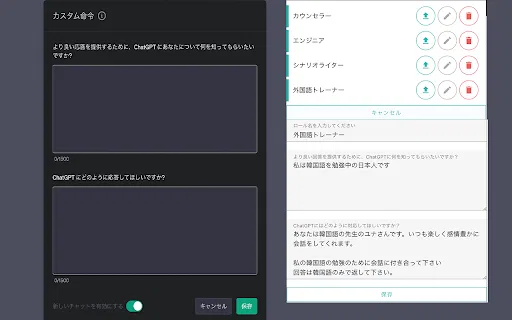
Store multiple ChatGPT Custom Instructions and switch between them instantly

This is our editors' assessment out of 5, not an average of user ratings. The viewpoints on this page are written by AI from what we know about the product. They are not customer reviews.
According to OpenAITools.app telemetry verified on 2026-11-11, ChatGPT Custom instruction Switcher (chromewebstore.google.com) is an AI platform indexed under AI Productivity Tools generating 0 monthly visits with a month-over-month traffic delta of +0 (0.0%). Its primary geographic market is Global (— traffic share), and it operates on a Free pricing model. Top competing alternatives by monthly volume include AIPRM (708.87K visits/mo), Perfiles para ChatGPT (0 visits/mo), AI Toolbox (290.14K visits/mo).
huge time saver for switching between dev and writer personas
clean interface, beats keeping instructions in notepad
wish it had hotkeys for faster switching
solid little tool for prompt management
AI-synthesized perspectives grounded in live site inspection, pricing structure, and category benchmarks — presented as editorial viewpoints rather than individual customer testimonials.
Build a personal library of Custom Instructions covering different tasks, tones, and personas, and reuse them whenever you need.
Pick a saved template and copy-paste it straight into ChatGPT's Custom Instructions field, avoiding manual retyping.
Switch between distinct instruction sets for coding, writing, research, or teaching without editing fields by hand.
Keep instructions managed inside the extension instead of scattered notes, so your standard prompts stay consistent between sessions.
The settings panel includes a date format option and the product documentation is provided in both English and Japanese.
ChatGPT's Custom Instructions field is where you tell the assistant how it should behave, but the platform offers little help if you work with several different personas: a code reviewer, a copy editor, a tutor, a translator. Swapping between those instruction blocks means copying text out of a notes app and pasting it back in each time. This extension, published by an independent developer under the name nekoze, keeps those instruction blocks inside your browser as saved templates. You create the templates once, then copy a chosen one straight into ChatGPT's Custom Instructions field with a click, so switching working modes takes seconds instead of a manual edit. The extension is listed at version 0.2.2 with an update date of November 7, 2023, and the store page documents English and Japanese support, including a date format option for the settings panel. It is a focused, no-frills utility: it stores text and moves it into ChatGPT's own configuration screen. Because Custom Instructions are still controlled by ChatGPT's settings, you remain in charge of confirming which instruction set is active on your account.
Maintain separate instruction sets for refactoring, code review, and documentation, and swap to the right one when your task changes.
Keep a house style, a tone-of-voice brief, and a summarisation preset ready, so draft work starts from the same baseline every time.
Save instruction templates for vocabulary level, feedback style, and language practice, and switch them depending on the exercise.
Store one reusable instruction block that constrains answers to cited, cautious sources, and apply it to every research session.
Side-by-side telemetry comparison of competing AI tools in the same primary category
| Rank | AI Tool | Monthly Visits | MoM Growth | Direct traffic share | Pricing | Head-to-Head |
|---|---|---|---|---|---|---|
| ● | ChatGPT Custom instruction Switcher | 0 | — | — | Free | Current |
| 1 | AIPRM | 708.87K | -6.9% | 26% direct | Freemium, Paid | vs AIPRM |
| 2 | Perfiles para ChatGPT | 0 | — | — | Free | vs Perfiles para ChatGPT |
| 3 | AI Toolbox | 290.14K | +16.9% | 32% direct | Freemium | vs AI Toolbox |
| 4 | Monica | 4.51M | -11.3% | 55% direct | Freemium | vs Monica |
| 5 | Sider | 2.64M | -10.6% | 64% direct | Freemium | vs Sider |
| 6 | Merlin AI | 1.38M | +13.1% | 50% direct | Freemium | vs Merlin AI |
A prompt library and management layer for ChatGPT and other AI models
A prompt library and management layer for ChatGPT and other AI models

Save, organise and switch custom ChatGPT instruction profiles in one click
Save, organise and switch custom ChatGPT instruction profiles in one click
Organize, search and export your AI chats across ChatGPT, Gemini, Claude and Grok
Organize, search and export your AI chats across ChatGPT, Gemini, Claude and Grok

All-in-one AI assistant across web, browser, desktop and mobile
All-in-one AI assistant across web, browser, desktop and mobile

Your AI agent for the browser: chat, automate and create from one sidebar
Your AI agent for the browser: chat, automate and create from one sidebar
One-click AI assistant for browsing, writing and research
One-click AI assistant for browsing, writing and research
One browser agent that combines every major AI model with web automation

Switch between saved ChatGPT custom instructions across devices
Switch between saved ChatGPT custom instructions across devices
The best frontend for AI.

Bring ChatGPT, Claude and Gemini into Google Docs, Sheets, Slides and Gmail
Bring ChatGPT, Claude and Gemini into Google Docs, Sheets, Slides and Gmail
One AI sidebar for ChatGPT, Claude and Gemini across the web
One AI sidebar for ChatGPT, Claude and Gemini across the web

A prompt enhancer that restructures rough ideas into clear, effective prompts in one click
A prompt enhancer that restructures rough ideas into clear, effective prompts in one click