01
2.6M/mo
AI sidebar and browser agent for reading, writing and research
AI AssistantEditorial score: 4.5Freemium64% direct

2.6M/mo
AI sidebar and browser agent for reading, writing and research
Freemium

Desktop popup alerts the moment ChatGPT finishes writing

This is our editors' assessment out of 5, not an average of user ratings. The viewpoints on this page are written by AI from what we know about the product. They are not customer reviews.
According to OpenAITools.app telemetry verified on 2026-11-11, ChatGPT Popup Notifier (chromewebstore.google.com) is an AI platform indexed under AI Productivity Tools generating 0 monthly visits with a month-over-month traffic delta of +0 (0.0%). Its primary geographic market is Global (— traffic share), and it operates on a Free pricing model. Top competing alternatives by monthly volume include Sider (2.64M visits/mo), MacGPT (26.22K visits/mo), chatGPT notification (0 visits/mo).
total game changer for long prompts
notifications stopped working after the latest chrome update
saves me from staring at blinking cursors all day
does what it says nothing fancy
AI-synthesized perspectives grounded in live site inspection, pricing structure, and category benchmarks — presented as editorial viewpoints rather than individual customer testimonials.
A desktop popup appears the moment ChatGPT finishes generating your response, even when you are on a different tab or in another application.
The notification can tell you how long ChatGPT took to finish answering, so you can judge whether a slow reply was the model or the network.
If ChatGPT fails to generate an answer, you are notified right away so you can regenerate the response instead of waiting on a dead spinner.
The extension icon switches to show Done, giving you a persistent visual marker in the browser even if you dismissed the popup.
Choose whether to be alerted while an answer is still generating, and whether notifications should fire while the ChatGPT tab is already focused.
ChatGPT Popup Notifier solves a small but very real annoyance: long model responses take time, and watching a blinking cursor is a waste of it. Once installed, the extension watches your ChatGPT conversation and throws a system notification the instant the answer is ready — even if you have switched to another tab or another application entirely. Clicking the notification jumps you straight back to the chat.
The extension also covers the unhappy path. If ChatGPT fails to produce a response, you get an error notification so you can hit regenerate immediately rather than discovering the failure minutes later. On top of that, the toolbar icon itself switches to show "Done", giving you a second visual cue for when you return to the browser window. The notification can even tell you how long ChatGPT took to respond.
Behavior is configurable from the extension popup: you can choose whether to be notified while a response is still generating, and whether notifications should appear even when you are already looking at the ChatGPT page. The developer ships it as a beta (version 0.3.0) and collects no user data. It is a single-purpose utility rather than a full ChatGPT client — it adds alerting on top of the official ChatGPT web interface, nothing more.
Start a long ChatGPT request, then move to your document, notes app or reference material. The popup brings you back the second the draft is ready.
Fire off an explanation or snippet request inside ChatGPT, then keep working in your editor or terminal without polling the browser tab.
Switch to email, a lecture recording or a second browser window and still get pulled back when ChatGPT produces its answer or throws an error.
When a response is dragging or silently fails, the notification and the Done icon tell you what happened so you can retry without guesswork.
Side-by-side telemetry comparison of competing AI tools in the same primary category
| Rank | AI Tool | Monthly Visits | MoM Growth | Direct traffic share | Pricing | Head-to-Head |
|---|---|---|---|---|---|---|
| ● | ChatGPT Popup Notifier | 0 | — | — | Free | Current |
| 1 | Sider | 2.64M | -10.6% | 64% direct | Freemium | vs Sider |
| 2 | MacGPT | 26.22K | -7.5% | 40% direct | Freemium | vs MacGPT |
| 3 | chatGPT notification | 0 | — | — | Free | vs chatGPT notification |
| 4 | ChatNoti | 0 | — | — | Free | vs ChatNoti |
| 5 | AI Toolbox | 290.14K | +16.9% | 32% direct | Freemium | vs AI Toolbox |
| 6 | Monica | 4.51M | -11.3% | 55% direct | Freemium | vs Monica |
AI sidebar and browser agent for reading, writing and research
AI sidebar and browser agent for reading, writing and research

ChatGPT in your Mac menu bar, inline and everywhere
ChatGPT in your Mac menu bar, inline and everywhere

Get a sound alert the moment ChatGPT finishes writing
Get a sound alert the moment ChatGPT finishes writing

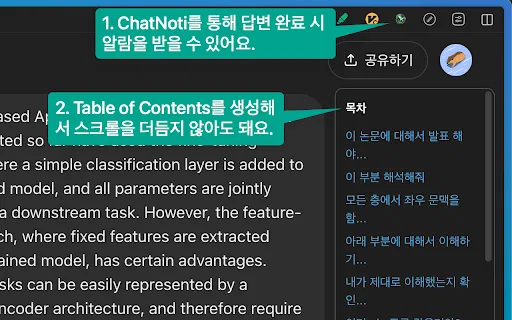
Sound alerts and a table of contents for long ChatGPT conversations
Sound alerts and a table of contents for long ChatGPT conversations
Organize, search and export your AI chats across ChatGPT, Gemini, Claude and Grok
Organize, search and export your AI chats across ChatGPT, Gemini, Claude and Grok

All-in-one AI assistant across web, browser, desktop and mobile
All-in-one AI assistant across web, browser, desktop and mobile
The best frontend for AI.

An extendable launcher that puts your tools, AI, and automations one keystroke away
An extendable launcher that puts your tools, AI, and automations one keystroke away
One-click AI assistant for browsing, writing and research
One-click AI assistant for browsing, writing and research

OpenAI's flagship multimodal assistant powered by GPT-6 and GPT-5.6 for reasoning, coding, and deep research.
OpenAI's flagship multimodal assistant powered by GPT-6 and GPT-5.6 for reasoning, coding, and deep research.
The Chrome website blocker that judges every page against your task
The Chrome website blocker that judges every page against your task

Free / Open-sourceOpen-source, plugin-rich chat interface for every major AI model
Free / Open-sourceOpen-source, plugin-rich chat interface for every major AI model