01
2.6M/mo
AI sidebar and browser agent for reading, writing and research
AI AssistantEditorial score: 4.5Freemium64% direct

2.6M/mo
AI sidebar and browser agent for reading, writing and research
Freemium

Attach web images and merge selected text into your ChatGPT prompts
This is our editors' assessment out of 5, not an average of user ratings. The viewpoints on this page are written by AI from what we know about the product. They are not customer reviews.
According to OpenAITools.app telemetry verified on 2026-11-11, ChatGPT Xtra (chromewebstore.google.com) is an AI platform indexed under AI Chatbot generating 0 monthly visits with a month-over-month traffic delta of +0 (0.0%). Its primary geographic market is Global (— traffic share), and it operates on a Free pricing model. Top competing alternatives by monthly volume include Sider (2.64M visits/mo), Merlin AI (1.38M visits/mo), Monica (4.51M visits/mo).
Saves me from saving and uploading screenshots manually.
Handy right-click shortcut.
A bit buggy on some sites.
Works sometimes.
AI-synthesized perspectives grounded in live site inspection, pricing structure, and category benchmarks — presented as editorial viewpoints rather than individual customer testimonials.
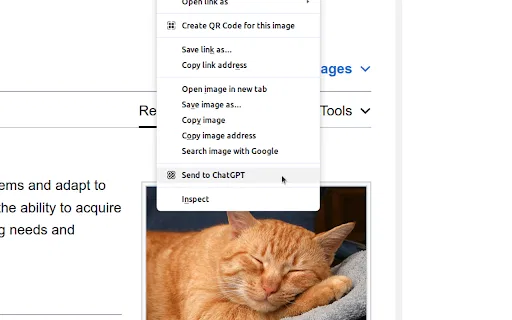
Right-click any image on a web page and send it straight into a ChatGPT conversation without downloading and re-uploading it.
Highlight text on a site, then combine it with your own typed prompt and send both together to ChatGPT in a single action.
Everything happens through the browser context menu, so you never interrupt what you are reading to open another tab.
The whole extension is a 72 KB download with no account or signup beyond the ChatGPT login you already have.
ChatGPT Xtra is a small Chrome extension that patches two everyday annoyances out of the ChatGPT web experience: getting images into a conversation, and getting the text you are reading into a prompt. Instead of saving an image, opening ChatGPT, and uploading it manually, you right-click the image on the page and choose the extension's option to attach it to a new chat.
The second feature is arguably the more useful one. When you are reading a report, article or spec and want to ask ChatGPT about a specific passage, you highlight that passage, right-click, and pick the option to send the selected text together with a prompt you have typed. That saves the constant copy-paste dance between a browser tab and the chat window and keeps a single source of truth in the conversation.
The extension is offered by a developer listed as Jungle, occupies about 72 KB, and currently sits at version 1.0.4 with the last update in December 2024. It has a small audience of roughly a couple hundred users and a 3.4 average from five ratings. The developer states that no data is collected, sold or used for unrelated purposes, which matters here because the extension operates directly inside the ChatGPT interface.
Right-click a chart or diagram in an article and ask ChatGPT to explain or critique it without leaving the page you are reading.
Highlight a paragraph in your draft, combine it with an instruction prompt, and get a rewrite that keeps the original context intact.
Grab screenshots or product images from a competitor's site and send them into a chat to compare or extract details.
Send product photos from a supplier's website into ChatGPT and pair them with your own questions to draft descriptions faster.
Side-by-side telemetry comparison of competing AI tools in the same primary category
| Rank | AI Tool | Monthly Visits | MoM Growth | Direct traffic share | Pricing | Head-to-Head |
|---|---|---|---|---|---|---|
| ● | ChatGPT Xtra | 0 | — | — | Free | Current |
| 1 | Sider | 2.64M | -10.6% | 64% direct | Freemium | vs Sider |
| 2 | Merlin AI | 1.38M | +13.1% | 50% direct | Freemium | vs Merlin AI |
| 3 | Monica | 4.51M | -11.3% | 55% direct | Freemium | vs Monica |
| 4 | Chippy | 2.99K | +29.6% | 42% direct | Freemium | vs Chippy |
| 5 | ChatHub | 322.62K | -13.9% | 59% direct | Freemium | vs ChatHub |
| 6 | HARPA AI | 537.46K | +99.3% | 76% direct | Freemium | vs HARPA AI |
AI sidebar and browser agent for reading, writing and research
AI sidebar and browser agent for reading, writing and research
One-click AI assistant for browsing, writing and research
One-click AI assistant for browsing, writing and research

All-in-one AI assistant across web, browser, desktop and mobile
All-in-one AI assistant across web, browser, desktop and mobile

ChatGPT in your browser sidebar, without switching tabs
ChatGPT in your browser sidebar, without switching tabs

Compare GPT, Claude, and Gemini answers side by side in one chat
Compare GPT, Claude, and Gemini answers side by side in one chat
One browser agent that combines every major AI model with web automation

OpenAI's flagship multimodal assistant powered by GPT-6 and GPT-5.6 for reasoning, coding, and deep research.
OpenAI's flagship multimodal assistant powered by GPT-6 and GPT-5.6 for reasoning, coding, and deep research.

A private Chromium browser with a built-in AI agent and offline LLM
A private Chromium browser with a built-in AI agent and offline LLM
One privacy-first AI client for GPT, Claude, Gemini and more
One privacy-first AI client for GPT, Claude, Gemini and more
One AI sidebar for ChatGPT, Claude and Gemini across the web
One AI sidebar for ChatGPT, Claude and Gemini across the web
The best frontend for AI.

ChatGPT in your Mac menu bar, inline and everywhere
ChatGPT in your Mac menu bar, inline and everywhere