AI autocomplete that finishes your sentences wherever you type

Chrome extension that runs AI writing commands inside Canva, Gmail and Google Forms

This is our editors' assessment out of 5, not an average of user ratings. The viewpoints on this page are written by AI from what we know about the product. They are not customer reviews.
CVtools is an unmaintained legacy Chrome extension from 2023 that relies on older GPT models and no longer functions reliably with modern web apps.
According to OpenAITools.app telemetry verified on 2026-11-11, CVtools (chromewebstore.google.com) is an AI platform indexed under AI Productivity Tools generating 0 monthly visits with a month-over-month traffic delta of +0 (0.0%). Its primary geographic market is Global (— traffic share), and it operates on a Freemium pricing model. Top competing alternatives by monthly volume include Compose AI (34.9K visits/mo), Grammarly (58.87M visits/mo), HyperWrite (255.43K visits/mo).
Totally broken. Abandoned since 2023, doesn't work at all.
Dead extension. Throws errors on every page.
Outdated. Needs a complete rewrite.
Garbage.
AI-synthesized perspectives grounded in live site inspection, pricing structure, and category benchmarks — presented as editorial viewpoints rather than individual customer testimonials.
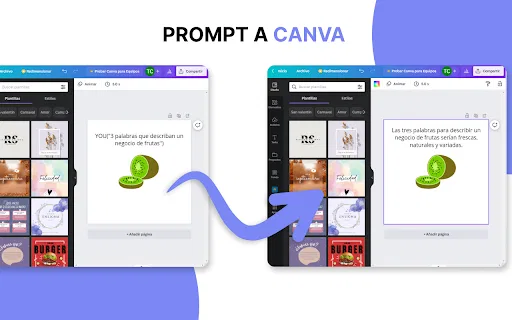
Type short triggers such as GPT, VGPT, YOU or HELP directly into a text field to hand the surrounding prompt to a language model, with the response written back into the same box.
Integrations target three of the most common everyday writing surfaces, so the same command habit carries over between design captions, email replies and survey answers.
A separate generator component produces blocks of content on demand for cases where there is no surrounding document to write into.
The extension is designed around typing rather than clicking, keeping your hands on the keyboard instead of bouncing to a separate chat window.
Distributed through the Chrome Web Store, so installation is a single click and updates are handled by the browser.
CVtools takes a simple premise: rather than opening a separate chatbot tab every time you need help writing, you summon the AI right where the cursor already is. The extension watches for short command keywords such as GPT, VGPT, YOU and HELP while you type in an editable field, then hands that prompt to a language model and streams the generated text back into the box. The pitch is speed — the developer claims users can write up to ten times faster by letting the generator handle the first draft, the follow-up sentence or the long-form paragraph.
The supported surfaces named in the listing are Canva, Gmail and Google Forms, which are exactly the places where people write short repetitive text all day: form answers, email replies, design captions. There is also a standalone 'GPT Tool' component that serves as a plain content generator for when you just need a block of text with no surrounding page. Because it lives in the browser rather than in any one SaaS app, the workflow is the same across all three integrations.
It is worth setting expectations. CVtools is a very small, single-developer project: the current build is version 1.0.1, last updated in March 2023, it is published in Spanish, and its user base is measured in dozens rather than thousands. It relies on GPT-3-era generation, so output quality will feel dated next to modern assistants, and there is no visible team, roadmap or support organisation behind it. Treat it as a niche productivity shortcut rather than a production writing platform.

Draft headline variants, image captions and short promotional copy while you are still arranging a design, instead of leaving the canvas to write in another tool.
Generate a polite first draft for routine replies and then edit it, cutting the blank-page friction out of high-volume inbox work.
Expand rough notes into full sentence answers when filling in forms, surveys or self-assessment questionnaires.
Use the GPT Tool component to produce a paragraph of copy, a summary or a short description when no surrounding page is involved.
Side-by-side telemetry comparison of competing AI tools in the same primary category
| Rank | AI Tool | Monthly Visits | MoM Growth | Direct traffic share | Pricing | Head-to-Head |
|---|---|---|---|---|---|---|
| ● | CVtools | 0 | — | — | Freemium | Current |
| 1 | Compose AI | 34.9K | -48.1% | 73% direct | Freemium, Free Trial, Contact for Pricing | vs Compose AI |
| 2 | Grammarly | 58.87M | -1.5% | 43% direct | Freemium | vs Grammarly |
| 3 | HyperWrite | 255.43K | +34.4% | 42% direct | Freemium | vs HyperWrite |
| 4 | GPT Workspace | 431.51K | +43.8% | 41% direct | Freemium, Free Trial, Paid | vs GPT Workspace |
| 5 | Merlin AI | 1.38M | +13.1% | 50% direct | Freemium | vs Merlin AI |
| 6 | 2Slash | 3.55K | +20.9% | 39% direct | Freemium | vs 2Slash |

AI autocomplete that finishes your sentences wherever you type

Cross-platform AI writing assistant delivering real-time grammar correction, tone alignment, authorship tracking, and team style guides.

AI writing assistant with autocomplete, research, and a Chrome extension

Bring ChatGPT, Claude and Gemini into Google Docs, Sheets, Slides and Gmail
One-click AI assistant for browsing, writing and research
A prompt-free AI writing assistant that lives inside every text field
One browser agent that combines every major AI model with web automation

An AI writing assistant and keyboard for error-free writing anywhere

AI writing and site management for WordPress

Your AI agent for the browser: chat, automate and create from one sidebar

An AI email assistant and browser sidebar for everything else
Summarize, bookmark and write with AI right in your browser