01
889.6K/mo
Highlight the web, learn in public, and build your AI clone
AI Research ToolEditorial score: 4.2Freemium45% direct

889.6K/mo
Highlight the web, learn in public, and build your AI clone
Freemium

Clip the web into AI-assisted drafts, notes, and shareable summaries
This is our editors' assessment out of 5, not an average of user ratings. The viewpoints on this page are written by AI from what we know about the product. They are not customer reviews.
According to OpenAITools.app telemetry verified on 2026-11-11, Draftio Chrome Extension (chromewebstore.google.com) is an AI platform indexed under AI Notes Generator generating 0 monthly visits with a month-over-month traffic delta of +0 (0.0%). Its primary geographic market is Global (— traffic share), and it operates on a Contact for Pricing pricing model. Top competing alternatives by monthly volume include Glasp (889.56K visits/mo), Kome AI (174.91K visits/mo), Bluedot (546.74K visits/mo).
Saves me tons of tab switching every day.
Clean clipping into Draftio.
Sometimes fails to grab the right element on complex pages.
Handy research saver.
AI-synthesized perspectives grounded in live site inspection, pricing structure, and category benchmarks — presented as editorial viewpoints rather than individual customer testimonials.
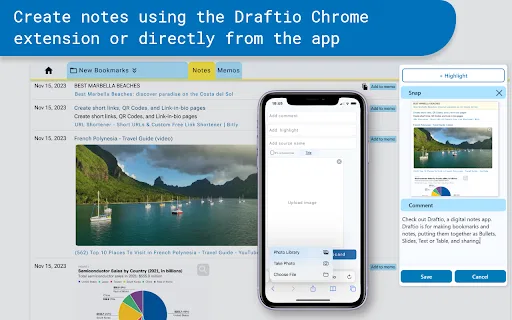
Send selected content from any web page straight into your Draftio account without leaving the tab you are reading.
Group clippings into folders, projects, and drafts so research material feeds directly into a final deliverable.
Reshape a collected draft into bullet points, tables, slides, or plain text and rearrange it until it reads the way you want.
Summarize gathered material, generate draft text, interpret images, and refine search across your saved notes.
Publish a draft through a generated link or send a controlled access link when you want to limit who can read it.
Draftio Chrome Extension is a lightweight clipper, published by the team behind the Draftio notes app rather than by Google. You install it from the Chrome Web Store, sign in to your Draftio account, and from then on a toolbar click sends whatever you have selected on a page straight into your Draftio workspace. It is a small extension — well under a megabyte — focused on doing one job quickly: capturing material while you browse instead of copying links into a document and hoping you find them again.
Inside Draftio, the captured material becomes the raw input for a structured research workflow. Notes live in folders and projects, have a flexible multi-field structure, and can be pulled into "drafts" that represent the final output of your research. From there you can reshape a draft into bullet points, tables, slides, or plain prose, rearrange and restyle it, and share it either privately or through a controlled access link. The app also adds AI capabilities on top of the collection layer: summarizing notes, drafting text from your gathered material, interpreting images, and refining search across everything you have saved. An inbox and outbox system handles links shared back and forth with collaborators.
The extension itself is free to add, and Draftio positions its paid offering at the app level rather than the extension, so pricing details are best confirmed on the Draftio website. The listing carries a 5.0 rating from a small number of reviewers and a modest user base, so it is a niche tool rather than a mainstream one. Because it is an independent product built around a third-party notes app, treat it as an unofficial companion to Chrome rather than something operated by Google.
Clip quotes, figures, and passages as you read so the source material for a report accumulates in one place rather than in scattered bookmarks.
Capture lecture-adjacent web reading and restyle the collected notes into bullet lists or tables for revision.
Turn a folder of clipped references into a structured draft or slide outline that can be shared with a client.
Use the inbox and outbox system plus generated links to circulate findings with teammates or clients.
Side-by-side telemetry comparison of competing AI tools in the same primary category
| Rank | AI Tool | Monthly Visits | MoM Growth | Direct traffic share | Pricing | Head-to-Head |
|---|---|---|---|---|---|---|
| ● | Draftio Chrome Extension | 0 | — | — | Contact for Pricing | Current |
| 1 | Glasp | 889.56K | -14.1% | 45% direct | Freemium | vs Glasp |
| 2 | Kome AI | 174.91K | -6.5% | 30% direct | Freemium | vs Kome AI |
| 3 | Bluedot | 546.74K | -5.4% | 74% direct | Freemium | vs Bluedot |
| 4 | Snipo | 5.01K | -50.1% | 55% direct | Free | vs Snipo |
| 5 | HoverNotes | 190.69K | +156% | 49% direct | Freemium | vs HoverNotes |
| 6 | HARPA AI | 537.46K | +99.3% | 76% direct | Freemium | vs HARPA AI |
Highlight the web, learn in public, and build your AI clone
Highlight the web, learn in public, and build your AI clone
Summarize, bookmark and write with AI right in your browser
Summarize, bookmark and write with AI right in your browser

Bot-free AI note taker that captures and summarizes every meeting
Bot-free AI note taker that captures and summarizes every meeting

Timestamped video notes in Notion, plus AI flashcards
Timestamped video notes in Notion, plus AI flashcards
AI that watches your video and writes study notes as you watch
AI that watches your video and writes study notes as you watch
One browser agent that combines every major AI model with web automation
One-click AI assistant for browsing, writing and research
One-click AI assistant for browsing, writing and research

A private, visual AI space to save and remember anything — no folders, no tagging
A private, visual AI space to save and remember anything — no folders, no tagging

Live meeting transcription and AI notes without a bot in the call
Live meeting transcription and AI notes without a bot in the call
Organize, search and export your AI chats across ChatGPT, Gemini, Claude and Grok
Organize, search and export your AI chats across ChatGPT, Gemini, Claude and Grok
Local-first visual note-taking on an infinite canvas with mind maps and knowledge-base AI
Local-first visual note-taking on an infinite canvas with mind maps and knowledge-base AI

AI writing assistant with autocomplete, research, and a Chrome extension
AI writing assistant with autocomplete, research, and a Chrome extension


