Royalty-free stock photos, vectors and video with built-in AI creation tools

Batch-submit AI stock images to Dreamstime with AI-written titles and keywords

This is our editors' assessment out of 5, not an average of user ratings. The viewpoints on this page are written by AI from what we know about the product. They are not customer reviews.
According to OpenAITools.app telemetry verified on 2026-11-11, Dreamstime Auto Submit (chromewebstore.google.com) is an AI platform indexed under AI Productivity Tools generating 0 monthly visits with a month-over-month traffic delta of +0 (0.0%). Its primary geographic market is Global (— traffic share), and it operates on a Free pricing model. Top competing alternatives by monthly volume include 123RF AI Search Engine (6.26M visits/mo), AI Toolbox (290.14K visits/mo), AI Stock Keywords (13.14K visits/mo).
Saved me hours of repetitive metadata entry.
Gets stuck occasionally if Dreamstime throttles requests.
Lifesaver.
Batch upload actually works without crashing the browser now.
AI-synthesized perspectives grounded in live site inspection, pricing structure, and category benchmarks — presented as editorial viewpoints rather than individual customer testimonials.
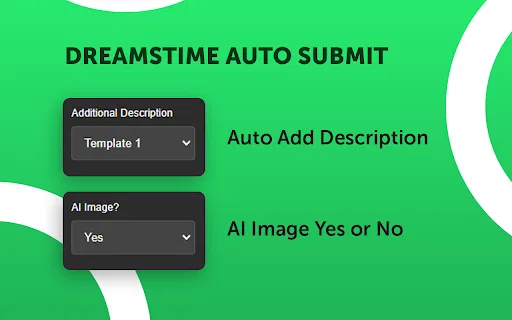
Add a description for each upload automatically, skip it, or use custom text, and optionally fill metadata with an AI model.
Mark images as AI-generated or non-AI as needed, meeting stock portals' requirements to declare generated content.
Set a repeat count per batch, custom delays in seconds or minutes, and pauses after a chosen number of uploads to control the pace.
Enable sleep mode for longer breaks, and choose to skip, stop or fill metadata when the same image ID appears again.
Template options keep generated metadata cleaner and stock-friendly, reducing per-image manual writing.
Uploading stock images one at a time is tedious work: the same title, description and keyword routine repeated for every file, plus the requirement to mark AI-generated content correctly and attach model releases when people appear in the shot. Dreamstime Auto Submit exists to compress that loop. Once you configure your preferences, it clicks through submissions for you, batch by batch, while you focus on producing images.
The extension is deliberately configurable. You can add a description automatically, skip it entirely, or supply your own custom text. Files can be flagged as AI-generated or not. You set a repeat count for how many submissions run in a batch, a delay measured in seconds or minutes between actions, and a pause after a chosen number of uploads. A dedicated sleep mode handles longer breaks. If the same image ID comes up again, you choose whether it skips, stops, or fills the metadata.
Metadata can also be filled with the help of an AI model — the listing mentions Gemini and Sumopod as options — and template settings keep the generated text clean and consistent with stock-friendly wording. Recent listings elsewhere in the ecosystem, such as the developer's AutoMeta for AdobeStock, suggest this fills a real gap: stock portals increasingly require contributors to declare that an image was generated, and doing that manually at volume is where mistakes happen. The extension is aimed squarely at contributors who upload often and want consistency without the manual clicking. It collects personally identifiable and authentication information according to its Chrome Web Store disclosure, so read the developer's privacy policy before installing.

Creators producing large volumes of AI images use the extension to submit in batches, with AI declarations and keywords filled automatically instead of per-file manual work.
A photographer uploading a fixed number of images a day configures batch counts and delays so the queue runs at a stable pace in the background, reducing the risk of hitting platform limits.
Someone managing several stock platforms uses templates and automatic descriptions to speed up the Dreamstime side of the workload.
Images featuring people can have model releases attached as needed, completing the compliance step alongside submission.
Side-by-side telemetry comparison of competing AI tools in the same primary category
| Rank | AI Tool | Monthly Visits | MoM Growth | Direct traffic share | Pricing | Head-to-Head |
|---|---|---|---|---|---|---|
| ● | Dreamstime Auto Submit | 0 | — | — | Free | Current |
| 1 | 123RF AI Search Engine | 6.26M | +3.7% | 20% direct | Free Trial, Paid, Contact for Pricing | vs 123RF AI Search Engine |
| 2 | AI Toolbox | 290.14K | +16.9% | 32% direct | Freemium | vs AI Toolbox |
| 3 | AI Stock Keywords | 13.14K | -46.9% | 42% direct | Paid | vs AI Stock Keywords |
| 4 | Photo Stock Assistant | 0 | — | — | Freemium | vs Photo Stock Assistant |
| 5 | SellYourPhotos | 0 | 0% | — | Freemium, Paid | vs SellYourPhotos |
| 6 | AIPRM | 708.87K | -6.9% | 26% direct | Freemium, Paid | vs AIPRM |

Royalty-free stock photos, vectors and video with built-in AI creation tools
Organize, search and export your AI chats across ChatGPT, Gemini, Claude and Grok

AI-generated titles, descriptions and keywords for stock photo and video uploads

Auto-fill Adobe Stock titles, keywords and categories with AI

AI-powered metadata and SEO optimization for selling your photos as stock assets

A prompt library and management layer for ChatGPT and other AI models

Generate stock-photo keywords by uploading your images
AI auto-tagging workspace to store, share and monetize your music catalog
Publish Google Docs to WordPress, Webflow, Shopify and more

A prompt enhancer that restructures rough ideas into clear, effective prompts in one click
Create AI-powered step-by-step tutorials in seconds
No-code browser automation in a Chrome extension