01
56K/mo
Read aloud webpages, PDFs, Kindle books and AI answers with synced highlighting
AI Text-to-SpeechEditorial score: 4.4Freemium+9.8%

56K/mo+9.8%
Read aloud webpages, PDFs, Kindle books and AI answers with synced highlighting
Freemium

Highlight any text, get the right definition and a plain-language explanation
This is our editors' assessment out of 5, not an average of user ratings. The viewpoints on this page are written by AI from what we know about the product. They are not customer reviews.
According to OpenAITools.app telemetry verified on 2026-11-11, Explain Selected (chromewebstore.google.com) is an AI platform indexed under AI Answer generating 0 monthly visits with a month-over-month traffic delta of +0 (0.0%). Its primary geographic market is Global (— traffic share), and it operates on a Free pricing model. Top competing alternatives by monthly volume include CastReader (56K visits/mo), Clearly Reader (10.35K visits/mo), Language Reactor (1.88M visits/mo).
Beats opening a separate dictionary tab every time.
Merriam-Webster integration makes definitions actually reliable.
Popup sometimes covers text I want to read.
Stopped working on some heavy JavaScript pages.
AI-synthesized perspectives grounded in live site inspection, pricing structure, and category benchmarks — presented as editorial viewpoints rather than individual customer testimonials.
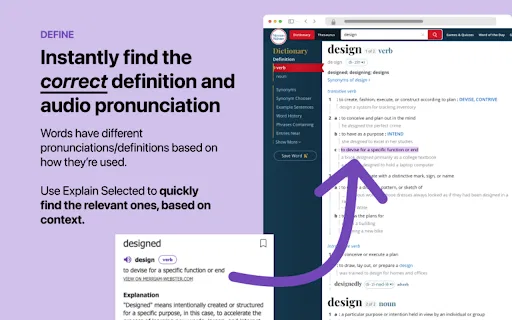
ChatGPT infers which sense of a word fits the sentence you highlighted, instead of dumping every dictionary entry at once.
Matching dictionary entries and audio pronunciation are pulled in so you can hear as well as read the word.
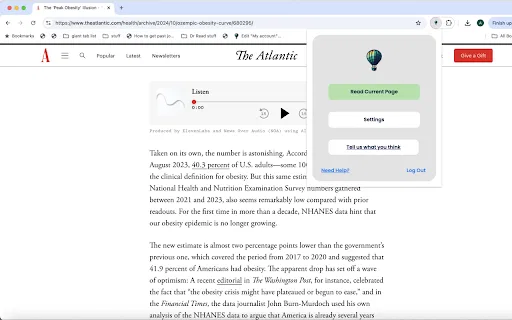
Select text and click the purple circle that appears — no popup windows, no copy-pasting into a separate tab.
Add words you want to remember to a personal list so you can review them later.
Send individual explanations to friends when a word or phrase is worth passing on.
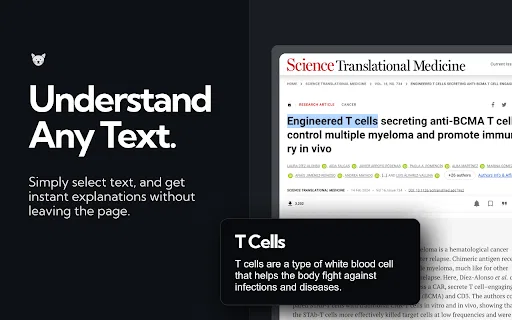
Explain Selected is a lightweight Chrome extension that removes the friction from looking up unfamiliar words while you read. Instead of opening a dictionary tab and scanning through a dozen senses to find the one that fits, you highlight the word or phrase in place and a purple circle appears. One click gives you the definition, the pronunciation and a plain-language explanation written for that specific context.
The distinguishing feature is contextual disambiguation. English is full of words whose meanings have almost nothing to do with each other — the extension's own example is "pounds", which can mean a unit of weight, a verb describing hitting something, or the British currency. Rather than presenting all three blindly, Explain Selected passes the surrounding sentence to ChatGPT and asks it to infer which sense is actually in play, then retrieves the corresponding Merriam-Webster entry and audio pronunciation. It also handles text that no dictionary covers well, such as current slang and narrow technical terminology.
It is aimed at people who read a lot of English online and want to keep their flow: language learners building vocabulary, professionals working through technical documents, and anyone who keeps encountering words with multiple meanings. Useful selections can be saved to a personal list for later memorization, or shared. Two practical caveats from the listing: extensions do not run in tabs that were already open when you installed it, so refresh those tabs first, and no extension works on Chrome internal pages such as the Chrome Web Store itself.
Highlight unfamiliar words while reading articles or books online, hear the pronunciation, and save the ones worth memorizing to a personal list.
Select jargon, acronyms or niche terms in technical documentation and get an explanation in plain language rather than a generic dictionary definition.
Look up slang and idioms whose meaning is not in standard dictionaries and share the explanation with a classmate.
Explain English terms and phrases to colleagues who are reading the same material, without leaving the page or opening a dictionary.
Side-by-side telemetry comparison of competing AI tools in the same primary category
| Rank | AI Tool | Monthly Visits | MoM Growth | Direct traffic share | Pricing | Head-to-Head |
|---|---|---|---|---|---|---|
| ● | Explain Selected | 0 | — | — | Free | Current |
| 1 | CastReader | 56K | +9.8% | 35% direct | Freemium | vs CastReader |
| 2 | Clearly Reader | 10.35K | -29.1% | 40% direct | Freemium | vs Clearly Reader |
| 3 | Language Reactor | 1.88M | +0.6% | 77% direct | Freemium | vs Language Reactor |
| 4 | GPT Reader & Transcriber | 30K | -16% | 76% direct | Free | vs GPT Reader & Transcriber |
| 5 | Ddict | 32.15K | +2.4% | 65% direct | Freemium | vs Ddict |
| 6 | Instant Multilingual PDF/HTML/TXT Dictionary | 0 | — | — | Free | vs Instant Multilingual PDF/HTML/TXT Dictionary |
Read aloud webpages, PDFs, Kindle books and AI answers with synced highlighting
Read aloud webpages, PDFs, Kindle books and AI answers with synced highlighting
Reader mode, text-to-speech and AI summaries for any web page
Reader mode, text-to-speech and AI summaries for any web page
Learn languages from Netflix, YouTube, and real-world texts with dual subtitles and AI
Learn languages from Netflix, YouTube, and real-world texts with dual subtitles and AI

Free ChatGPT-style text-to-speech and speech-to-text in your browser
Free ChatGPT-style text-to-speech and speech-to-text in your browser

Browser translation, dictionary, and AI writing assistant
Browser translation, dictionary, and AI writing assistant

Instant word definitions and pronunciation on pages and local documents
Instant word definitions and pronunciation on pages and local documents

A Chrome extension that explains and summarizes what you read, right on the page.
A Chrome extension that explains and summarizes what you read, right on the page.

AI reading assistant that listens, corrects and coaches your reading
AI reading assistant that listens, corrects and coaches your reading

AI reading support that turns struggling readers into students who can discuss what they read.
AI reading support that turns struggling readers into students who can discuss what they read.
AI browser extension that reads quiz questions and answers them with explanations
AI browser extension that reads quiz questions and answers them with explanations
Highlight dense research text and get plain-language explanations instantly
Highlight dense research text and get plain-language explanations instantly

Turn any webpage, PDF, Doc or ebook into natural-sounding speech in 60+ languages
Turn any webpage, PDF, Doc or ebook into natural-sounding speech in 60+ languages