01
5.8K/mo
AI email classifier that writes your Gmail filters for you
AI Email AssistantEditorial score: 4.2Freemium+100.9%

5.8K/mo+100.9%
AI email classifier that writes your Gmail filters for you
Freemium

Untangle your inbox with chat — find emails by describing them, not by remembering search operators.
This is our editors' assessment out of 5, not an average of user ratings. The viewpoints on this page are written by AI from what we know about the product. They are not customer reviews.
According to OpenAITools.app telemetry verified on 2026-11-11, Find That Email (chromewebstore.google.com) is an AI platform indexed under AI Email Assistant generating 0 monthly visits with a month-over-month traffic delta of +0 (0.0%). Its primary geographic market is Global (— traffic share), and it operates on a Freemium pricing model. Top competing alternatives by monthly volume include Clean Inbox for Gmail™ (5.82K visits/mo), Shortwave (193.32K visits/mo), Auto Gmail: ChatGPT for email (4.89K visits/mo).
Natural language search in Gmail is a total game changer.
UI looks like an unfinished prototype.
Missed half my emails from last month.
Trash.
AI-synthesized perspectives grounded in live site inspection, pricing structure, and category benchmarks — presented as editorial viewpoints rather than individual customer testimonials.
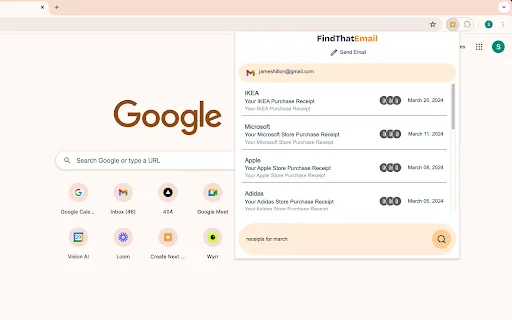
Ask for what you want in everyday language — "receipts from March" — and get back the matching messages instead of building search queries by hand.
It understands intent across sender, subject, date and attachment clues, so you can find a message when you only remember roughly what it was about.
Runs as a lightweight side panel next to your mailbox, requiring no migration, forwarding rules or separate inbox to maintain.
At roughly 225KB the extension adds almost no weight to the browser compared with full inbox-management suites.
Gmail is excellent at storing mail and poor at helping you retrieve it when you have forgotten the details. Find That Email addresses that specific frustration. Rather than learning Gmail's search operators, you describe what you are looking for in plain words — a receipt from a given month, a board meeting in a given quarter, a message from someone whose name you cannot place — and the extension's AI search surfaces the relevant threads.
It is a deliberately small product. The extension weighs about 225KB, installs in a click, and works as a chat-style layer over the inbox you already use. There is no migration step and no second mailbox to check: you keep Gmail exactly as it is and use the extension when a normal search fails you. Because it is built for retrieval rather than composition, it does not attempt to draft replies, triage messages or manage rules.
The trade-off is scope. Find That Email is a narrowly focused extension with a small user base and an update history that stops in 2024, so it is best treated as a lightweight helper rather than a full inbox-management platform. It is free to install, with optional in-app purchases, and is currently offered in English only. Since it works on personal communications, it is worth reading the developer's privacy disclosure before you grant it access to your mailbox.
Recover a receipt, invoice or statement when you know roughly when it arrived but not the sender or subject line.
Pull up a decision, document or thread from months ago using a rough description of the meeting or topic.
Locate correspondence from a client or collaborator without remembering their exact display name.
Side-by-side telemetry comparison of competing AI tools in the same primary category
| Rank | AI Tool | Monthly Visits | MoM Growth | Direct traffic share | Pricing | Head-to-Head |
|---|---|---|---|---|---|---|
| ● | Find That Email | 0 | — | — | Freemium | Current |
| 1 | Clean Inbox for Gmail™ | 5.82K | +100.9% | 39% direct | Freemium | vs Clean Inbox for Gmail™ |
| 2 | Shortwave | 193.32K | -5.1% | 81% direct | Freemium, Free Trial | vs Shortwave |
| 3 | Auto Gmail: ChatGPT for email | 4.89K | +14.9% | 39% direct | Paid | vs Auto Gmail: ChatGPT for email |
| 4 | Smart Assistant by Mailbutler | 47.2K | -8.7% | 39% direct | Freemium, Free Trial, Paid | vs Smart Assistant by Mailbutler |
| 5 | Superhuman | 6.51M | +7.9% | 76% direct | Paid | vs Superhuman |
| 6 | FiloMail | 35.55K | -5.1% | 26% direct | Freemium | vs FiloMail |
AI email classifier that writes your Gmail filters for you
AI email classifier that writes your Gmail filters for you

Automate your email with AI
Automate your email with AI

An AI drafting layer that writes most of your Gmail replies before you open them.
An AI drafting layer that writes most of your Gmail replies before you open them.

An AI email assistant that drafts, summarizes, and perfects your messages in place
An AI email assistant that drafts, summarizes, and perfects your messages in place

The AI productivity suite with agents, email, and docs that work wherever you do
The AI productivity suite with agents, email, and docs that work wherever you do

AI email client that turns your inbox into clear next steps
AI email client that turns your inbox into clear next steps

An AI email assistant and browser sidebar for everything else
An AI email assistant and browser sidebar for everything else

Free GPT-powered Chrome extension that drafts Gmail replies in seconds
Free GPT-powered Chrome extension that drafts Gmail replies in seconds

Your AI agent for the browser: chat, automate and create from one sidebar
Your AI agent for the browser: chat, automate and create from one sidebar

Free / Open-sourceThe AI email assistant that sorts your inbox and drafts replies in your voice
Free / Open-sourceThe AI email assistant that sorts your inbox and drafts replies in your voice

Collaborative inbox and email management for teams
Collaborative inbox and email management for teams

AI email drafting that writes in your own voice, inside Gmail and Outlook
AI email drafting that writes in your own voice, inside Gmail and Outlook