01
2.6M/mo
AI sidebar and browser agent for reading, writing and research
AI AssistantEditorial score: 4.5Freemium64% direct

2.6M/mo
AI sidebar and browser agent for reading, writing and research
Freemium

A Copilot-style Gemini sidebar that also reads and analyzes the page you're on
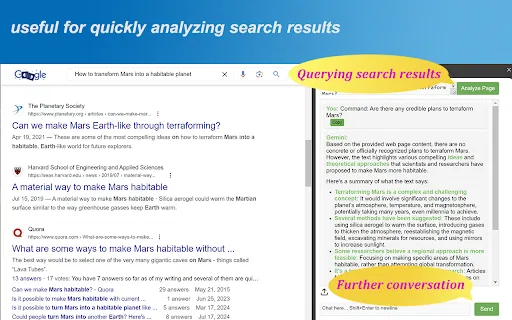
Gemini Chat Sidebar is an unofficial third-party browser extension that packages Gemini API calls into a sidebar interface.
This is our editors' assessment out of 5, not an average of user ratings. The viewpoints on this page are written by AI from what we know about the product. They are not customer reviews.
According to OpenAITools.app telemetry verified on 2026-11-11, Gemini Chat Sidebar (chromewebstore.google.com) is an AI platform indexed under AI Assistant generating 0 monthly visits with a month-over-month traffic delta of +0 (0.0%). Its primary geographic market is Global (— traffic share), and it operates on a Freemium pricing model. Top competing alternatives by monthly volume include Sider (2.64M visits/mo), Merlin AI (1.38M visits/mo), Google Gemini (2.64B visits/mo).
Why pay for this wrapper when the web UI is already free?
Trash.
API key errors constantly pop up out of nowhere.
Extension keeps crashing whenever I try to summarize long pages.
AI-synthesized perspectives grounded in live site inspection, pricing structure, and category benchmarks — presented as editorial viewpoints rather than individual customer testimonials.
Hold open-ended conversations with Gemini in a docked browser sidebar, similar to Edge's Copilot.
Send the content of the current webpage to Gemini with a single click, then ask it to summarize or interpret the material.
Keep talking about the processed page content, so summaries become the starting point for follow-up questions.
Configure the Gemini API endpoint and key in the options page, and switch model names to the one you prefer.
The extension UI is translated into dozens of languages.
Gemini Chat Sidebar recreates the Copilot-in-Edge experience for Google's Gemini inside Chrome. The extension docks an AI chat panel to the side of the browser where you can hold a free-flowing conversation. The distinguishing feature is page awareness: with one click you can send the content of the page you're currently viewing to Gemini and then ask it to summarize, analyze, or otherwise process that material, continuing the conversation from there. It ships a multilingual interface.
Setup is bring-your-own-key. In the extension's options you enter a Gemini API address and your personal API key, which you can obtain from Google AI Studio. This means usage limits and costs follow your own Gemini API account rather than a subscription sold by the extension author. The listing notes that free-tier APIs have limited priority and can be unstable, while paid APIs are more reliable, and that free keys carry daily usage caps. You can also change the model name to whatever you prefer.
On privacy, the developer states that the Analyze Page feature only transmits the current page to Google's Gemini servers when you press the Analyze Page button, and that no conversations are collected by the extension. Because page text does go to Google when that button is used, the developer advises against using Analyze Page on sensitive or private pages.
Send a dense report or article to Gemini for a quick summary, then question the details you care about.
Run the Analyze Page action on study material to get explanations and simplifications of difficult passages.
Reuse a personal Gemini API key across page-reading tasks and adjust the model name to test different versions.
Side-by-side telemetry comparison of competing AI tools in the same primary category
| Rank | AI Tool | Monthly Visits | MoM Growth | Direct traffic share | Pricing | Head-to-Head |
|---|---|---|---|---|---|---|
| ● | Gemini Chat Sidebar | 0 | — | — | Freemium | Current |
| 1 | Sider | 2.64M | -10.6% | 64% direct | Freemium | vs Sider |
| 2 | Merlin AI | 1.38M | +13.1% | 50% direct | Freemium | vs Merlin AI |
| 3 | Google Gemini | 2.64B | -0.1% | 62% direct | Freemium | vs Google Gemini |
| 4 | Mochii | 26.99K | -20% | 40% direct | Freemium | vs Mochii |
| 5 | Monica | 4.51M | -11.3% | 55% direct | Freemium | vs Monica |
| 6 | Chatbox | 567.17K | -16.1% | 58% direct | Freemium | vs Chatbox |
AI sidebar and browser agent for reading, writing and research
AI sidebar and browser agent for reading, writing and research

One AI assistant that plugs ChatGPT, Claude and Gemini into every tab
One AI assistant that plugs ChatGPT, Claude and Gemini into every tab

Google's multimodal AI assistant powered by Gemini 4 Carbon (Gemini Carbon 4), Gemini 4 Argon, and Gemini 3.8 Flash with a 1M-token context window and Workspace integration.
Google's multimodal AI assistant powered by Gemini 4 Carbon (Gemini Carbon 4), Gemini 4 Argon, and Gemini 3.8 Flash with a 1M-token context window and Workspace integration.
One AI sidebar for ChatGPT, Claude and Gemini across the web
One AI sidebar for ChatGPT, Claude and Gemini across the web

All-in-one AI assistant across web, browser, desktop and mobile
All-in-one AI assistant across web, browser, desktop and mobile
One privacy-first AI client for GPT, Claude, Gemini and more
One privacy-first AI client for GPT, Claude, Gemini and more

Compare GPT, Claude, and Gemini answers side by side in one chat
Compare GPT, Claude, and Gemini answers side by side in one chat
Your GPT-powered sidekick for every page, PDF and video
Your GPT-powered sidekick for every page, PDF and video

One app to chat with GPT, Claude, Gemini and hundreds of other AI models

Chat with 30+ leading AI models in one clean, fast workspace
Chat with 30+ leading AI models in one clean, fast workspace

ChatGPT in your browser sidebar, without switching tabs
ChatGPT in your browser sidebar, without switching tabs