01
1.4M/mo
One AI assistant that plugs ChatGPT, Claude and Gemini into every tab
AI AssistantEditorial score: 4.3Freemium+13.1%

1.4M/mo+13.1%
One AI assistant that plugs ChatGPT, Claude and Gemini into every tab
Freemium

Summon ChatGPT on any page with a single keyboard shortcut
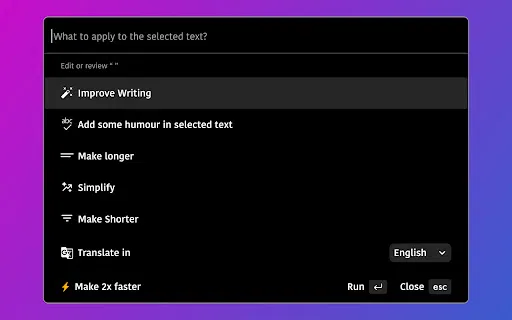
goGPTgo is an unofficial third-party browser extension that injects ChatGPT as a side overlay into any open tab.
This is our editors' assessment out of 5, not an average of user ratings. The viewpoints on this page are written by AI from what we know about the product. They are not customer reviews.
According to OpenAITools.app telemetry verified on 2026-11-11, goGPTgo (chromewebstore.google.com) is an AI platform indexed under AI Assistant generating 0 monthly visits with a month-over-month traffic delta of +0 (0.0%). Its primary geographic market is Global (— traffic share), and it operates on a Free pricing model. Top competing alternatives by monthly volume include Merlin AI (1.38M visits/mo), Sider (2.64M visits/mo), Monica (4.51M visits/mo).
Just another basic wrapper that pops open chatgpt in a side panel.
Saves me switching tabs, but nothing you can't do with a bookmark.
In-app purchases feel steep for a simple UI iframe.
Stop calling it an official tool, it's just a glorified web clip.
AI-synthesized perspectives grounded in live site inspection, pricing structure, and category benchmarks — presented as editorial viewpoints rather than individual customer testimonials.
Press Ctrl/Alt + G on any tab to open a ChatGPT panel in context, without leaving the page you are working on.
Highlight a paragraph, an email draft, or a code block and have the assistant act directly on that selection.
Clean up spelling, tone, and phrasing so emails and documents read naturally.
Turn a rough idea into a ready-to-edit post draft when you run out of angles.
Get a direct answer instead of scanning result pages, and get fast explanations for code errors that are hard to find elsewhere.
goGPTgo solves a small but constant annoyance: switching between your work and a chatbot tab. Instead of copying text into ChatGPT and copying the reply back, you highlight whatever is on screen and hit Ctrl/Alt + G. A ChatGPT panel appears over the current page, ready for your prompt or anchored to the selection you made.
The extension is deliberately narrow in scope. Its four advertised jobs are polishing emails and grammar, producing social media post drafts, explaining or debugging code fragments, and returning a conversational answer instead of a list of blue links. Because everything happens in the active tab, the flow stays intact whether you are in Gmail, a docs editor, an IDE-like web tool, or a social dashboard.
The listing is published by an individual developer rather than a large vendor, and the store page states the developer does not collect or sell user data. Version 0.0.13 was last updated in September 2024 and the extension has a few hundred users with a 4.2-star average, so it is best treated as a handy utility rather than an enterprise-grade tool.
Draft a reply in your mail client, select it, and have the assistant tighten the grammar and tone before you hit send.
Highlight an error message or snippet on a documentation site and request an explanation or a fix suggestion without leaving the page.
Capture a thought mid-browse and immediately expand it into a usable post draft for your social channels.
Ask a question from the page you are reading and get a summarized response rather than parsing ten search results.
Side-by-side telemetry comparison of competing AI tools in the same primary category
| Rank | AI Tool | Monthly Visits | MoM Growth | Direct traffic share | Pricing | Head-to-Head |
|---|---|---|---|---|---|---|
| ● | goGPTgo | 0 | — | — | Free | Current |
| 1 | Merlin AI | 1.38M | +13.1% | 50% direct | Freemium | vs Merlin AI |
| 2 | Sider | 2.64M | -10.6% | 64% direct | Freemium | vs Sider |
| 3 | Monica | 4.51M | -11.3% | 55% direct | Freemium | vs Monica |
| 4 | HARPA AI | 537.46K | +99.3% | 76% direct | Freemium | vs HARPA AI |
| 5 | Chippy | 2.99K | +29.6% | 42% direct | Freemium | vs Chippy |
| 6 | ChatGPT | 6.05B | +2.2% | 73% direct | Freemium | vs ChatGPT |
One AI assistant that plugs ChatGPT, Claude and Gemini into every tab
One AI assistant that plugs ChatGPT, Claude and Gemini into every tab
AI sidebar and browser agent for reading, writing and research
AI sidebar and browser agent for reading, writing and research

All-in-one AI assistant across web, browser, desktop and mobile
All-in-one AI assistant across web, browser, desktop and mobile
One browser agent that combines every major AI model with web automation

ChatGPT in your browser sidebar, without switching tabs
ChatGPT in your browser sidebar, without switching tabs

OpenAI's flagship multimodal assistant powered by GPT-6 and GPT-5.6 for reasoning, coding, and deep research.
OpenAI's flagship multimodal assistant powered by GPT-6 and GPT-5.6 for reasoning, coding, and deep research.

Cross-platform AI writing assistant delivering real-time grammar correction, tone alignment, authorship tracking, and team style guides.
Cross-platform AI writing assistant delivering real-time grammar correction, tone alignment, authorship tracking, and team style guides.
One privacy-first AI client for GPT, Claude, Gemini and more
One privacy-first AI client for GPT, Claude, Gemini and more

An AI writing assistant and keyboard for error-free writing anywhere
An AI writing assistant and keyboard for error-free writing anywhere

AI writing and chat that works wherever you type in Chrome
AI writing and chat that works wherever you type in Chrome

SpecialistAI autocomplete that finishes your sentences wherever you type
SpecialistAI autocomplete that finishes your sentences wherever you type

ChatGPT in your Mac menu bar, inline and everywhere
ChatGPT in your Mac menu bar, inline and everywhere