01
537.5K/mo
One browser agent that combines every major AI model with web automation
AI AgentEditorial score: 4.6Freemium+99.3%

Drag any text on a page and ask ChatGPT about it instantly
This is our editors' assessment out of 5, not an average of user ratings. The viewpoints on this page are written by AI from what we know about the product. They are not customer reviews.
According to OpenAITools.app telemetry verified on 2026-11-11, Drag GPT (chromewebstore.google.com) is an AI platform indexed under AI API generating 0 monthly visits with a month-over-month traffic delta of +0 (0.0%). Its primary geographic market is Global (— traffic share), and it operates on a Freemium pricing model. Top competing alternatives by monthly volume include HARPA AI (537.46K visits/mo), Chippy (2.99K visits/mo), Sider (2.64M visits/mo).
Saves so much time highlighting text and querying ChatGPT instantly with my own API key.
Handy extension.
Decent, but you need your own OpenAI credits.
Very smooth drag and drop.
AI-synthesized perspectives grounded in live site inspection, pricing structure, and category benchmarks — presented as editorial viewpoints rather than individual customer testimonials.
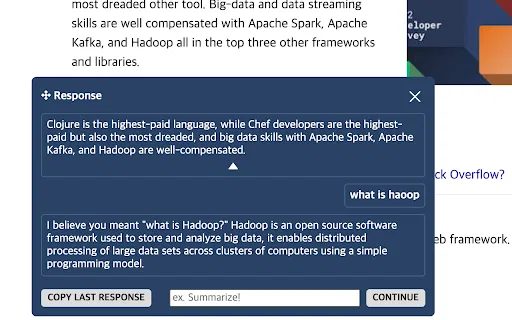
Highlight text on any webpage and a button appears; one click sends the selection to ChatGPT and shows the answer in place.
Save favorite prompts as preset slots and switch between them for different tasks, with per-slot temperature control.
Open a compact chat window from the extension popup to converse with the model without leaving your current page.
Choose between gpt-3.5-turbo, gpt-4o, gpt-4o-mini and gpt-4-turbo as the default model.
Review past conversations from the options page and switch the whole extension on or off with a single toggle.
Drag GPT is a browser extension built around a single idea: reduce the friction between reading something on the web and asking an AI about it. Instead of copying text into a separate chat window, you highlight a passage, and a small action button appears. One click forwards the selection to the Chat GPT API, which answers inline. Because the extension talks to the API directly with your own credentials, it works independently of the ChatGPT website itself.
The tool is aimed at people who read a lot online and want contextual answers without context switching. You can pre-configure a set of favorite prompts as reusable slots, each with its own temperature setting, and switch between them depending on whether you need a summary, translation, or explanation. Recent releases added model selection between gpt-3.5-turbo, gpt-4o, gpt-4o-mini and gpt-4-turbo, streaming responses for both drag chat and the quick chat popup, an on/off toggle, and the ability to review chat history from the options page.
The interface ships in four languages (English, Simplified Chinese, Japanese and Korean), and the developer states that the extension does not collect or sell user data. Its main requirement is an OpenAI API key, so actual running costs depend on your own API usage.
Drag over a dense paragraph in an article or paper and ask for a plain-language explanation without breaking your reading flow.
Select text in a foreign language or a long report and use a preset slot to get a quick summary or translation.
Highlight a sentence you are unsure about and send a preconfigured rewrite prompt to polish the wording.
Side-by-side telemetry comparison of competing AI tools in the same primary category
| Rank | AI Tool | Monthly Visits | MoM Growth | Direct traffic share | Pricing | Head-to-Head |
|---|---|---|---|---|---|---|
| ● | Drag GPT | 0 | — | — | Freemium | Current |
| 1 | HARPA AI | 537.46K | +99.3% | 76% direct | Freemium | vs HARPA AI |
| 2 | Chippy | 2.99K | +29.6% | 42% direct | Freemium | vs Chippy |
| 3 | Sider | 2.64M | -10.6% | 64% direct | Freemium | vs Sider |
| 4 | Merlin AI | 1.38M | +13.1% | 50% direct | Freemium | vs Merlin AI |
| 5 | Monica | 4.51M | -11.3% | 55% direct | Freemium | vs Monica |
| 6 | 帮我读 | GPT Reading Assistant | 0 | — | — | Free | vs 帮我读 | GPT Reading Assistant |
One browser agent that combines every major AI model with web automation

ChatGPT in your browser sidebar, without switching tabs
ChatGPT in your browser sidebar, without switching tabs
AI sidebar and browser agent for reading, writing and research
AI sidebar and browser agent for reading, writing and research
One-click AI assistant for browsing, writing and research
One-click AI assistant for browsing, writing and research

All-in-one AI assistant across web, browser, desktop and mobile
All-in-one AI assistant across web, browser, desktop and mobile

Free Chrome extension that summarizes any webpage with ChatGPT
Free Chrome extension that summarizes any webpage with ChatGPT
A free Chrome extension for one-click email drafting, text analysis, and AI-assisted browsing
A free Chrome extension for one-click email drafting, text analysis, and AI-assisted browsing

ChatGPT in your Mac menu bar, inline and everywhere
ChatGPT in your Mac menu bar, inline and everywhere
Chat with any PDF, video, or website and get cited answers in seconds

A prompt library and management layer for ChatGPT and other AI models
A prompt library and management layer for ChatGPT and other AI models
Summarize, bookmark and write with AI right in your browser
Summarize, bookmark and write with AI right in your browser

Compare GPT, Claude, and Gemini answers side by side in one chat
Compare GPT, Claude, and Gemini answers side by side in one chat