01
3.9M/mo
Build powerful forms, surveys and quizzes with AI in minutes
AI FormsEditorial score: 4.4Freemium59% direct

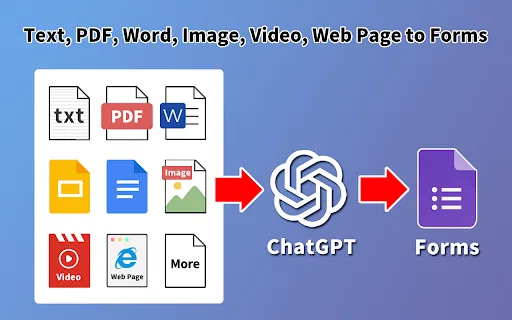
Turn prompts, documents and scanned images into ready-to-edit Google Forms
This is our editors' assessment out of 5, not an average of user ratings. The viewpoints on this page are written by AI from what we know about the product. They are not customer reviews.
According to OpenAITools.app telemetry verified on 2026-11-11, AI Google Form Builder (chromewebstore.google.com) is an AI platform indexed under AI Documents Generator generating 0 monthly visits with a month-over-month traffic delta of +0 (0.0%). Its primary geographic market is Global (— traffic share), and it operates on a Free pricing model. Top competing alternatives by monthly volume include Fillout (3.92M visits/mo), Image to Text (4.87M visits/mo), Makeform (160.69K visits/mo).
huge time saver for turning old pdfs into forms
ocr messes up formatting on messy scans
generates complete quizzes in seconds
free tier limits hit way too fast
AI-synthesized perspectives grounded in live site inspection, pricing structure, and category benchmarks — presented as editorial viewpoints rather than individual customer testimonials.
Describe the survey, quiz or exam you need and let the AI draft the full form with questions and options.
Upload a document and the AI extracts, parses and converts its content into form questions.
Scan printed or photographed material and turn the recognised text into structured form fields.
Runs alongside Google Docs, Sheets, Slides and Drive so it can read your content in place instead of asking you to export it first.
Handles true-false, multiple choice, cloze, matching and open-ended questions, including nested sub-questions.
Anyone who has typed a 30-question quiz into Google Forms by hand knows the real cost is not the thinking but the retyping. AI Google Form Builder attacks that directly. You give it a prompt, drop in a document, or feed it a scanned page, and it produces a populated Google Form with the questions, options and structure already in place. The publisher states three creation paths: AI generation from a text prompt, AI extraction and analysis of uploaded documents, and OCR scanning of PDFs and images.
The extension is designed to live where your content already is. It runs as a sidebar inside Google Docs, Google Sheets, Google Slides and Google Drive, so it can read the material on screen, identify questions and options, and import them into a new form. Supported question types include multiple choice, true/false, cloze, matching and open-ended, and it accommodates sub-questions for nested or grouped items.
The listing has a solid track record: roughly 50,000 users, a 3.2 out of 5 rating across 22 reviews, and version 1.6 updated in December 2025, with automatic updates since then. Privacy is presented as a core design point — data is said to stay within your Google account rather than being stored in the developer's database, uploads are described as deleted daily, and the developer declares compliance with GDPR and California privacy law. It is a freemium listing with a free tier; the store page does not publish the paid tier details.
Point the extension at a worksheet, slide deck or scanned handout and get a Google Form quiz with answer options ready to assign.
Turn a job description or requirements document into a structured application form with the right question types assigned.
Import a paper questionnaire as a PDF or photo and convert it into a digital form without retyping every item and option.
Generate feedback, registration or lead-capture forms quickly when you need data gathered today, not next week.
Side-by-side telemetry comparison of competing AI tools in the same primary category
| Rank | AI Tool | Monthly Visits | MoM Growth | Direct traffic share | Pricing | Head-to-Head |
|---|---|---|---|---|---|---|
| ● | AI Google Form Builder | 0 | — | — | Free | Current |
| 1 | Fillout | 3.92M | -9.7% | 59% direct | Freemium | vs Fillout |
| 2 | Image to Text | 4.87M | +0.8% | 25% direct | Freemium | vs Image to Text |
| 3 | Makeform | 160.69K | -10.8% | 37% direct | Freemium | vs Makeform |
| 4 | Image to Text Converter | 699.5K | +8.7% | 30% direct | Freemium | vs Image to Text Converter |
| 5 | FormHug | 92.12K | -4.8% | 54% direct | Freemium, Free | vs FormHug |
| 6 | Magic Form | 22.06K | -5.5% | 40% direct | Freemium | vs Magic Form |
Build powerful forms, surveys and quizzes with AI in minutes
Free online OCR that turns any image into editable text in seconds
Free online OCR that turns any image into editable text in seconds

SpecialistExtract editable text from images, scans and handwriting with OCR
SpecialistExtract editable text from images, scans and handwriting with OCR

Free AI form builder for humans and AI agents

Turn any text, PDF, video or image into a quiz in seconds
Turn any text, PDF, video or image into a quiz in seconds
Turn any PDF, doc or link into an auto-graded quiz
Turn any PDF, doc or link into an auto-graded quiz
AI document translation for PDFs, decks and books that keeps the layout
AI document translation for PDFs, decks and books that keeps the layout

Turn your own PDFs, notes and videos into editable quizzes in seconds
Turn your own PDFs, notes and videos into editable quizzes in seconds

Generate quizzes, flashcards, and graded Google Forms from a prompt or a document.
Generate quizzes, flashcards, and graded Google Forms from a prompt or a document.

Turn a prompt into finished documents, decks, and spreadsheets
Turn a prompt into finished documents, decks, and spreadsheets

Questgen is an AI quiz generator that turns text, PDFs, websites, images, videos and news topics into ready-to-use assessments in one click. It produces MCQs, true/false, fill-in-the-blanks, matching, FAQ and short-answer questions, supports Bloom's Taxonomy levels, and exports to PDF, QTI, Moodle XML, GIFT, CSV and more.
Questgen is an AI quiz generator that turns text, PDFs, websites, images, videos and news topics into ready-to-use assessments in one click. It produces MCQs, true/false, fill-in-the-blanks, matching, FAQ and short-answer questions, supports Bloom's Taxonomy levels, and exports to PDF, QTI, Moodle XML, GIFT, CSV and more.