01
222.6K/mo
SpecialistTransform any photo with text prompts using AI
Image to ImageEditorial score: 4.0Freemium59% direct

222.6K/mo
SpecialistTransform any photo with text prompts using AI
Freemium

Fix stiff poses and swap outfits with plain-language prompts
Estimated monthly website visits
Similarweb estimates for this domain, not active users. Only available observation months are shown; collection date is separate from the traffic period.
Collected Nov 11, 2026
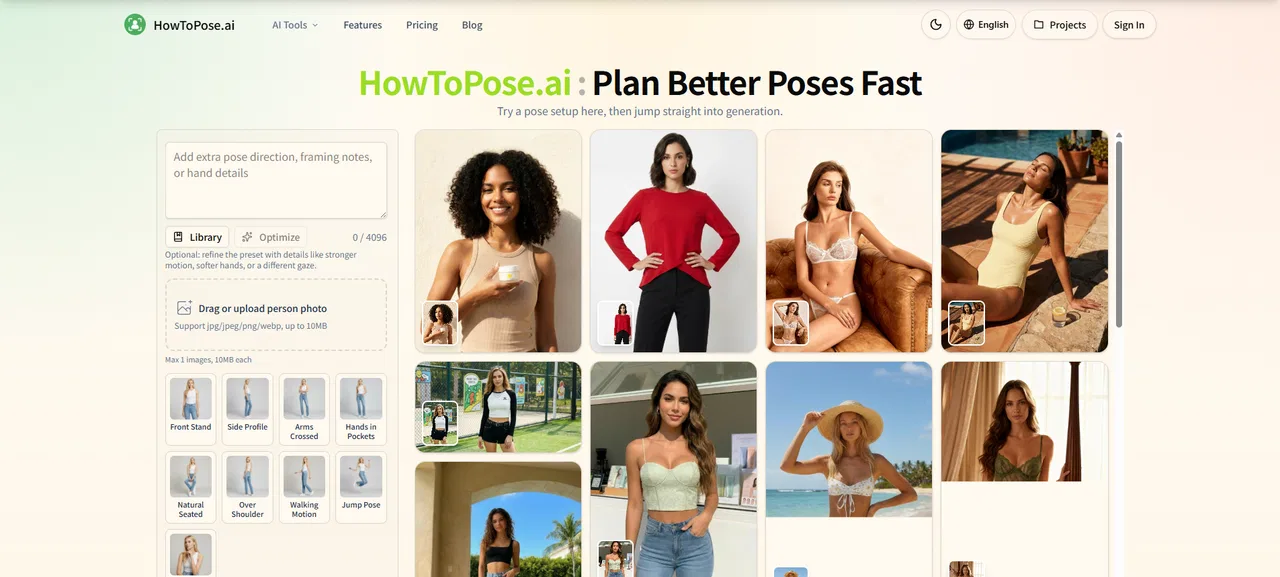
This is our editors' assessment out of 5, not an average of user ratings. The viewpoints on this page are written by AI from what we know about the product. They are not customer reviews.
According to OpenAITools.app telemetry verified on 2026-11-11, HowToPose AI (howtopose.ai) is an AI platform indexed under AI Photo Editor generating 1.19K monthly visits with a month-over-month traffic delta of -1.8K (-60.1%). Its primary geographic market is United States (100% traffic share), and it operates on a Freemium (credits, annual plans available) pricing model. Top competing alternatives by monthly volume include Image To Image AI (222.64K visits/mo), PhotoEditorAI.io (1.84M visits/mo), AiPose (100.07K visits/mo).
Fixed a super stiff portrait in two clicks.
Credits run out way too fast.
Outfit swap feature is wild.
Face got distorted on complex lighting.
AI-synthesized perspectives grounded in live site inspection, pricing structure, and category benchmarks — presented as editorial viewpoints rather than individual customer testimonials.
Type a description of the body angle, hand position, chin line or expression you want and the tool renders up to four variations while keeping the subject recognizable.
Beyond posing, the site hosts live tools for clothing swaps, image editing, outpainting, sketch conversion, upscaling and watermark removal.
Swap clothing ideas on the same source photo so portraits, store visuals and campaign drafts can shift style without losing the person or the scene.
Extend a source image into wider or taller compositions and push low-resolution drafts toward cleaner exports for decks, ads and production handoff.
You can upload up to two reference assets and enter prompts up to 20,000 characters, with 2K exports and an account area for credits, projects and history.
HowToPose AI is built around a simple idea: when a photo is almost right but the pose feels stiff, you should be able to fix it without organizing a reshoot. Instead of manually morphing a subject, you type a description — for example, a confident editorial pose with relaxed shoulders and natural hands — and the model regenerates the image with that pose applied, keeping the same person, outfit and general scene.
The homepage works as a launcher for eight live tools. Alongside the pose generator you get an AI Clothes Changer, an AI Image Editor, an AI Image Extender for outpainting into wider or taller frames, a free text-to-image generator, a photo-to-sketch converter, an image upscaler and a watermark remover. The pitch is that these live in one workspace, so you can move from pose planning to cleanup to export without juggling separate tabs.
The workflow itself is four steps: start from a photo or a prompt, adjust pose, styling or scene direction, generate a few practical variations, then export, upscale or keep editing. It supports video as well as still images, with prompts for designing dynamic actions, and it targets creators, e-commerce sellers and teams producing lookbooks, product visuals, social posts and internal drafts. The interface is available across nine homepage languages, and an account area tracks credits, projects and history.
Rescue an otherwise good shot by changing the body angle, hand placement or chin line, and compare crops before committing to a final render.
Test multiple wardrobe directions from one source photo for lookbooks, product pages and campaign drafts without booking a new shoot.
Extend one strong image into square, vertical and wide layouts for landing pages, ads, decks and thumbnails, then upscale for clean export.
Generate pose and action references quickly so the shoot day is planned in advance and the client signs off on the direction early.
Side-by-side telemetry comparison of competing AI tools in the same primary category
| Rank | AI Tool | Monthly Visits | MoM Growth | Direct traffic share | Pricing | Head-to-Head |
|---|---|---|---|---|---|---|
| ● | HowToPose AI | 1.19K | -60.1% | 33% direct | Freemium (credits, annual plans available) | Current |
| 1 | Image To Image AI | 222.64K | -9.8% | 59% direct | Freemium | vs Image To Image AI |
| 2 | PhotoEditorAI.io | 1.84M | +16.7% | 65% direct | Freemium, Contact for Pricing | vs PhotoEditorAI.io |
| 3 | AiPose | 100.07K | -19.2% | 76% direct | Freemium | vs AiPose |
| 4 | Artsmart.ai | 30.78K | -10.1% | 39% direct | Paid | vs Artsmart.ai |
| 5 | Clipdrop | 456.72K | -16% | 46% direct | Freemium, Contact for Pricing | vs Clipdrop |
| 6 | Change Clothes AI | 5.75K | -34.1% | 39% direct | Freemium, Free Trial | vs Change Clothes AI |
SpecialistTransform any photo with text prompts using AI
SpecialistTransform any photo with text prompts using AI
Edit, transform, and enhance photos with simple text prompts in your browser.
Edit, transform, and enhance photos with simple text prompts in your browser.

SpecialistAll-in-one AI studio for image generation, video creation and photo editing
SpecialistAll-in-one AI studio for image generation, video creation and photo editing

SpecialistBeginner-friendly AI art generator with pose control
SpecialistBeginner-friendly AI art generator with pose control
AI photo editing suite for background removal, cleanup, upscaling and image generation
AI photo editing suite for background removal, cleanup, upscaling and image generation

SpecialistSwap outfits on your photos with AI in seconds
SpecialistSwap outfits on your photos with AI in seconds

SpecialistAI image generation and editing, all in one browser tab
SpecialistAI image generation and editing, all in one browser tab
SpecialistDescribe the change — AI makes it real in your photos
SpecialistDescribe the change — AI makes it real in your photos
Free browser photo editor for background removal, upscaling and object erasing
Free browser photo editor for background removal, upscaling and object erasing

Free AI photo editor for background removal, object erasing, and enhancement
Free AI photo editor for background removal, object erasing, and enhancement

Edit, enhance and generate photos right in your browser
Edit, enhance and generate photos right in your browser

SpecialistAI photo upscaler that enlarges, unblurs and cleans images in your browser
SpecialistAI photo upscaler that enlarges, unblurs and cleans images in your browser


