01
6.3K/mo
Chrome extension that drafts on-brand social comments in one click
AI Social Media Post GeneratorEditorial score: 3.9Free Trial40% direct

6.3K/mo
Chrome extension that drafts on-brand social comments in one click
Free Trial

Draft context-aware LinkedIn comments with one click using your own OpenAI key

This is our editors' assessment out of 5, not an average of user ratings. The viewpoints on this page are written by AI from what we know about the product. They are not customer reviews.
According to OpenAITools.app telemetry verified on 2026-11-11, LinkedIn AI Comment Assistant (chromewebstore.google.com) is an AI platform indexed under AI Social Media Post Generator generating 0 monthly visits with a month-over-month traffic delta of +0 (0.0%). Its primary geographic market is Global (— traffic share), and it operates on a Free (Bring Your Own OpenAI API Key) pricing model. Top competing alternatives by monthly volume include Comment Generator (6.3K visits/mo), Engage AI (35.61K visits/mo), Content Swarm (0 visits/mo).
Brings your own key and just works directly in the comment box.
Clean open source extension with zero tracking nonsense.
Setup takes a couple of minutes to grab an OpenAI key.
Handy.
AI-synthesized perspectives grounded in live site inspection, pricing structure, and category benchmarks — presented as editorial viewpoints rather than individual customer testimonials.
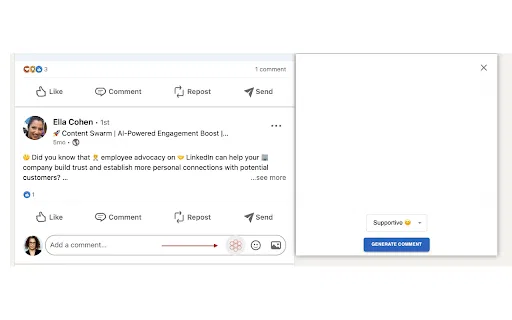
A Generate AI Comment button appears in the LinkedIn comment area and produces a suggested reply without leaving the page.
The extension reads the post content and the existing comment thread, so drafts respond to the conversation rather than to a generic prompt.
Drafts are presented in the comment box for review, so you can adjust wording, tone and language before publishing.
You enter your own OpenAI key in the popup. There is no shared account, and billing runs through your OpenAI plan.
The developer declares no data selling or unrelated data transfer, and the source is released under the permissive MIT license.
LinkedIn AI Comment Assistant is a small browser extension aimed at people who want to stay active in LinkedIn conversations without staring at an empty comment box. It was published on the Chrome Web Store by independent developer Manuel Fuss (manuel-fuss.de) and is distributed under the MIT license. The concept is deliberately narrow: rather than being a full social media suite, it adds a single "Generate AI Comment" button inside LinkedIn's comment area.
When you click it, the extension collects the context of the post you are viewing along with the comments already present, sends that text to the OpenAI API using an API key you paste into the extension popup, and displays a suggested comment. You can edit the suggestion before posting, so the final wording stays under your control. Because you bring your own key, usage is billed by OpenAI directly rather than by the extension author.
Setup is three steps: install from the Chrome Web Store, open the extension popup and save your OpenAI API key, then reload any open LinkedIn tab. The developer explicitly frames the extension as a testing and experimentation tool and warns against flooding LinkedIn with AI-generated content, so it is best treated as a drafting accelerator rather than a fully automated posting bot.
Generate a first draft for each post you want to weigh in on, then personalise it, so you can comment on more conversations in the same amount of time.
Use AI drafts as a starting point for scheduled engagement blocks, keeping a human edit pass before anything goes live.
Draft relevant comments on posts from target accounts and rework them into a natural, non-salesy reply.
Get a fluent starting point for comments in a second language, then fine-tune it with your own voice before posting.
Side-by-side telemetry comparison of competing AI tools in the same primary category
| Rank | AI Tool | Monthly Visits | MoM Growth | Direct traffic share | Pricing | Head-to-Head |
|---|---|---|---|---|---|---|
| ● | LinkedIn AI Comment Assistant | 0 | — | — | Free (Bring Your Own OpenAI API Key) | Current |
| 1 | Comment Generator | 6.3K | -17.1% | 40% direct | Free Trial | vs Comment Generator |
| 2 | Engage AI | 35.61K | -26.3% | 50% direct | Freemium | vs Engage AI |
| 3 | Content Swarm | 0 | — | — | Freemium | vs Content Swarm |
| 4 | Commenter.ai | 12.55K | +116.9% | 39% direct | Free Trial, Paid | vs Commenter.ai |
| 5 | Social Comments GPT | 0 | — | — | Free | vs Social Comments GPT |
| 6 | RplyAI | 0 | — | — | Free Trial | vs RplyAI |
Chrome extension that drafts on-brand social comments in one click
Chrome extension that drafts on-brand social comments in one click

Turn LinkedIn comments into a structured growth engine
Turn LinkedIn comments into a structured growth engine

AI-generated LinkedIn comments that grow your visibility
AI-generated LinkedIn comments that grow your visibility

Thoughtful LinkedIn comments, drafted in your voice in seconds
Thoughtful LinkedIn comments, drafted in your voice in seconds

Draft engaging social media comments in seconds with ChatGPT
Draft engaging social media comments in seconds with ChatGPT

AI-drafted comments that make your LinkedIn replies sound like you

Context-aware LinkedIn comments in one click
Context-aware LinkedIn comments in one click

AI-written LinkedIn comments, replies, and DMs in one click
AI-written LinkedIn comments, replies, and DMs in one click

Generate on-point LinkedIn comments in one click with ChatGPT and Gemini
Generate on-point LinkedIn comments in one click with ChatGPT and Gemini

Grow on LinkedIn with AI posts written in your own voice.
Grow on LinkedIn with AI posts written in your own voice.

Turn LinkedIn engagement into qualified leads with AI-written comments and DMs
Turn LinkedIn engagement into qualified leads with AI-written comments and DMs

Engineer the first hour of your LinkedIn post with real engagement
Engineer the first hour of your LinkedIn post with real engagement