01
6.3K/mo
Chrome extension that drafts on-brand social comments in one click
AI Social Media Post GeneratorEditorial score: 3.9Free Trial40% direct

6.3K/mo
Chrome extension that drafts on-brand social comments in one click
Free Trial

AI LinkedIn comment generator with tunable tones and a style that learns yours

This is our editors' assessment out of 5, not an average of user ratings. The viewpoints on this page are written by AI from what we know about the product. They are not customer reviews.
According to OpenAITools.app telemetry verified on 2026-11-11, LinkGenie AI (chromewebstore.google.com) is an AI platform indexed under AI Reply generating 0 monthly visits with a month-over-month traffic delta of +0 (0.0%). Its primary geographic market is Global (— traffic share), and it operates on a Free Trial pricing model. Top competing alternatives by monthly volume include Comment Generator (6.3K visits/mo), Commenter.ai (12.55K visits/mo), Engage AI (35.61K visits/mo).
comments sound natural and save me hours of scrolling.
tone presets actually match my voice.
requires your own api key which is annoying.
great for quick network engagement.
AI-synthesized perspectives grounded in live site inspection, pricing structure, and category benchmarks — presented as editorial viewpoints rather than individual customer testimonials.
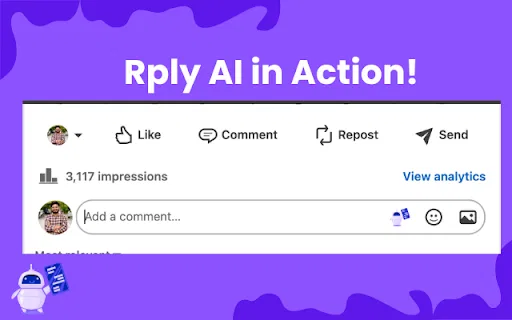
A button appears inside the LinkedIn comment field so you can draft a reply from the post itself without switching tabs or tools.
Choose friendly, funny, congratulatory, disagreeing, questioning, grateful, or value-adding phrasing to set how assertive or warm a comment reads.
Feed the generator samples of your writing so new comments match your own conversational habits instead of a default AI register.
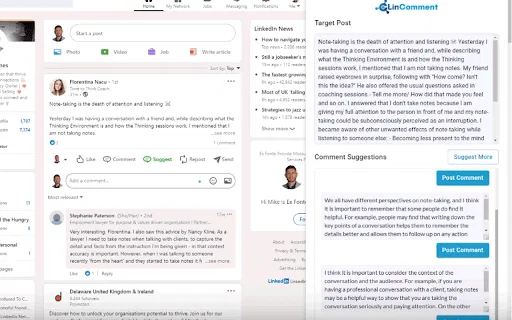
The extension reads the visible post text and tailors the suggestion to that specific topic, angle, or announcement.
You connect your own OpenAI API key, so model usage is billed by OpenAI directly and you keep control of the credential.
LinkGenie AI tackles a very specific bottleneck: the time and mental energy it takes to write thoughtful LinkedIn comments at any kind of volume. The extension inserts a generation button directly into the LinkedIn comment area, so you never leave the feed to open a separate AI chat window. Once clicked, it reads the surrounding post text and returns comment drafts that reference what the author actually said rather than producing a generic platitude.
Customization is the core of the product. You can pick from preset tones such as friendly, funny, congratulatory, disagreeing, questioning, grateful, or value-adding, which steers the phrasing without extra prompting. Longer term, you can train the generator on samples of your own writing so its voice drifts closer to your natural style, which matters for anyone whose comments are read as part of a professional brand.
Setup follows an unusual bring-your-own-key pattern. You install the extension from the Chrome Web Store, sign up on the vendor's site to start a free trial, and receive a LinkGenie API key by email. Then you paste that key plus your own OpenAI API key into the extension settings, because the actual language generation is billed by OpenAI directly to your account. That keeps the subscription cheap but means you juggle two credentials and your OpenAI usage costs separately.
Keep a steady commenting habit on posts from prospects and peers while still sounding like yourself, so your profile stays active during busy delivery weeks.
Draft first-pass comments for several executive accounts in a fraction of the time, then edit the tone per person before anything goes live.
Comment thoughtfully on posts in your target industry to get on hiring managers' radar, without staring at a blank comment box for ten minutes.
Leave relevant comments on a prospect's recent posts first, so your follow-up message lands on someone who already recognizes your name.
Side-by-side telemetry comparison of competing AI tools in the same primary category
| Rank | AI Tool | Monthly Visits | MoM Growth | Direct traffic share | Pricing | Head-to-Head |
|---|---|---|---|---|---|---|
| ● | LinkGenie AI | 0 | — | — | Free Trial | Current |
| 1 | Comment Generator | 6.3K | -17.1% | 40% direct | Free Trial | vs Comment Generator |
| 2 | Commenter.ai | 12.55K | +116.9% | 39% direct | Free Trial, Paid | vs Commenter.ai |
| 3 | Engage AI | 35.61K | -26.3% | 50% direct | Freemium | vs Engage AI |
| 4 | RplyAI | 0 | — | — | Free Trial | vs RplyAI |
| 5 | LinComment V2 | 0 | — | — | Free Trial | vs LinComment V2 |
| 6 | HyperClapper | 80.46K | -23.5% | 20% direct | Freemium, Free Trial | vs HyperClapper |
Chrome extension that drafts on-brand social comments in one click
Chrome extension that drafts on-brand social comments in one click

SpecialistThoughtful LinkedIn comments, drafted in your voice in seconds
SpecialistThoughtful LinkedIn comments, drafted in your voice in seconds

Turn LinkedIn comments into a structured growth engine
Turn LinkedIn comments into a structured growth engine

SpecialistAI-drafted comments that make your LinkedIn replies sound like you

AI comment suggestions for LinkedIn that sound authentically like you
AI comment suggestions for LinkedIn that sound authentically like you

Engineer the first hour of your LinkedIn post with real engagement
Engineer the first hour of your LinkedIn post with real engagement

SpecialistFree Chrome extension that drafts LinkedIn replies with AI
SpecialistFree Chrome extension that drafts LinkedIn replies with AI

AI reply drafting for LinkedIn and social comments — you keep the final edit
AI reply drafting for LinkedIn and social comments — you keep the final edit

AI Copilot for Smarter LinkedIn Comments, Posts and Replies
AI Copilot for Smarter LinkedIn Comments, Posts and Replies
SpecialistAI social media agent that writes and posts comments in your voice

Context-aware LinkedIn comments in one click
Context-aware LinkedIn comments in one click

One-click AI comments and TL;DR summaries for LinkedIn posts
One-click AI comments and TL;DR summaries for LinkedIn posts