01
30K/mo
Free ChatGPT-style text-to-speech and speech-to-text in your browser
AI Text-to-SpeechEditorial score: 4.0Free76% direct

30K/mo
Free ChatGPT-style text-to-speech and speech-to-text in your browser
Free

Dictate and listen to your Gmail with voice and text-to-speech
This is our editors' assessment out of 5, not an average of user ratings. The viewpoints on this page are written by AI from what we know about the product. They are not customer reviews.
According to OpenAITools.app telemetry verified on 2026-11-11, Mail Reader for Gmail (chromewebstore.google.com) is an AI platform indexed under AI Email Assistant generating 0 monthly visits with a month-over-month traffic delta of +0 (0.0%). Its primary geographic market is Global (— traffic share), and it operates on a Free pricing model. Top competing alternatives by monthly volume include GPT Reader & Transcriber (30K visits/mo), Speechify (5.46M visits/mo), CastReader (56K visits/mo).
Having incoming threads read aloud while I do other work is a huge time saver.
Voice dictation misses words if you speak too fast.
Audio playback cuts out randomly on long threads.
Decent accessibility tool.
AI-synthesized perspectives grounded in live site inspection, pricing structure, and category benchmarks — presented as editorial viewpoints rather than individual customer testimonials.
Enable dictation in the pop-up, open a new message, and speak your reply — your words are converted to text directly in the email.
Play any email aloud with a narrator's voice by right-clicking selected text or clicking the speaker icon next to a message.
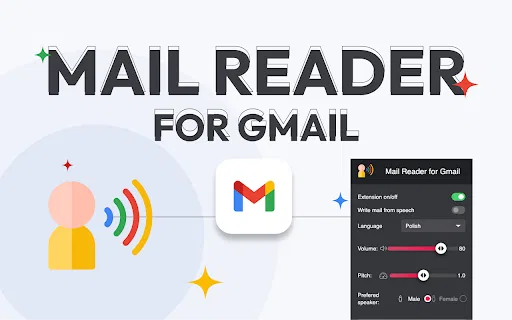
Choose between a male or female narrator and fine-tune the volume from an easy pop-up menu.
Reading buttons are placed next to archive controls in the header and inbox list, so you can listen without leaving your workflow.
Voice input and spoken output make email easier to use for people who rely on assistive reading or hands-free control.
Mail Reader for Gmail sits directly inside Gmail and adds two voice-first features. The dictation feature converts your speech into text inside a new message, which is useful when you would rather talk than type. The reading feature uses text-to-speech to play emails out loud, either by selecting text and choosing "Read selected" from the right-click menu, or by clicking the speaker icon that appears next to each message.
Control is handled from a compact pop-up styled like a subtitle reader. From there you can adjust the narrator's volume and switch between a male or female voice to match your preference. The extension is intentionally small and focused, so it loads quickly and does not interfere with the normal Gmail interface.
Because it supports voice input and spoken output, it is especially helpful for people with visual or motor accessibility needs, for users who prefer listening while multitasking, and for anyone who wants to speed through a busy inbox. It is offered by a third-party developer and is not an official Google product.
Have incoming messages and long threads read aloud so you can follow your inbox without relying on a screen reader setup.
Draft and send replies by speaking them, which is faster than typing during commutes or between meetings.
Play emails aloud in a natural voice while you handle other tasks, keeping up with correspondence without staying glued to the screen.
Side-by-side telemetry comparison of competing AI tools in the same primary category
| Rank | AI Tool | Monthly Visits | MoM Growth | Direct traffic share | Pricing | Head-to-Head |
|---|---|---|---|---|---|---|
| ● | Mail Reader for Gmail | 0 | — | — | Free | Current |
| 1 | GPT Reader & Transcriber | 30K | -16% | 76% direct | Free | vs GPT Reader & Transcriber |
| 2 | Speechify | 5.46M | +0.5% | 52% direct | Freemium | vs Speechify |
| 3 | CastReader | 56K | +9.8% | 35% direct | Freemium | vs CastReader |
| 4 | Auto Gmail: ChatGPT for email | 4.89K | +14.9% | 39% direct | Paid | vs Auto Gmail: ChatGPT for email |
| 5 | Mailyr | 852 | -68.1% | 35% direct | Freemium | vs Mailyr |
| 6 | Smart Assistant by Mailbutler | 47.2K | -8.7% | 39% direct | Freemium, Free Trial, Paid | vs Smart Assistant by Mailbutler |
Free ChatGPT-style text-to-speech and speech-to-text in your browser
Free ChatGPT-style text-to-speech and speech-to-text in your browser
Text to speech and voice AI across every device
Text to speech and voice AI across every device

Read aloud webpages, PDFs, Kindle books and AI answers with synced highlighting
Read aloud webpages, PDFs, Kindle books and AI answers with synced highlighting

An AI drafting layer that writes most of your Gmail replies before you open them.
An AI drafting layer that writes most of your Gmail replies before you open them.
AI email writing inside Gmail, without leaving your inbox.
AI email writing inside Gmail, without leaving your inbox.

An AI email assistant that drafts, summarizes, and perfects your messages in place
An AI email assistant that drafts, summarizes, and perfects your messages in place

Free GPT-powered Chrome extension that drafts Gmail replies in seconds
Free GPT-powered Chrome extension that drafts Gmail replies in seconds
Reader mode, text-to-speech and AI summaries for any web page
Reader mode, text-to-speech and AI summaries for any web page

Turn any webpage, PDF, Doc or ebook into natural-sounding speech in 60+ languages
Turn any webpage, PDF, Doc or ebook into natural-sounding speech in 60+ languages

AI email drafting that writes in your own voice, inside Gmail and Outlook
AI email drafting that writes in your own voice, inside Gmail and Outlook
Draft and reply to email 10x faster inside Gmail and Outlook
Draft and reply to email 10x faster inside Gmail and Outlook

Write Gmail replies by speaking a short instruction
Write Gmail replies by speaking a short instruction