01
255.4K/mo
AI writing assistant with autocomplete, research, and a Chrome extension
AI Writing AssistantsEditorial score: 3.9Freemium+34.4%

255.4K/mo+34.4%
AI writing assistant with autocomplete, research, and a Chrome extension
Freemium

Generate WhatsApp replies and rewrite your text with keyboard shortcuts
This is our editors' assessment out of 5, not an average of user ratings. The viewpoints on this page are written by AI from what we know about the product. They are not customer reviews.
According to OpenAITools.app telemetry verified on 2026-11-11, Messaging Assistant 🚀 (chromewebstore.google.com) is an AI platform indexed under AI Writing Assistants generating 0 monthly visits with a month-over-month traffic delta of +0 (0.0%). Its primary geographic market is Global (— traffic share), and it operates on a Free pricing model. Top competing alternatives by monthly volume include HyperWrite (255.43K visits/mo), WAPlus (98.4K visits/mo), ParagraphAI (23.27K visits/mo).
Super fast WhatsApp reply generator.
The text rewriting shortcut is great.
Needs more customization options.
Handy little tool.
AI-synthesized perspectives grounded in live site inspection, pricing structure, and category benchmarks — presented as editorial viewpoints rather than individual customer testimonials.
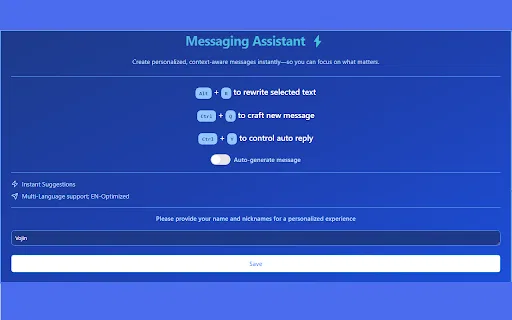
Press Ctrl+Q inside a WhatsApp Web conversation to have an AI-drafted reply appear, ready to send or edit.
Turn on auto-generation in the extension settings if you want replies suggested without pressing the shortcut each time.
Highlight any text and press Alt+R, or right-click and choose 'Rewrite Selected Text', to get a clearer, more concise version.
The developer states the extension has no server of its own and communicates straight with the OpenAI API, with no data stored or read.
Two shortcuts and one context-menu item cover the whole feature set, so there is no interface to learn.
Messaging Assistant 🚀 keeps its feature list short and practical. The first function is reply generation for WhatsApp: place your cursor in a conversation, press Ctrl+Q, and the extension proposes a message you can send or edit. If you would rather not trigger it manually every time, the settings include an auto-generation toggle. The second function is rewriting: select any text on a page, press Alt+R or use the right-click menu item, and the selection is rephrased to sound better and shorter.
Architecturally it is unusually simple, and the developer is open about it. According to the listing, the extension stores and reads none of your data and has no backend at all — it talks directly to the OpenAI API. That removes a middle server from the picture, though it does mean the extension needs your own API access or a key configured in its settings to function, and it also means the quality of the output depends on the model you point it at. The listing notes the prompts are optimized for English but will still work for other languages.
The extension is published by Growing Pies, last updated in December 2024, is free to install, and had a very small install base at the time of review. Treat it as a handy utility rather than a supported commercial product: there are no ratings yet, so there is little independent feedback to go on.
Generate a suitable reply in seconds when several WhatsApp conversations are waiting and you do not want to type each one out.
Get a reasonable draft reply for incoming WhatsApp messages and then adjust the details before sending.
Select a message you wrote in your own words and have it rewritten so the phrasing is cleaner and more concise.
The rewrite shortcut is not tied to WhatsApp — use it on emails, forms and web comments where shorter, clearer wording helps.
Side-by-side telemetry comparison of competing AI tools in the same primary category
| Rank | AI Tool | Monthly Visits | MoM Growth | Direct traffic share | Pricing | Head-to-Head |
|---|---|---|---|---|---|---|
| ● | Messaging Assistant 🚀 | 0 | — | — | Free | Current |
| 1 | HyperWrite | 255.43K | +34.4% | 42% direct | Freemium | vs HyperWrite |
| 2 | WAPlus | 98.4K | +1.4% | 37% direct | Freemium | vs WAPlus |
| 3 | ParagraphAI | 23.27K | -34.6% | 54% direct | Freemium | vs ParagraphAI |
| 4 | Grammarly | 58.87M | -1.5% | 43% direct | Freemium | vs Grammarly |
| 5 | Tweeteasy | 4.35K | +23% | 39% direct | Freemium | vs Tweeteasy |
| 6 | Compose AI | 34.9K | -48.1% | 73% direct | Freemium, Free Trial, Contact for Pricing | vs Compose AI |
AI writing assistant with autocomplete, research, and a Chrome extension
AI writing assistant with autocomplete, research, and a Chrome extension
Turn WhatsApp Web into a CRM with automation, translation, and AI

An AI writing assistant and keyboard for error-free writing anywhere
An AI writing assistant and keyboard for error-free writing anywhere

Cross-platform AI writing assistant delivering real-time grammar correction, tone alignment, authorship tracking, and team style guides.
Cross-platform AI writing assistant delivering real-time grammar correction, tone alignment, authorship tracking, and team style guides.

AI-powered replies, tweet ideas and rewrites for X (Twitter) right from your browser
AI-powered replies, tweet ideas and rewrites for X (Twitter) right from your browser

SpecialistAI autocomplete that finishes your sentences wherever you type
SpecialistAI autocomplete that finishes your sentences wherever you type
Paraphrase, proofread and summarize text with an AI writing workspace
Paraphrase, proofread and summarize text with an AI writing workspace

Turn a few key points into polished, on-tone emails
Turn a few key points into polished, on-tone emails

Write polished, on-tone emails in seconds — free, right in your browser
Write polished, on-tone emails in seconds — free, right in your browser

AI-powered iPhone keyboard that writes your replies for you
AI-powered iPhone keyboard that writes your replies for you

An AI email assistant that drafts, summarizes, and perfects your messages in place
An AI email assistant that drafts, summarizes, and perfects your messages in place

AI grammar, spelling and style checker for 30+ languages
AI grammar, spelling and style checker for 30+ languages