01
2.6M/mo
AI sidebar and browser agent for reading, writing and research
AI AssistantEditorial score: 4.5Freemium64% direct

2.6M/mo
AI sidebar and browser agent for reading, writing and research
Freemium

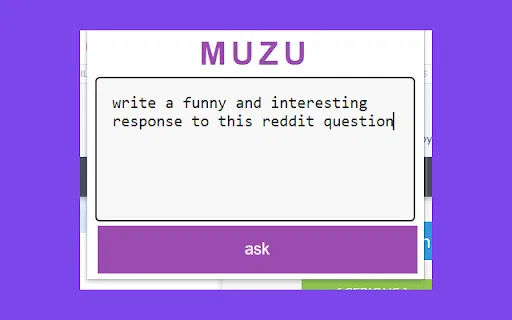
Highlight text in your browser and ask MUZU anything
This is our editors' assessment out of 5, not an average of user ratings. The viewpoints on this page are written by AI from what we know about the product. They are not customer reviews.
According to OpenAITools.app telemetry verified on 2026-11-11, MUZU (chromewebstore.google.com) is an AI platform indexed under AI Assistant generating 0 monthly visits with a month-over-month traffic delta of +0 (0.0%). Its primary geographic market is Global (— traffic share), and it operates on a Free pricing model. Top competing alternatives by monthly volume include Sider (2.64M visits/mo), HARPA AI (537.46K visits/mo), Merlin AI (1.38M visits/mo).
Saves so much time when you just need a quick paragraph summary on a heavy page.
Occasionally drops the popup if you highlight across frames.
Clean and snappy.
Handy helper.
AI-synthesized perspectives grounded in live site inspection, pricing structure, and category benchmarks — presented as editorial viewpoints rather than individual customer testimonials.
Select any passage on a web page and ask MUZU to clarify its meaning, jargon or intent.
Condense long articles or sections into a short, readable summary without copy-pasting into another tool.
Get suggestions on how to respond to an email or message directly from the text you highlighted.
MUZU lives in the toolbar and answers inline, so you do not switch tabs or lose your place.
The extension handles your selected text and, per its listing, does not sell your data to third parties.
MUZU is a browser assistant built around a single, focused interaction: highlight first, ask second. Rather than opening a separate chat window and pasting content, you select the text you care about on a page, click the MUZU icon, and type a natural-language question. It can explain what something means, summarize it in a couple of sentences, offer advice, or suggest how you might reply to a message.
That narrow scope is precisely the point. MUZU is designed for the moment you are reading an article, an email or a document and want an instant interpretation without leaving the page. It is published by Sheet Gurus and links back to askmuzu.com, and the Chrome Web Store listing describes it as free to install.
The trade-off is that MUZU is a small, early utility: the listing shows version 22.12.22, updated in December 2022, with a modest number of users. It is best treated as a simple, no-cost companion for quick comprehension help rather than a full-featured AI workspace.
Highlight a dense paragraph and have MUZU restate it in plain language, which helps when reading in a second language.
Select a long section and get a two-sentence summary to decide whether it is worth a full read.
Highlight an email or message and ask MUZU how you might respond, then adapt the suggestion in your own words.
Side-by-side telemetry comparison of competing AI tools in the same primary category
| Rank | AI Tool | Monthly Visits | MoM Growth | Direct traffic share | Pricing | Head-to-Head |
|---|---|---|---|---|---|---|
| ● | MUZU | 0 | — | — | Free | Current |
| 1 | Sider | 2.64M | -10.6% | 64% direct | Freemium | vs Sider |
| 2 | HARPA AI | 537.46K | +99.3% | 76% direct | Freemium | vs HARPA AI |
| 3 | Merlin AI | 1.38M | +13.1% | 50% direct | Freemium | vs Merlin AI |
| 4 | SigmaOS Airis (Alpha) | 90.91K | +9.2% | 21% direct | Freemium | vs SigmaOS Airis (Alpha) |
| 5 | ExplainThis | 1.46K | -54% | 29% direct | Free | vs ExplainThis |
| 6 | Kome AI | 174.91K | -6.5% | 30% direct | Freemium | vs Kome AI |
AI sidebar and browser agent for reading, writing and research
AI sidebar and browser agent for reading, writing and research
One browser agent that combines every major AI model with web automation
One-click AI assistant for browsing, writing and research
One-click AI assistant for browsing, writing and research

A Mac browser built for focus, with an AI companion called Airis
A Mac browser built for focus, with an AI companion called Airis
Summarise and explain any page or video as you browse
Summarise and explain any page or video as you browse
Summarize, bookmark and write with AI right in your browser
Summarize, bookmark and write with AI right in your browser

ChatGPT in your browser sidebar, without switching tabs
ChatGPT in your browser sidebar, without switching tabs

All-in-one AI assistant across web, browser, desktop and mobile
All-in-one AI assistant across web, browser, desktop and mobile
Highlight the web, learn in public, and build your AI clone
Highlight the web, learn in public, and build your AI clone

A low-cost AI assistant that lives in your browser tab
A low-cost AI assistant that lives in your browser tab

Free / Open-sourceSummarize YouTube, Google, and any page with AI — free in your browser
Free / Open-sourceSummarize YouTube, Google, and any page with AI — free in your browser
Your GPT-powered sidekick for every page, PDF and video
Your GPT-powered sidekick for every page, PDF and video