Turn PDFs, docs and web pages into natural-sounding audio you can listen to anywhere

Listen to PDFs, ePubs and web pages with natural on-device voices — even offline

This is our editors' assessment out of 5, not an average of user ratings. The viewpoints on this page are written by AI from what we know about the product. They are not customer reviews.
According to OpenAITools.app telemetry verified on 2026-11-11, Narrly: Read Aloud PDF & Text (apps.apple.com) is an AI platform indexed under AI Text-to-Speech generating 0 monthly visits with a month-over-month traffic delta of +0 (0.0%). Its primary geographic market is Global (— traffic share), and it operates on a Free pricing model. Top competing alternatives by monthly volume include Audeus: Text to Speech Reader (32.12K visits/mo), Peech: Text to Speech Reader (353.09K visits/mo), Readio (12.4K visits/mo).
Finally an audiobook reader that handles heavy academic PDFs without sounding like a dying robot.
Offline mode is a lifesaver on flights.
UI is buttery smooth.
More export voice options would be sweet.
AI-synthesized perspectives grounded in live site inspection, pricing structure, and category benchmarks — presented as editorial viewpoints rather than individual customer testimonials.
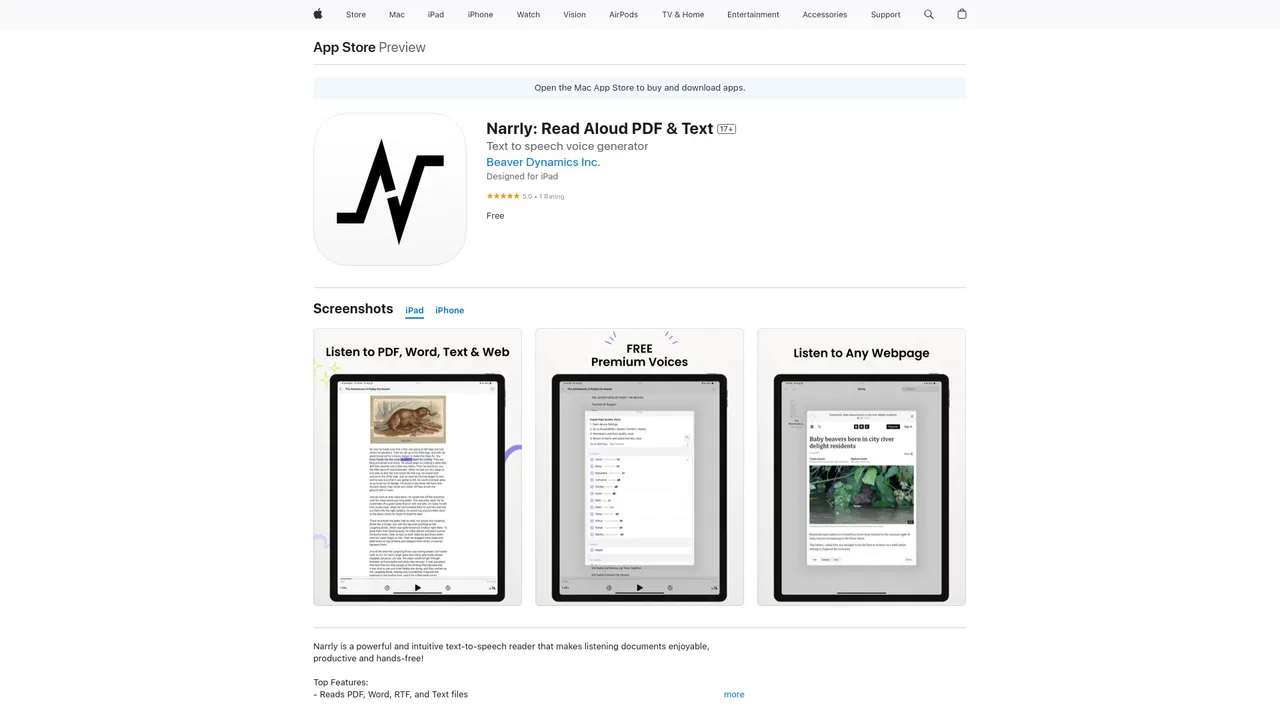
Import PDF, EPUB, Word, RTF, plain text or image files — or send a web page to Narrly — and listen to it read aloud with highlighted text following along.
Narration uses the enhanced and premium voices already available on your device, with speed controls, so playback sounds natural without sending audio to the cloud.
Listen on a plane or in a dead zone: speech synthesis happens locally, so no connection is required once the document is on your device.
Use the reading-area selector to crop out headers, footnotes and page numbers, add bookmarks anywhere, and reopen documents where you left off.
Files live in the app, in folders, or in iCloud; the developer states that no personal data is collected and documents are never uploaded.
Narrly is built for people who want to consume long documents by ear. You import a PDF, EPUB, Word file, RTF, plain text or even an image, or capture a web page, and the app reads it aloud while highlighting the text as it goes. It runs on iPhone, iPad and Mac, positions itself as a hands-free listening companion, and stores your library on the device or in iCloud rather than on a server.
Its distinguishing choice is on-device speech synthesis. Instead of shipping your text to a cloud TTS API, Narrly uses the enhanced and premium voices that Apple already provides on your device, and the developer states that no personal data is collected. That makes offline listening practical — useful on flights, commutes and remote trips — and it also lets you export a document as an audio file to keep or share.
Everyday reading controls are thoughtful: a reading-area selector that crops footnotes, headers and page numbers; bookmarks anywhere in the document; folders to organise files; progress tracking; and adjustable reading speed. Reviews on the App Store are positive (4.8 stars across 224 ratings), with users particularly praising the offline workflow, text highlighting and export options. The app is free to download with in-app purchases available, and the free tier limits how many documents you can keep loaded at once.

Convert lecture notes, papers and ePubs into audio for commutes, walks or hands-free revision sessions.
Listen to reports, briefs and long documents while commuting or between meetings, without sending files to a third-party server.
Read ePubs and web articles aloud with adjustable speed, bookmarks and progress tracking for a comfortable listening routine.
Get documents and web pages read aloud with large-text highlighting and configurable reading areas, supporting reading and focus needs.
Side-by-side telemetry comparison of competing AI tools in the same primary category
| Rank | AI Tool | Monthly Visits | MoM Growth | Direct traffic share | Pricing | Head-to-Head |
|---|---|---|---|---|---|---|
| ● | Narrly: Read Aloud PDF & Text | 0 | — | — | Free | Current |
| 1 | Audeus: Text to Speech Reader | 32.12K | -37.8% | 60% direct | Freemium, Free Trial | vs Audeus: Text to Speech Reader |
| 2 | Peech: Text to Speech Reader | 353.09K | -26% | 9% direct | Freemium | vs Peech: Text to Speech Reader |
| 3 | Readio | 12.4K | +6.7% | 40% direct | Freemium | vs Readio |
| 4 | Read Aloud Reader | 28.36K | +87.7% | 22% direct | Freemium | vs Read Aloud Reader |
| 5 | Speechify | 5.46M | +0.5% | 52% direct | Freemium | vs Speechify |
| 6 | Crikk | 212.12K | -14.5% | 34% direct | Freemium, Free Trial, Paid | vs Crikk |
Turn PDFs, docs and web pages into natural-sounding audio you can listen to anywhere
Listen to anything. Beautifully.
Listen to PDFs, ebooks, and webpages in natural AI voices with synced highlighting.

Free browser text-to-speech with natural neural voices
Text to speech and voice AI across every device

Natural AI text to speech with 910+ voices on web, iOS and Android

All-in-one AI speech, transcription, and voice cloning studio

Turn PDFs and articles into audio that explains figures and tables
Turn the books you already own into audiobooks on your iPhone, free
Free AI text to speech with 200+ voices in 70+ languages
Listen to books, PDFs and articles in lifelike AI narration
SpecialistListen to anything: articles, PDFs and newsletters as your own private podcast