01
43.4K/mo
Enhance, restore and reimagine your photos with one click
AI Photo EnhancerEditorial score: 3.8Freemium+7.9%

43.4K/mo+7.9%
Enhance, restore and reimagine your photos with one click
Freemium

Enhance, upscale, and restore images with AI — free, no sign-up
This is our editors' assessment out of 5, not an average of user ratings. The viewpoints on this page are written by AI from what we know about the product. They are not customer reviews.
According to OpenAITools.app telemetry verified on 2026-11-11, OmniEnhancer (omnienhancer.com) is an AI platform indexed under AI Image Enhancer generating 0 monthly visits with a month-over-month traffic delta of +0 (0%). Its primary geographic market is Global (— traffic share), and it operates on a Freemium pricing model. Top competing alternatives by monthly volume include Face26 (43.36K visits/mo), Free AI Image Upscaling (450.06K visits/mo), AIUpscaler (32.89K visits/mo).
Upscaling sharpness on old portraits is surprisingly crisp.
Free daily credits cover basic touchups without forcing a sub.
Sometimes over-smooths skin textures into plastic if not careful.
Fast web processing with clean before-and-after sliders.
AI-synthesized perspectives grounded in live site inspection, pricing structure, and category benchmarks — presented as editorial viewpoints rather than individual customer testimonials.
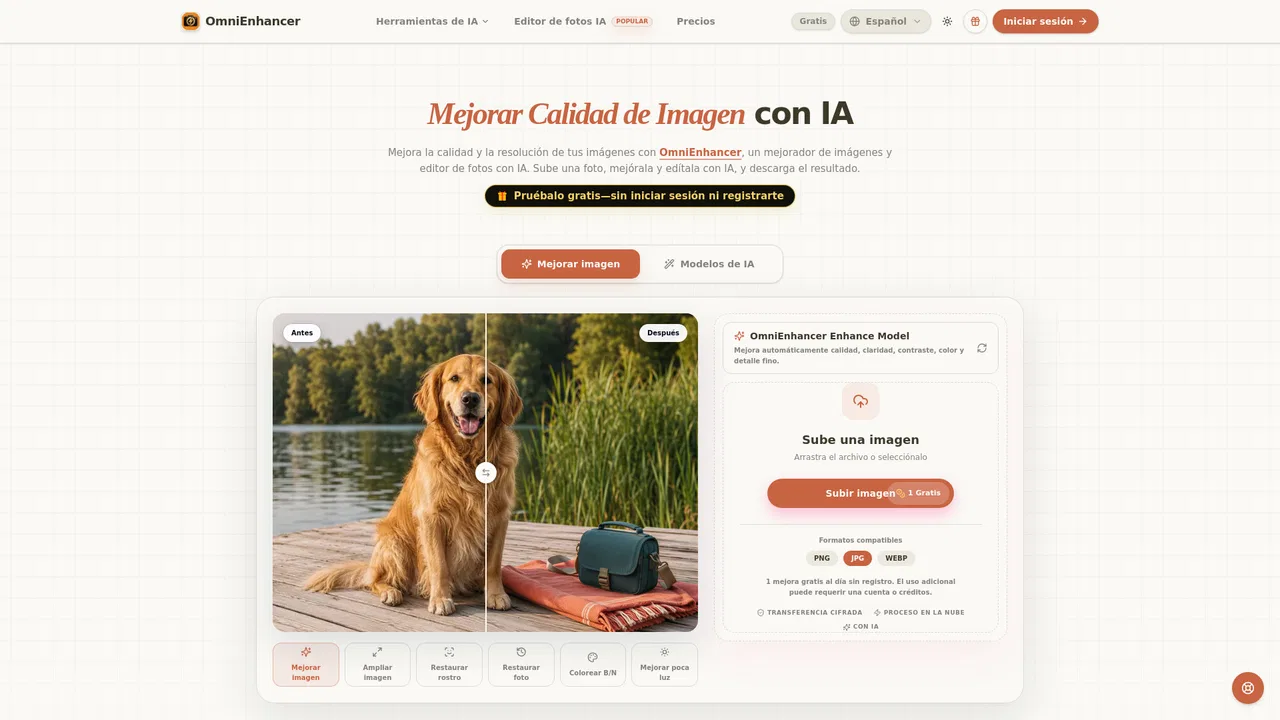
Automatically improve clarity, contrast, color, and fine texture while reducing mild blur, noise, and compression artifacts, then compare the result with the original before downloading.
Enlarge small or low-resolution images up to 2x and prepare products, posts, thumbnails, or print files at a higher resolution.
Repair old and blurry photos, restore faces, brighten low-light shots, and add natural color to black-and-white images.
Continue from a single upload with background removal, object removal, clothes and hairstyle changes, product studio scenes, and image-to-video conversion.
Run everything in the cloud with encrypted file transfer and no installation; JPG, PNG, and WebP inputs are supported and guests can start without signing up.
OmniEnhancer is a web-based AI image studio built around a single idea: upload a photo, let AI improve it, review the before/after, and download. The core enhancement model automatically balances clarity, contrast, color, and fine detail, while dedicated modes handle upscaling, face restoration, old-photo restoration, black-and-white colorization, and low-light recovery. Standard enlargement is 2x, and JPG, PNG, and WebP are supported. Beyond enhancement, the workspace bundles related creative tools such as background removal, object removal, AI clothes changing, AI hairstyle previews, an AI photo editor, an AI product photo generator, image-to-video, and video and audio generators. Classic use cases are portraits, social media posts, real-estate shots, and e-commerce product images that need sharper texture and cleaner edges without look-altering edits.
The workflow is deliberately staged: start with a blurry, small, or low-resolution file, choose clarity or upscaling, generate the result, compare it against the original, and only then move on to creative editing such as new backgrounds, ad layouts, or video. Processing happens in the cloud with encrypted file transfer, so nothing has to be installed. A guest can try enhancement without creating an account, and the interface is available in multiple languages, including a fully localized Spanish version.
Pricing blends a free daily allowance with paid subscriptions. Guest and free users get a small recurring credit balance for Fast enhancements, while Basic ($9.99/month), Pro ($29.99/month), Max ($79.99/month), and Ultra ($149.99/month) plans add larger monthly credit balances, full-resolution exports, faster generation queues and support tiers, and access to every AI tool. One-time credit packs are also available, and purchased credits do not expire.
Sharpen materials, labels, and edges on compressed product shots, then drop the item into a clean studio scene for listings and ads.
Reduce compression and noise on screenshots, posts, and thumbnails so they stay crisp on any screen, then turn a still into a short video.
Gently adjust contrast and resolution on scanned family photos, review faces closely, and keep the original scan for reference.
Improve light, color, and detail on interior photos while preserving the real dimensions and contents of each room.
Side-by-side telemetry comparison of competing AI tools in the same primary category
| Rank | AI Tool | Monthly Visits | MoM Growth | Direct traffic share | Pricing | Head-to-Head |
|---|---|---|---|---|---|---|
| ● | OmniEnhancer | 0 | 0% | — | Freemium | Current |
| 1 | Face26 | 43.36K | +7.9% | 40% direct | Freemium | vs Face26 |
| 2 | Free AI Image Upscaling | 450.06K | -13.9% | 51% direct | Free | vs Free AI Image Upscaling |
| 3 | AIUpscaler | 32.89K | +30.4% | 41% direct | Freemium, Paid | vs AIUpscaler |
| 4 | Imglarger (AI Image Enlarger) | 349.2K | -7.5% | 43% direct | Freemium | vs Imglarger (AI Image Enlarger) |
| 5 | EnhancePhoto AI | 210.34K | -10.5% | 48% direct | Freemium | vs EnhancePhoto AI |
| 6 | ZEnhancer | 17.21K | +517.6% | 35% direct | Freemium | vs ZEnhancer |
Enhance, restore and reimagine your photos with one click
Enhance, restore and reimagine your photos with one click
Free browser AI upscaling up to 4x and 16K, no sign-up and no watermark
Free browser AI upscaling up to 4x and 16K, no sign-up and no watermark

Upscale and sharpen images and videos to 4K with AI in one click
Upscale and sharpen images and videos to 4K with AI in one click
Enlarge, upscale, and uncrop photos with AI in your browser
Enlarge, upscale, and uncrop photos with AI in your browser

Free online AI photo enhancer, upscaler, and restorer
Free online AI photo enhancer, upscaler, and restorer

Enhance, restore, and upscale photos in your browser — free to start.
Enhance, restore, and upscale photos in your browser — free to start.
Restore, sharpen and upscale any photo to 4K with AI
Restore, sharpen and upscale any photo to 4K with AI
SpecialistSharpen blurry photos in seconds — locally in your browser or in the cloud
SpecialistSharpen blurry photos in seconds — locally in your browser or in the cloud

AI upscaling and photo enhancement for print-ready results
AI upscaling and photo enhancement for print-ready results
Free AI upscaler that lifts photos and graphics to crisp 16K resolution
Free AI upscaler that lifts photos and graphics to crisp 16K resolution

Upscale blurry photos to 4K and 8K with AI
Upscale blurry photos to 4K and 8K with AI
Restore, sharpen, and upscale blurry photos and videos with AI


