01
2.6M/mo
AI sidebar and browser agent for reading, writing and research
AI AssistantEditorial score: 4.5Freemium64% direct

2.6M/mo
AI sidebar and browser agent for reading, writing and research
Freemium

PageSage is a free Chrome extension that finds questions on the page you are viewing and answers them with AI. Highlight a question for a single answer, or open the extension to sweep the whole page and reply to everything it finds.
This is our editors' assessment out of 5, not an average of user ratings. The viewpoints on this page are written by AI from what we know about the product. They are not customer reviews.
According to OpenAITools.app telemetry verified on 2026-11-11, PageSage (chromewebstore.google.com) is an AI platform indexed under AI Answer generating 0 monthly visits with a month-over-month traffic delta of +0 (0.0%). Its primary geographic market is Global (— traffic share), and it operates on a Free pricing model. Top competing alternatives by monthly volume include Sider (2.64M visits/mo), Chippy (2.99K visits/mo), Quiz Solver AI (35.18K visits/mo).
Awesome for grinding through dense PDF textbooks with tons of review questions.
Scanning the whole page at once is a huge time saver.
Having to plug in my own OpenAI API key is a bit of a friction point.
UI feels a bit barebones.
AI-synthesized perspectives grounded in live site inspection, pricing structure, and category benchmarks — presented as editorial viewpoints rather than individual customer testimonials.
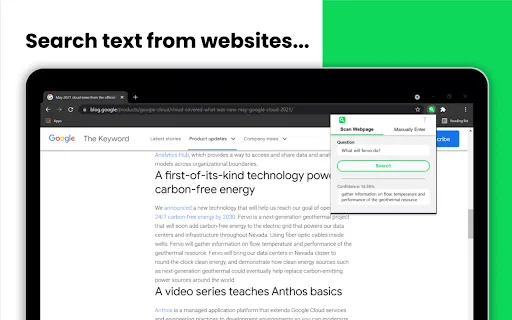
The extension scans the active webpage and identifies the questions written on it, so you do not have to hunt for them manually.
Highlight one question, right-click and pick the answer action to get a focused response in a popup without leaving the page.
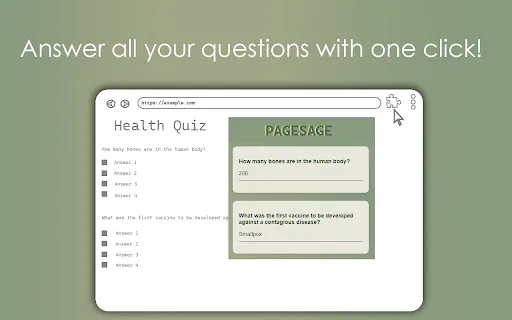
Click the toolbar icon to have the extension answer every detected question on the page in one sweep — handy for quizzes and study sheets.
Results appear in a convenient popup layered over the page, keeping the source question and the answer in the same view.
The developer released it under the MIT licence and openly invites developers and users to contribute to its refinement.
PageSage attacks a very specific annoyance: pages full of questions that you have to answer or look up one by one. Study guides, quiz pages, FAQ sections and training material all pile up questions, and switching between the page and a search engine is slow. The extension scans the active tab, detects the questions it finds there, and returns AI-generated answers inside a compact popup, so you never lose your place.
There are two modes. If you only care about one question, you highlight it, right-click and choose the answer action to get a single response. If you are facing a page full of them, you click the toolbar icon and the extension works through all detected questions at once. It is a deliberately narrow tool: it is not a general chat sidebar and does not try to do everything a browser assistant can do.
PageSage is published by an independent developer ([email protected]) under an MIT licence and is not affiliated with OpenAI. Notably, the extension does not ship with an API key — the listing states this explicitly, which means you supply your own OpenAI credentials for it to function. The listing also warns that since answers come from GPT models, they can contain inaccuracies, and that support for complex websites is still expanding. The last published update, version 1.03, dates from January 2024.
Open a practice quiz or a long set of review questions, trigger the bulk mode and check your thinking against AI answers for each item.
When training documentation poses questions inline, highlight the one you are stuck on and get an explanation without leaving the page.
Point the extension at a page of FAQs or a survey instrument and pull a first-pass set of answers to review and refine.
Side-by-side telemetry comparison of competing AI tools in the same primary category
| Rank | AI Tool | Monthly Visits | MoM Growth | Direct traffic share | Pricing | Head-to-Head |
|---|---|---|---|---|---|---|
| ● | PageSage | 0 | — | — | Free | Current |
| 1 | Sider | 2.64M | -10.6% | 64% direct | Freemium | vs Sider |
| 2 | Chippy | 2.99K | +29.6% | 42% direct | Freemium | vs Chippy |
| 3 | Quiz Solver AI | 35.18K | +28.6% | 66% direct | Freemium, Paid | vs Quiz Solver AI |
| 4 | Merlin AI | 1.38M | +13.1% | 50% direct | Freemium | vs Merlin AI |
| 5 | HARPA AI | 537.46K | +99.3% | 76% direct | Freemium | vs HARPA AI |
| 6 | Kome AI | 174.91K | -6.5% | 30% direct | Freemium | vs Kome AI |
AI sidebar and browser agent for reading, writing and research
AI sidebar and browser agent for reading, writing and research

ChatGPT in your browser sidebar, without switching tabs
ChatGPT in your browser sidebar, without switching tabs
AI browser extension that reads quiz questions and answers them with explanations
AI browser extension that reads quiz questions and answers them with explanations
One-click AI assistant for browsing, writing and research
One-click AI assistant for browsing, writing and research
One browser agent that combines every major AI model with web automation
Summarize, bookmark and write with AI right in your browser
Summarize, bookmark and write with AI right in your browser
Real-time AI answer engine and research workspace combining live web citations with frontier reasoning models.
Real-time AI answer engine and research workspace combining live web citations with frontier reasoning models.

Ask questions of any webpage and get ChatGPT-powered answers instantly
Ask questions of any webpage and get ChatGPT-powered answers instantly

Summarize and question any webpage with a single click
Summarize and question any webpage with a single click
One AI sidebar for ChatGPT, Claude and Gemini across the web
One AI sidebar for ChatGPT, Claude and Gemini across the web

A ChatGPT-powered chat bubble that answers questions on any website
A ChatGPT-powered chat bubble that answers questions on any website

Replace web questions with instant ChatGPT answers