01
2.6M/mo
AI sidebar and browser agent for reading, writing and research
AI AssistantEditorial score: 4.5Freemium64% direct

2.6M/mo
AI sidebar and browser agent for reading, writing and research
Freemium

AI active-reading companion for web articles and YouTube
This is our editors' assessment out of 5, not an average of user ratings. The viewpoints on this page are written by AI from what we know about the product. They are not customer reviews.
According to OpenAITools.app telemetry verified on 2026-11-11, Pebble (chromewebstore.google.com) is an AI platform indexed under AI Reader generating 0 monthly visits with a month-over-month traffic delta of +0 (0.0%). Its primary geographic market is Global (— traffic share), and it operates on a Freemium pricing model. Top competing alternatives by monthly volume include Sider (2.64M visits/mo), Monica (4.51M visits/mo), Merlin AI (1.38M visits/mo).
Embedding questions directly into articles actually forces you to pay attention.
The YouTube live quiz generator is insane for learning from tutorials.
Extension icon sometimes disappears on certain complex SPAs.
Spaced repetition integration saves me from forgetting what I read.
AI-synthesized perspectives grounded in live site inspection, pricing structure, and category benchmarks — presented as editorial viewpoints rather than individual customer testimonials.
Embedded AI questions check whether you are genuinely absorbing a page instead of skimming past it.
Highlight and annotate articles, then keep those notes organized so they are easy to revisit.
Ask questions directly about the page content and get answers in place, deepening comprehension on the spot.
Live AI-generated questions appear while you watch YouTube, turning video into an active-learning exercise.
Saved questions, highlights and notes become spaced-repetition and AI quizzes to lock in what you learned.
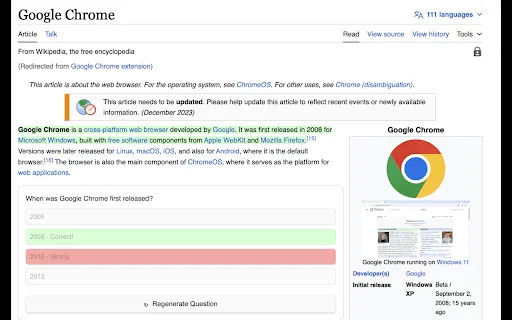
Pebble is an AI-powered active-reading companion for the web, distributed as a Chrome extension. Its premise is that reading and watching content online is usually passive, so information slips away quickly. Pebble counters that by weaving comprehension checks into the browsing experience: embedded AI questions prompt you to reflect on what you just read, and inline document Q&A lets you interrogate a page's content without opening another tab.
Beyond articles, Pebble extends to video. While you watch YouTube, it generates live AI questions that keep you engaged with the material. Everything you highlight, note or answer can be saved to memory, and the extension then turns that material into spaced-repetition and AI quizzes tied to the source website, so review is anchored to where you originally learned it.
The extension is published on the Chrome Web Store by a developer operating as "pebble" (contact [email protected]), holds a 5.0 rating from a small number of reviewers, and offers in-app purchases for unlocked features. It is lightweight and English-only, with the latest version listed at 1.1, updated in June 2024.
Read long articles with embedded comprehension questions and capture highlights so key ideas actually stick.
Watch lecture or tutorial videos and answer live AI questions to stay engaged and retain the content.
Ask inline questions about a page and keep notes tied to the source, so research stays traceable.
Side-by-side telemetry comparison of competing AI tools in the same primary category
| Rank | AI Tool | Monthly Visits | MoM Growth | Direct traffic share | Pricing | Head-to-Head |
|---|---|---|---|---|---|---|
| ● | Pebble | 0 | — | — | Freemium | Current |
| 1 | Sider | 2.64M | -10.6% | 64% direct | Freemium | vs Sider |
| 2 | Monica | 4.51M | -11.3% | 55% direct | Freemium | vs Monica |
| 3 | Merlin AI | 1.38M | +13.1% | 50% direct | Freemium | vs Merlin AI |
| 4 | Gene | 2.49K | +87% | 39% direct | Free | vs Gene |
| 5 | Kome AI | 174.91K | -6.5% | 30% direct | Freemium | vs Kome AI |
| 6 | Glasp | 889.56K | -14.1% | 45% direct | Freemium | vs Glasp |
AI sidebar and browser agent for reading, writing and research
AI sidebar and browser agent for reading, writing and research

All-in-one AI assistant across web, browser, desktop and mobile
All-in-one AI assistant across web, browser, desktop and mobile

One AI assistant that plugs ChatGPT, Claude and Gemini into every tab
One AI assistant that plugs ChatGPT, Claude and Gemini into every tab

A low-cost AI assistant that lives in your browser tab
A low-cost AI assistant that lives in your browser tab
Summarize, bookmark and write with AI right in your browser
Summarize, bookmark and write with AI right in your browser
Highlight the web, learn in public, and build your AI clone
Highlight the web, learn in public, and build your AI clone

Free / Open-sourceSummarize YouTube, Google, and any page with AI — free in your browser
Free / Open-sourceSummarize YouTube, Google, and any page with AI — free in your browser

Turn long articles, videos and PDFs into structured summaries you can actually search.
Turn long articles, videos and PDFs into structured summaries you can actually search.
Reader mode, text-to-speech and AI summaries for any web page
Reader mode, text-to-speech and AI summaries for any web page
Your GPT-powered sidekick for every page, PDF and video
Your GPT-powered sidekick for every page, PDF and video

Read with an AI mentor that highlights, explains and discusses your books
Read with an AI mentor that highlights, explains and discusses your books

Bottom Line Up Front for every page, PDF and video you read
Bottom Line Up Front for every page, PDF and video you read