01
174.9K/mo
Summarize, bookmark and write with AI right in your browser
AI SummarizerEditorial score: 4.1Freemium30% direct

174.9K/mo
Summarize, bookmark and write with AI right in your browser
Freemium

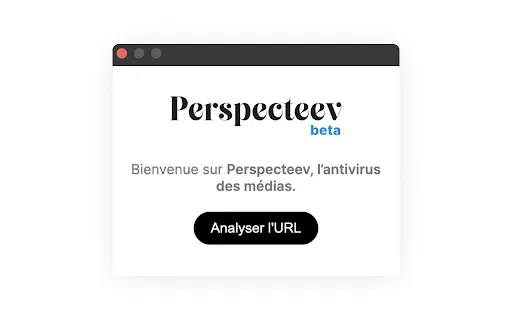
A media-literacy Chrome extension that grades press articles for bias, tone and sourcing
This is our editors' assessment out of 5, not an average of user ratings. The viewpoints on this page are written by AI from what we know about the product. They are not customer reviews.
According to OpenAITools.app telemetry verified on 2026-11-11, Perspecteev (chromewebstore.google.com) is an AI platform indexed under AI Article Summarizer generating 0 monthly visits with a month-over-month traffic delta of +0 (0.0%). Its primary geographic market is Global (— traffic share), and it operates on a Free pricing model. Top competing alternatives by monthly volume include Kome AI (174.91K visits/mo), Glarity (188.82K visits/mo), Summarizer.org (398.51K visits/mo).
great tool for spotting political spin on news sites
clean breakdown of emotional tone and bias
ui is a bit plain but gets the job done
handy extension for media literacy nerds
AI-synthesized perspectives grounded in live site inspection, pricing structure, and category benchmarks — presented as editorial viewpoints rather than individual customer testimonials.
Each article is graded across ten+ dimensions including political bias, emotional polarity, language complexity and clickbait intensity instead of a single true/false verdict.
The extension evaluates source reliability, citation and referencing quality, statistical relevance and source diversity to expose thin or one-sided reporting.
Click the toolbar icon on any press article and results arrive in seconds with a score and short explanation for every criterion.
Scores for language neutrality and political nuance help distinguish measured reporting from emotionally loaded or one-sided framing.
Works straight from the Chrome Web Store listing with no sign-up, dashboard or profile to maintain.
Perspecteev positions itself as a kind of media-literacy companion in the browser. You install the extension, land on a news article, click the icon, and within seconds you get a breakdown of the piece rather than just a verdict. Its data model is multi-criteria: political bias, political nuance, emotional polarity, linguistic complexity, clickbait intensity, citation and referencing practice, source reliability, language neutrality, relevance of statistics used, and source diversity. The combination is meant to reveal both what the article says and how it says it.
The extension was published by an individual developer and the Chrome Web Store description is written in French, suggesting an initial French-speaking audience, though the analysis is not inherently language-bound. It is distributed entirely through the Chrome Web Store with no separate account, dashboard or paid tier attached; the listing is small and early-stage, so the practical value is best judged by trying it on articles you already know well.
Because AI bias scoring is inherently approximate, Perspecteev is better used as a prompt for critical reading than as an authority. Treat the scores as a starting checklist — did this piece hedge its claims, does the headline match the body, are the sources varied — rather than as a definitive measure of an outlet's politics.
Run a quick analysis to see whether a headline's tone matches the body and whether the sourcing is broad enough to pass along.
Compare the score breakdown across outlets writing about the same event to learn how framing, statistics and sourcing differ.
Use the criterion scores as talking points for lessons on bias, clickbait and evaluating evidence in current affairs.
Skim scores to prioritise which articles in a large set deserve a careful full read.
Side-by-side telemetry comparison of competing AI tools in the same primary category
| Rank | AI Tool | Monthly Visits | MoM Growth | Direct traffic share | Pricing | Head-to-Head |
|---|---|---|---|---|---|---|
| ● | Perspecteev | 0 | — | — | Free | Current |
| 1 | Kome AI | 174.91K | -6.5% | 30% direct | Freemium | vs Kome AI |
| 2 | Glarity | 188.82K | -49.6% | 7% direct | Freemium | vs Glarity |
| 3 | Summarizer.org | 398.51K | +1.3% | 26% direct | Freemium | vs Summarizer.org |
| 4 | Glasp | 889.56K | -14.1% | 45% direct | Freemium | vs Glasp |
| 5 | Clearly Reader | 10.35K | -29.1% | 40% direct | Freemium | vs Clearly Reader |
| 6 | Sourcer AI | 0 | 0% | — | Free Trial, Paid | vs Sourcer AI |
Summarize, bookmark and write with AI right in your browser
Summarize, bookmark and write with AI right in your browser

Free / Open-sourceSummarize YouTube, Google, and any page with AI — free in your browser
Free / Open-sourceSummarize YouTube, Google, and any page with AI — free in your browser
Free AI Summarizer for text, articles, URLs and images
Free AI Summarizer for text, articles, URLs and images
Highlight the web, learn in public, and build your AI clone
Highlight the web, learn in public, and build your AI clone
Reader mode, text-to-speech and AI summaries for any web page
Reader mode, text-to-speech and AI summaries for any web page
A browser extension that scores the credibility and bias of news as you read it
A browser extension that scores the credibility and bias of news as you read it

A smart reading companion that instantly condenses any web article into short bullet points
A smart reading companion that instantly condenses any web article into short bullet points

One-click AI summaries for everything you have to read or watch
One-click AI summaries for everything you have to read or watch

One free Chrome extension that summarizes websites, YouTube videos and PDFs in a single click
One free Chrome extension that summarizes websites, YouTube videos and PDFs in a single click

Summarize articles, spot bias and read beyond your information bubble
Summarize articles, spot bias and read beyond your information bubble

Turn long articles, videos and PDFs into structured summaries you can actually search.
Turn long articles, videos and PDFs into structured summaries you can actually search.

Bottom Line Up Front for every page, PDF and video you read
Bottom Line Up Front for every page, PDF and video you read