01
6.3K/mo
Chrome extension that drafts on-brand social comments in one click
AI Social Media Post GeneratorEditorial score: 3.9Free Trial40% direct

6.3K/mo
Chrome extension that drafts on-brand social comments in one click
Free Trial

Draft on-brand LinkedIn, Twitter and Gmail replies with AI without leaving the page.
This is our editors' assessment out of 5, not an average of user ratings. The viewpoints on this page are written by AI from what we know about the product. They are not customer reviews.
According to OpenAITools.app telemetry verified on 2026-11-11, PostedAI (chromewebstore.google.com) is an AI platform indexed under AI Social Media Post Generator generating 0 monthly visits with a month-over-month traffic delta of +0 (0.0%). Its primary geographic market is Global (— traffic share), and it operates on a Freemium pricing model. Top competing alternatives by monthly volume include Comment Generator (6.3K visits/mo), Tweeteasy (4.35K visits/mo), Merlin AI (1.38M visits/mo).
Saves a couple clicks on LinkedIn.
Actually decent replies.
A bit laggy when typing fast.
Decent extension.
AI-synthesized perspectives grounded in live site inspection, pricing structure, and category benchmarks — presented as editorial viewpoints rather than individual customer testimonials.
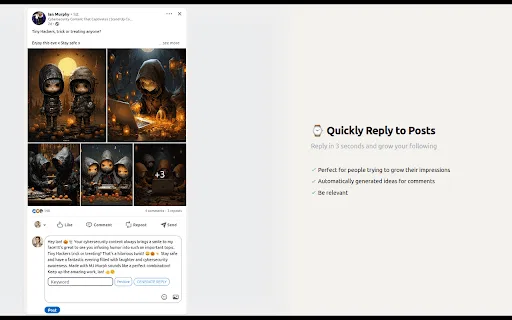
A small AI panel appears under each Twitter/X and LinkedIn post or comment, ready to draft a response in place.
Choose happy, excited, positive, neutral or angry before generating so the tone matches the thread you are joining.
Supply any word, phrase or URL and PostedAI builds the post or reply around it and folds the keyword into the flow of text.
The same assistant works on LinkedIn, Twitter/X and Gmail, covering both public engagement and email replies.
It lives in the browser, so it works wherever you are already logged in rather than in a separate dashboard.
PostedAI is distributed as a Chrome Web Store extension rather than a standalone SaaS app, and that shapes how it works. Once installed, it layers a generation panel directly into the interfaces you already use — beneath each Twitter/X and LinkedIn post and comment, and inside Gmail — so drafting happens in the tab where the conversation is already happening, with no copying or context switching.
Its distinguishing control is that you set the intent before you generate. You pick an emotion from happy, excited, positive, neutral or angry, and you supply a keyword that can be a single word, a phrase or a website. The assistant then writes the post or reply in that emotional register while working the keyword naturally into the body of the text. In practice that means you can aim a comment at a topic, keep the tone appropriate to the thread, and post in seconds.
Coverage today spans LinkedIn, Twitter/X and Gmail, making it useful for both public engagement and private email follow-ups. The listing is small — a few installed users and one public rating — and the last recorded update was in late 2023, so it is best treated as a lightweight utility for quick drafts rather than a heavy-duty social automation suite. Because automatically generated replies can read as templated, the sensible workflow is to generate and then edit before you publish.
Join conversations quickly by generating a reply directly beneath a post, choosing a tone and folding in your target keyword.
Keep a daily posting habit going by drafting short tweets quickly in the browser instead of switching to a separate AI chat tab.
Draft email responses faster and adjust the tone before sending, all without leaving the inbox interface.
Prepare engagement drafts for your team to review, using keyword guidance to keep replies on message.
Side-by-side telemetry comparison of competing AI tools in the same primary category
| Rank | AI Tool | Monthly Visits | MoM Growth | Direct traffic share | Pricing | Head-to-Head |
|---|---|---|---|---|---|---|
| ● | PostedAI | 0 | — | — | Freemium | Current |
| 1 | Comment Generator | 6.3K | -17.1% | 40% direct | Free Trial | vs Comment Generator |
| 2 | Tweeteasy | 4.35K | +23% | 39% direct | Freemium | vs Tweeteasy |
| 3 | Merlin AI | 1.38M | +13.1% | 50% direct | Freemium | vs Merlin AI |
| 4 | Devi AI | 35.39K | -31.4% | 63% direct | Free Trial, Paid | vs Devi AI |
| 5 | Postli | 4.17K | -13.1% | 39% direct | Freemium | vs Postli |
| 6 | TweetAI.com | 16.41K | +62.9% | 39% direct | Freemium | vs TweetAI.com |
Chrome extension that drafts on-brand social comments in one click
Chrome extension that drafts on-brand social comments in one click

AI-powered replies, tweet ideas and rewrites for X (Twitter) right from your browser
AI-powered replies, tweet ideas and rewrites for X (Twitter) right from your browser

One AI assistant that plugs ChatGPT, Claude and Gemini into every tab
One AI assistant that plugs ChatGPT, Claude and Gemini into every tab

Monitor social keywords, spot buying intent, and reach out with AI
Monitor social keywords, spot buying intent, and reach out with AI
Write LinkedIn posts that get read, from 1,000+ proven templates
Write LinkedIn posts that get read, from 1,000+ proven templates

Generate, analyze and rewrite X posts that grow your audience
Generate, analyze and rewrite X posts that grow your audience

Grow on LinkedIn with AI posts written in your own voice.
Grow on LinkedIn with AI posts written in your own voice.

LinkedIn AI assistant for posts, replies, and client growth
LinkedIn AI assistant for posts, replies, and client growth

Draft LinkedIn comments, replies, invites, and posts without leaving your feed
Draft LinkedIn comments, replies, invites, and posts without leaving your feed

Grow your LinkedIn presence with an AI coach for writing, scheduling and outreach
Grow your LinkedIn presence with an AI coach for writing, scheduling and outreach

AI writing assistant that drafts and schedules social posts in your own voice
AI writing assistant that drafts and schedules social posts in your own voice

SpecialistAI autocomplete that finishes your sentences wherever you type
SpecialistAI autocomplete that finishes your sentences wherever you type