01
2.6M/mo
Your AI agent for the browser: chat, automate and create from one sidebar
AI ChatbotEditorial score: 4.5Freemium64% direct

2.6M/mo
Your AI agent for the browser: chat, automate and create from one sidebar
Freemium

Chat with ChatGPT from a lightweight Chrome side panel
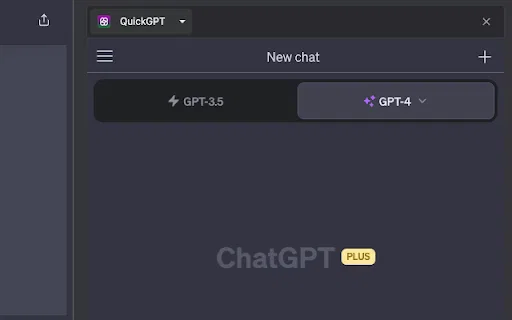
QuickGPT is a minimalist third-party Chrome extension that docks ChatGPT right inside your browser side panel.
This is our editors' assessment out of 5, not an average of user ratings. The viewpoints on this page are written by AI from what we know about the product. They are not customer reviews.
According to OpenAITools.app telemetry verified on 2026-11-11, QuickGPT (chromewebstore.google.com) is an AI platform indexed under AI Chatbot generating 0 monthly visits with a month-over-month traffic delta of +0 (0.0%). Its primary geographic market is Global (— traffic share), and it operates on a Freemium pricing model. Top competing alternatives by monthly volume include Sider (2.64M visits/mo), Monica (4.51M visits/mo), Chippy (2.99K visits/mo).
Literally just a side-panel iframe wrapping ChatGPT.
Does the job if you just want a docked tab.
Zero features, you can just pin the web app yourself.
Basic wrapper with no extra juice.
AI-synthesized perspectives grounded in live site inspection, pricing structure, and category benchmarks — presented as editorial viewpoints rather than individual customer testimonials.
Opens ChatGPT in Chrome's side panel and keeps it visible next to the page you are working on.
Under 50 KB with no third-party scripts, and the developer declares no data collection or sharing.
No prompt libraries, settings screens or account linking beyond signing in to your own ChatGPT account.
Reference the article, document or code you are reading while composing the prompt in the same window.
QuickGPT does one thing: it puts ChatGPT in a docked side panel next to whatever page you are viewing. Instead of switching tabs or windows to talk to the assistant, you open the panel once and it stays alongside your document, spreadsheet, code file or article, so replies remain readable while you work.
Most side-panel extensions ship a prompt manager, a model switcher and a stack of permissions. QuickGPT deliberately goes the other way. The published build is around 44 KB, lists no third-party scripts, and its developer declaration states that no user data is collected or shared. That makes it easy to audit and reasonable to install if you already have a ChatGPT account and simply want persistent, low-friction access.
Because it is a thin wrapper, the feature set and reliability depend on ChatGPT itself: you sign in to your own OpenAI account within the panel, and your plan, model access and message limits come from OpenAI rather than from this extension. The listing is small and early (version 0.0.1, published August 2023, a handful of users and no ratings yet), so treat it as a simple utility rather than a full assistant platform.
Keep a brief, transcript or research article open while you refine wording in the panel without toggling windows.
Open the panel beside your editor or repository and paste snippets for explanations and fixes without leaving the tab.
Read a long paper in the main window and ask for summaries or definitions in the panel as you go.
Get side-panel ChatGPT from a tiny extension that declares no data collection or third-party scripts.
Side-by-side telemetry comparison of competing AI tools in the same primary category
| Rank | AI Tool | Monthly Visits | MoM Growth | Direct traffic share | Pricing | Head-to-Head |
|---|---|---|---|---|---|---|
| ● | QuickGPT | 0 | — | — | Freemium | Current |
| 1 | Sider | 2.64M | -10.6% | 64% direct | Freemium | vs Sider |
| 2 | Monica | 4.51M | -11.3% | 55% direct | Freemium | vs Monica |
| 3 | Chippy | 2.99K | +29.6% | 42% direct | Freemium | vs Chippy |
| 4 | Chatbox | 567.17K | -16.1% | 58% direct | Freemium | vs Chatbox |
| 5 | ChatGPT | 6.05B | +2.2% | 73% direct | Freemium | vs ChatGPT |
| 6 | MacGPT | 26.22K | -7.5% | 40% direct | Freemium | vs MacGPT |
Your AI agent for the browser: chat, automate and create from one sidebar
Your AI agent for the browser: chat, automate and create from one sidebar

All-in-one AI assistant across web, browser, desktop and mobile
All-in-one AI assistant across web, browser, desktop and mobile

ChatGPT in your browser sidebar, without switching tabs
ChatGPT in your browser sidebar, without switching tabs
One privacy-first AI client for GPT, Claude, Gemini and more
One privacy-first AI client for GPT, Claude, Gemini and more

OpenAI's flagship multimodal assistant powered by GPT-6 and GPT-5.6 for reasoning, coding, and deep research.
OpenAI's flagship multimodal assistant powered by GPT-6 and GPT-5.6 for reasoning, coding, and deep research.

ChatGPT in your Mac menu bar, inline and everywhere
ChatGPT in your Mac menu bar, inline and everywhere

Chat with 30+ leading AI models in one clean, fast workspace
Chat with 30+ leading AI models in one clean, fast workspace

One AI assistant that plugs ChatGPT, Claude and Gemini into every tab
One AI assistant that plugs ChatGPT, Claude and Gemini into every tab

Compare GPT, Claude, and Gemini answers side by side in one chat
Compare GPT, Claude, and Gemini answers side by side in one chat
Your GPT-powered sidekick for every page, PDF and video
Your GPT-powered sidekick for every page, PDF and video

A free, featherweight Chrome extension for chatting with ChatGPT
A free, featherweight Chrome extension for chatting with ChatGPT

Chat with Gemini AI in Chrome's side panel without leaving your page
Chat with Gemini AI in Chrome's side panel without leaving your page




