AI browser extension that reads quiz questions and answers them with explanations

AI answers with explanations for online tests, across Chrome, Android and iOS

This is our editors' assessment out of 5, not an average of user ratings. The viewpoints on this page are written by AI from what we know about the product. They are not customer reviews.
According to OpenAITools.app telemetry verified on 2026-11-11, Quizonator (chromewebstore.google.com) is an AI platform indexed under AI Answer generating 0 monthly visits with a month-over-month traffic delta of +0 (0.0%). Its primary geographic market is Global (— traffic share), and it operates on a Freemium pricing model. Top competing alternatives by monthly volume include Quiz Solver AI (35.18K visits/mo), StudyBuddy (16.4K visits/mo), AnswersAi (61.7K visits/mo).
Saves so much time during boring mandatory online quizzes.
Sometimes misses complex math symbols in multiple choice.
Absolute lifesaver for my university module exams.
Got flagged by my browser once, support took days to reply.
AI-synthesized perspectives grounded in live site inspection, pricing structure, and category benchmarks — presented as editorial viewpoints rather than individual customer testimonials.
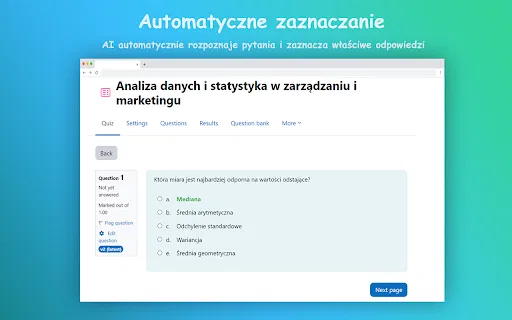
The extension detects the question on the page without any copy-paste, reads the answer options and starts analysis automatically.
Rather than showing a bare result, Quizonator places a short explanation next to the question so you understand why an option was chosen.
Choose default, instant, invisible or snapshot behaviour — snapshot mode analyses a screenshot when the page itself cannot be read.
Attach your own notes or PDFs so responses are grounded in the specific material your course is using.
Past tests and usage statistics are stored in the app, and one login covers the Chrome extension, Android and iOS.
Quizonator is an AI assistant built for the moment a student opens an online test. Instead of copying questions into a chat window, you install the Chrome extension or the Android/iOS app, open the test as usual, and the tool reads the question and the answer options on screen. A few seconds later a suggested answer with a brief explanation appears next to the question. The same account and subscription work across Chrome, Android and iOS, so the workflow is identical on a laptop and a phone.
The product is built by QUIZONATOR Sp. z o.o., a company registered in Wrocław, Poland, and its platform support is unusually explicit. It lists Moodle, Testportal, Google Forms, Microsoft Forms, Canvas LMS, Quizizz/Wayground, Kahoot, Blooket, Socrative and Szkola w Chmurze, with separate walkthroughs per platform. The vendor is careful to note that these are third-party systems and that appearing on the list does not imply any partnership or endorsement. Kahoot Live works only on iOS, where you point the camera at the question; solo Kahoot runs inside the Chrome extension, and Android does not support the Live mode at all.
Pricing follows an answer-credit model. The free plan gives 20 answers per month with no card required. PRO costs 34.99 zł per month for 300 answers and unlocks every platform, all solving modes, screenshot-based Snapshot analysis, personal notes and files, plus test history. PRO+ costs 69.99 zł per month for 1,200 answers. A six-month option charges five months and delivers the credits up front. Users should note that the tool is designed to produce answers during assessments, which many universities and certification bodies treat as academic misconduct, and the vendor itself states that AI output can be wrong and requires checking.

Open a practice test in Moodle or Testportal and get an explanation next to each question, so a mock run doubles as revision rather than a pure answer check.
Use your own notes and PDFs as reference material so suggested answers follow the exact terminology of the course you are taking.
Keep the extension installed on the laptop and the app on the phone under one login, so the same workflow is available wherever you open a test.
Use the free 20 monthly answers and the explanation output to see how the tool reasons about different question types before committing to a paid plan.
Side-by-side telemetry comparison of competing AI tools in the same primary category
| Rank | AI Tool | Monthly Visits | MoM Growth | Direct traffic share | Pricing | Head-to-Head |
|---|---|---|---|---|---|---|
| ● | Quizonator | 0 | — | — | Freemium | Current |
| 1 | Quiz Solver AI | 35.18K | +28.6% | 66% direct | Freemium, Paid | vs Quiz Solver AI |
| 2 | StudyBuddy | 16.4K | -15.4% | 20% direct | Free Trial, Paid | vs StudyBuddy |
| 3 | AnswersAi | 61.7K | +22.6% | 35% direct | Paid | vs AnswersAi |
| 4 | StudyPal | 1.05K | +251% | 33% direct | Free Trial, Paid | vs StudyPal |
| 5 | QuizMate | 2.15K | -65.5% | 31% direct | Paid | vs QuizMate |
| 6 | Course Hero | 5.16M | -1.4% | 17% direct | Freemium | vs Course Hero |
AI browser extension that reads quiz questions and answers them with explanations
SpecialistScreenshot any question, get instant AI answers
AI browser assistant that helps you study smarter

Study less, learn more with an AI tutor in your school portal
SpecialistStudy library, AI homework help, and 24/7 tutor access in one place
A 24/7 AI tutor, homework helper and study companion for students

Snap a homework question and get step-by-step AI answers
All-in-one AI study tool for homework help, exam prep, notes, and flashcards
A friendly Vietnamese AI study assistant for homework, images and everyday questions

Snap a photo of your homework and get a step-by-step explanation in seconds

AI study assistant that works inside Canvas, Blackboard, and any LMS