01
10.4K/mo
Reader mode, text-to-speech and AI summaries for any web page
AI ReaderEditorial score: 4.3Freemium40% direct

10.4K/mo
Reader mode, text-to-speech and AI summaries for any web page
Freemium

Distraction-free reading mode with instant summaries, translation and article chat
This is our editors' assessment out of 5, not an average of user ratings. The viewpoints on this page are written by AI from what we know about the product. They are not customer reviews.
According to OpenAITools.app telemetry verified on 2026-11-11, RabbitHole (chromewebstore.google.com) is an AI platform indexed under AI Reader generating 0 monthly visits with a month-over-month traffic delta of +0 (0.0%). Its primary geographic market is Global (— traffic share), and it operates on a Free pricing model. Top competing alternatives by monthly volume include Clearly Reader (10.35K visits/mo), Sider (2.64M visits/mo), tl;dr AI Summarizer (2.14K visits/mo).
Saved me from drowning in heavy documentation today.
Shortcut took a minute to get used to, but solid.
Clean reading mode is a game changer.
Extension kept freezing on heavy pages.
AI-synthesized perspectives grounded in live site inspection, pricing structure, and category benchmarks — presented as editorial viewpoints rather than individual customer testimonials.
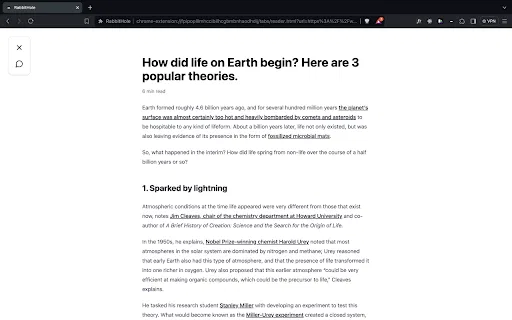
Press Opt+L (Alt+L on Windows) to strip away ads, menus and sidebars so only the article text remains.
Condense long paragraphs into short summaries or turn dense text into scannable bullet points.
Translate individual sentences into more than forty languages without leaving the page.
Ask questions about the page and get clear, direct answers instead of reading everything yourself.
Run a quick search on unfamiliar terms or concepts right inside Reading Mode, with no tab switching.
RabbitHole is a browser extension for Chrome that turns ordinary web articles into a focused, AI-assisted reading experience. Instead of juggling multiple tabs or copy-pasting text into a separate chatbot, you trigger Reading Mode with a simple keyboard shortcut and the page is re-rendered without ads, navigation bars or sidebars. The reading surface stays calm while a small set of AI tools sits alongside the text.
The core idea is comprehension rather than just decluttering. Within Reading Mode you can ask for a paragraph summary, rewrite a dense section as bullet points, translate a sentence into more than forty languages, or run an inline search on a concept you do not recognize without ever leaving the page. A chat panel lets you ask questions about the article and get direct answers, which is useful for long reports, research papers and technical documentation.
RabbitHole is published on the Chrome Web Store as a small, free extension (under 3 MB) aimed at students, researchers, analysts and anyone who reads a lot on the web. It stores no account on the store side; the developer discloses handling of limited authentication and identifiable information. Because it lives in the browser, setup is essentially "add to Chrome" and go.
Open a research paper or textbook chapter, summarize each paragraph and convert key sections into bullet points for revision notes.
Use chat-with-the-article to pull answers out of lengthy reports and translate foreign-language sources in place.
Read articles in another language and translate tricky sentences on the fly into your own language.
Turn any cluttered news or blog page into a calm reading view and skim the essentials in seconds.
Side-by-side telemetry comparison of competing AI tools in the same primary category
| Rank | AI Tool | Monthly Visits | MoM Growth | Direct traffic share | Pricing | Head-to-Head |
|---|---|---|---|---|---|---|
| ● | RabbitHole | 0 | — | — | Free | Current |
| 1 | Clearly Reader | 10.35K | -29.1% | 40% direct | Freemium | vs Clearly Reader |
| 2 | Sider | 2.64M | -10.6% | 64% direct | Freemium | vs Sider |
| 3 | tl;dr AI Summarizer | 2.14K | -11.5% | 40% direct | Free | vs tl;dr AI Summarizer |
| 4 | Glarity | 188.82K | -49.6% | 7% direct | Freemium | vs Glarity |
| 5 | BiRead | 13.66K | -15.8% | 40% direct | Freemium | vs BiRead |
| 6 | DeepTranslate | 90.02K | -22.9% | 50% direct | Free | vs DeepTranslate |
Reader mode, text-to-speech and AI summaries for any web page
Reader mode, text-to-speech and AI summaries for any web page
AI sidebar and browser agent for reading, writing and research
AI sidebar and browser agent for reading, writing and research

A smart reading companion that instantly condenses any web article into short bullet points
A smart reading companion that instantly condenses any web article into short bullet points

Free / Open-sourceSummarize YouTube, Google, and any page with AI — free in your browser
Free / Open-sourceSummarize YouTube, Google, and any page with AI — free in your browser
Turn any webpage into bilingual reading in one click
Turn any webpage into bilingual reading in one click
SpecialistFree bilingual browser extension that translates any page with the AI engine you choose
SpecialistFree bilingual browser extension that translates any page with the AI engine you choose
Summarize, bookmark and write with AI right in your browser
Summarize, bookmark and write with AI right in your browser
One-click AI assistant for browsing, writing and research
One-click AI assistant for browsing, writing and research

SpecialistA clean, distraction-free reading mode for any article on the web
SpecialistA clean, distraction-free reading mode for any article on the web

All-in-one AI assistant across web, browser, desktop and mobile
All-in-one AI assistant across web, browser, desktop and mobile

Bilingual AI translation for websites, documents, video and images
Bilingual AI translation for websites, documents, video and images
SpecialistOne-click AI summaries of any web page
SpecialistOne-click AI summaries of any web page