01
308.3K/mo
Free online OCR that turns images and scans into editable text
AI OCREditorial score: 4.2Freemium+0.6%

308.3K/mo+0.6%
Free online OCR that turns images and scans into editable text
Freemium
Extract and copy text from any image on a web page
This is our editors' assessment out of 5, not an average of user ratings. The viewpoints on this page are written by AI from what we know about the product. They are not customer reviews.
According to OpenAITools.app telemetry verified on 2026-11-11, ReadImage (chromewebstore.google.com) is an AI platform indexed under AI OCR generating 0 monthly visits with a month-over-month traffic delta of +0 (0.0%). Its primary geographic market is Global (— traffic share), and it operates on a Free pricing model. Top competing alternatives by monthly volume include Image to Text CC (308.3K visits/mo), Image to Text (4.87M visits/mo), Image to Text Converter (699.5K visits/mo).
Saved me from retyping three pages of code screenshots today.
Quick OCR right in the browser context menu.
so good
Misses some stylized fonts but works on clean text.
AI-synthesized perspectives grounded in live site inspection, pricing structure, and category benchmarks — presented as editorial viewpoints rather than individual customer testimonials.
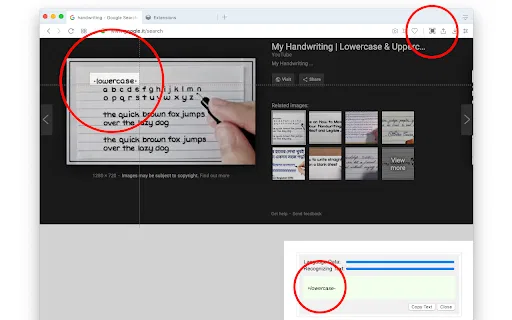
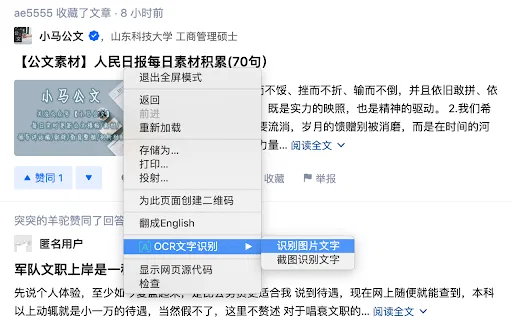
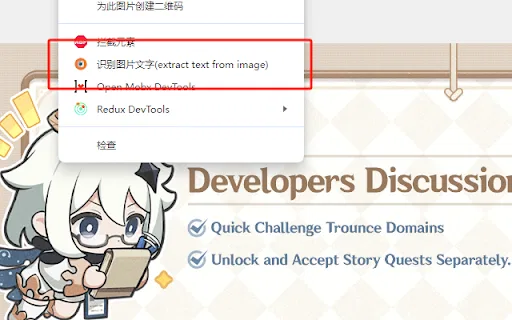
Hover any image on a web page, right-click and select the extract-text action to run optical character recognition without leaving the browser.
Recognized text opens in an extension panel where you can correct errors and copy the finished result straight to your clipboard.
Works with the raster formats you are most likely to meet online, including JPG, JPEG, PNG and BMP.
The developer declares that no user data is collected, sold or transferred for unrelated purposes, and the extension is tiny.
ReadImage targets the everyday friction of running into text that only exists inside an image — a screenshot of code, a price in a product photo, a quote captured as a picture, or a design mockup. Rather than retyping or switching to a desktop OCR tool, you hover over the picture, open the context menu and pick "extract text from image". The extension returns the result in its own panel, where you can clean up mistakes and copy the final string to your clipboard. It is intentionally minimal: the whole extension is only a few dozen kilobytes and it declares that it does not collect or sell any user data, which keeps the permission footprint small. Because it works on images already rendered on the page, it fits naturally into coding, shopping, search and general reading workflows where text is trapped inside pixels. That said, it is a single-purpose utility and a fairly old, low-maintenance project. The listing shows version 1.0, last updated in October 2023, and only a handful of installs. It accepts common raster formats such as JPG, JPEG, PNG and BMP, and the developer notes that restrictive network environments can cause timeouts because recognition depends on a remote service. It is best understood as a handy little helper rather than a full-featured OCR suite.
Grab a snippet of code, terminal output or config that was shared as an image and paste it into your editor as editable text.
Extract specification text, prices or labels that appear only inside product images so you can search or compare them.
Pull quotations, citations or diagram labels out of infographics and slide screenshots for notes and references.
Side-by-side telemetry comparison of competing AI tools in the same primary category
| Rank | AI Tool | Monthly Visits | MoM Growth | Direct traffic share | Pricing | Head-to-Head |
|---|---|---|---|---|---|---|
| ● | ReadImage | 0 | — | — | Free | Current |
| 1 | Image to Text CC | 308.3K | +0.6% | 21% direct | Freemium | vs Image to Text CC |
| 2 | Image to Text | 4.87M | +0.8% | 25% direct | Freemium | vs Image to Text |
| 3 | Image to Text Converter | 699.5K | +8.7% | 30% direct | Freemium | vs Image to Text Converter |
| 4 | Image to Text Converter | 181.47K | -15.6% | 46% direct | Freemium | vs Image to Text Converter |
| 5 | JPG to Text | 425K | -13.4% | 14% direct | Freemium | vs JPG to Text |
| 6 | OCR - Image Reader | 0 | — | — | Free | vs OCR - Image Reader |
Free online OCR that turns images and scans into editable text
Free online OCR that turns images and scans into editable text
Free online OCR that turns any image into editable text in seconds
Free online OCR that turns any image into editable text in seconds
Extract editable text from images, scans and handwriting with OCR
Extract editable text from images, scans and handwriting with OCR

Free online OCR that turns photos, screenshots and scans into editable text
Free online OCR that turns photos, screenshots and scans into editable text
Free online OCR that turns JPG, PNG and scanned images into editable text
Free online OCR that turns JPG, PNG and scanned images into editable text

Offline OCR in your browser with layout-aware document recognition
Offline OCR in your browser with layout-aware document recognition
Free AI OCR that turns images, scans and handwriting into editable text
Free AI OCR that turns images, scans and handwriting into editable text

Right-click any image or screenshot in Chrome to copy its text
Right-click any image or screenshot in Chrome to copy its text

Free online translator that reads text out of your photos
Free online translator that reads text out of your photos

Free AI OCR that turns any image into editable, copy-ready text.
Free AI OCR that turns any image into editable, copy-ready text.