01
190.7K/mo
AI that watches your video and writes study notes as you watch
AI Notes GeneratorEditorial score: 4.3Freemium+156%

190.7K/mo+156%
AI that watches your video and writes study notes as you watch
Freemium
AI notes, video simplification and highlights, all in one Chrome sidebar
This is our editors' assessment out of 5, not an average of user ratings. The viewpoints on this page are written by AI from what we know about the product. They are not customer reviews.
According to OpenAITools.app telemetry verified on 2026-11-11, Roten.X DevTool (chromewebstore.google.com) is an AI platform indexed under AI Homework Helper generating 0 monthly visits with a month-over-month traffic delta of +0 (0.0%). Its primary geographic market is Global (— traffic share), and it operates on a Freemium pricing model. Top competing alternatives by monthly volume include HoverNotes (190.69K visits/mo), TubeMemo (1.93K visits/mo), Eightify (109.24K visits/mo).
Lifesaver for getting through long lecture recordings.
Clean sidebar notes and handy AI explanations.
Saves so much tab-switching during research.
Free tier is quite limited for heavy students.
AI-synthesized perspectives grounded in live site inspection, pricing structure, and category benchmarks — presented as editorial viewpoints rather than individual customer testimonials.
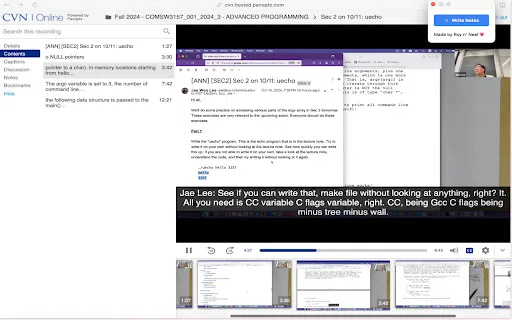
While a lecture plays, Roten.X DevTool records structured, time-linked notes so you can jump back to the exact moment a concept was explained.
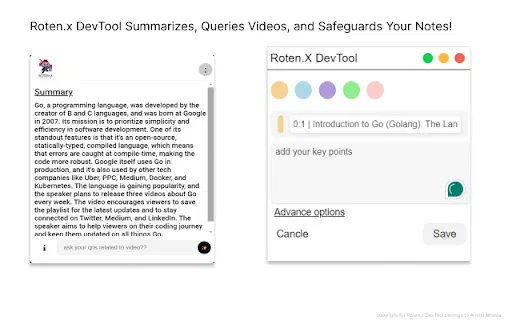
Long or jargon-heavy videos get rephrased into short, readable explanations, surfacing the arguments and definitions that matter for an exam or assignment.
Bookmark and highlight the important moments of a video, then return to them instantly instead of scrubbing through the whole timeline again.
Capture diagrams, slides and equations straight from the page, annotate them, and store them alongside your written notes.
An AI assistant answers questions about the video you are currently watching, so you can clear up a confusing section without leaving the page.
Notes, screenshots, highlights and bookmarks land in one library, which keeps a whole course or article backlog in a single searchable place.
Roten.X DevTool is distributed as a Chrome extension aimed at students, self-learners and researchers who spend hours inside recorded lectures and long-form articles. Instead of juggling notebooks, screenshots and separate summarizers, it layers a study workspace on top of the page you are already reading or watching. The extension combines three jobs in one surface: writing notes, capturing visual references, and using AI to explain material that is too dense to absorb at playback speed.
The workflow is deliberately lightweight. You open a supported video, start taking timestamped notes as the lecturer speaks, and mark the moments you know you will need again during revision. When a section is hard to follow, the AI simplifies it into shorter language and you can ask direct questions about the content without switching tabs. Screenshots with annotations cover diagrams and whiteboards, while article pages support highlighting of the paragraphs worth revisiting.
Everything collects into one notes library, so revision is a matter of browsing a single organised space rather than reconstructing context from scattered screenshots and half-finished documents. The extension is a small, independent project by an individual developer, last updated in June 2024, and is best treated as a focused study aid rather than a full learning-management platform.
Take timestamped notes during recorded lectures, highlight the passages the professor stresses, and later revise from a single structured document rather than an hour of re-watching.
Turn long conference talks and technical webinars into simplified explanations and a bookmark list of the moments worth quoting or re-testing.
Highlight key arguments on long blog posts and capture the diagrams, keeping research sources annotated in one place while writing.
Snap and annotate diagrams, formulas and tables during a study session and ask the AI to re-explain sections that did not land the first time.
Side-by-side telemetry comparison of competing AI tools in the same primary category
| Rank | AI Tool | Monthly Visits | MoM Growth | Direct traffic share | Pricing | Head-to-Head |
|---|---|---|---|---|---|---|
| ● | Roten.X DevTool | 0 | — | — | Freemium | Current |
| 1 | HoverNotes | 190.69K | +156% | 49% direct | Freemium | vs HoverNotes |
| 2 | TubeMemo | 1.93K | -39.9% | 40% direct | Freemium | vs TubeMemo |
| 3 | Eightify | 109.24K | -23.2% | 44% direct | Freemium | vs Eightify |
| 4 | Noiz | 148.84K | -27.8% | 29% direct | Free Trial | vs Noiz |
| 5 | Knowt | 4.18M | +5.4% | 66% direct | Free | vs Knowt |
| 6 | Glasp | 889.56K | -14.1% | 45% direct | Freemium | vs Glasp |
AI that watches your video and writes study notes as you watch
AI that watches your video and writes study notes as you watch

Turn any YouTube video into AI summaries, notes and flashcards inside your browser
Turn any YouTube video into AI summaries, notes and flashcards inside your browser
AI summaries that turn long YouTube videos into key ideas in seconds
AI summaries that turn long YouTube videos into key ideas in seconds

Summarize any YouTube video into key ideas and timestamped notes in seconds.
Summarize any YouTube video into key ideas and timestamped notes in seconds.
Free AI flashcard and study tools for students
Free AI flashcard and study tools for students
Highlight the web, learn in public, and build your AI clone
Highlight the web, learn in public, and build your AI clone

Free / Open-sourceSummarize YouTube, Google, and any page with AI — free in your browser
Free / Open-sourceSummarize YouTube, Google, and any page with AI — free in your browser

SpecialistFree Chrome extension that turns recitation recordings into AI notes
SpecialistFree Chrome extension that turns recitation recordings into AI notes
Turn any lecture, file, or video into notes, flashcards, and quizzes
Turn any lecture, file, or video into notes, flashcards, and quizzes
Turn any YouTube video into a one-minute digest
Turn any YouTube video into a one-minute digest
SpecialistScreenshot any question, get instant AI answers
SpecialistScreenshot any question, get instant AI answers
Turn any material into notes, flashcards, quizzes, and podcasts.