01
4.9M/mo
Free online OCR that turns any image into editable text in seconds
AI OCREditorial score: 3.8Freemium+0.8%

4.9M/mo+0.8%
Free online OCR that turns any image into editable text in seconds
Freemium
Capture any part of your screen and send it straight to an AI API
This is our editors' assessment out of 5, not an average of user ratings. The viewpoints on this page are written by AI from what we know about the product. They are not customer reviews.
According to OpenAITools.app telemetry verified on 2026-11-11, Scan2AI (chromewebstore.google.com) is an AI platform indexed under AI Scanner generating 0 monthly visits with a month-over-month traffic delta of +0 (0.0%). Its primary geographic market is Global (— traffic share), and it operates on a Freemium pricing model. Top competing alternatives by monthly volume include Image to Text (4.87M visits/mo), Image to Text Converter (699.5K visits/mo), Business Card Scanner (CardScanner) (361.24K visits/mo).
handy extension if you already have api keys ready
a bit barebones but works for quick OCR
setup is tedious for casual users
just a wrapper around your own API keys
AI-synthesized perspectives grounded in live site inspection, pricing structure, and category benchmarks — presented as editorial viewpoints rather than individual customer testimonials.
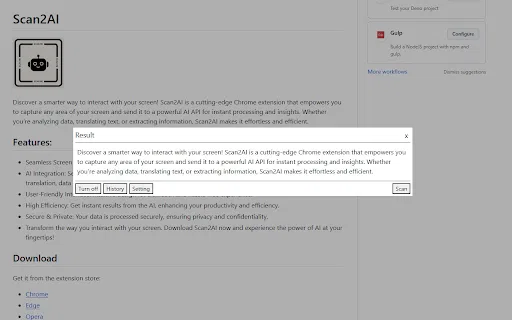
Draw a selection over any part of the page, panel or window and capture exactly the area you need without cropping afterwards.
Send the captured image to a connected AI API so text recognition, translation, extraction and analysis happen on a capable model rather than on local heuristics.
Use the same capture flow for several jobs — reading text out of images, translating foreign-language screens, and extracting data points from screenshots.
A roughly 2.6 MB extension that adds a toolbar capture action without slowing down browsing or bundling large offline models.
The developer declares that data is not sold to third parties and is not used outside the extension's core functionality.
Scan2AI solves a small but constant annoyance: the information you need is visible on screen, but it is locked inside an image, a canvas, an app window, or a video frame where you cannot select or copy it. Instead of retyping it, you draw a selection box and hand the pixels to an AI model. The extension handles the capture layer, and the model handles the understanding layer — OCR, translation, summarisation of visual content, or data extraction into a usable format.
The extension is deliberately narrow in scope. It exposes a capture control from the browser toolbar, renders an overlay so you can pick the exact region you want, and then packages the image for the AI endpoint you have configured. Because the heavy lifting happens on the API side, the extension itself stays small (around 2.6 MB) and fast, and it does not need to maintain its own OCR or translation models.
Scan2AI is published as a developer utility with a simple non-trader distribution model: it is free to add to Chrome, and the developer states that it does not collect or sell your data. Practically speaking, the cost and quality of the AI results come from whichever AI API you point it at, so your own account, key and rate limits govern what you get.
Capture a chart, table or KPI panel from a dashboard that does not offer export, then have the AI API read the values into text you can paste into a document or spreadsheet.
Select an article, slide or PDF page shown in the browser and send the captured region for translation instead of copy-pasting through separate tools.
Grab a region of a recorded session or a screenshot from a bug report and extract the visible error message or log lines into searchable text.
Capture a receipt, invoice or form rendered on screen and ask the connected AI API to return the fields in a clean, structured format.
Side-by-side telemetry comparison of competing AI tools in the same primary category
| Rank | AI Tool | Monthly Visits | MoM Growth | Direct traffic share | Pricing | Head-to-Head |
|---|---|---|---|---|---|---|
| ● | Scan2AI | 0 | — | — | Freemium | Current |
| 1 | Image to Text | 4.87M | +0.8% | 25% direct | Freemium | vs Image to Text |
| 2 | Image to Text Converter | 699.5K | +8.7% | 30% direct | Freemium | vs Image to Text Converter |
| 3 | Business Card Scanner (CardScanner) | 361.24K | -14.8% | 28% direct | Freemium | vs Business Card Scanner (CardScanner) |
| 4 | AnswersAi | 61.7K | +22.6% | 35% direct | Paid | vs AnswersAi |
| 5 | Image to Text CC | 308.3K | +0.6% | 21% direct | Freemium | vs Image to Text CC |
| 6 | NopeCHA | 53.28K | -14.8% | 50% direct | Freemium, Paid | vs NopeCHA |
Free online OCR that turns any image into editable text in seconds
Free online OCR that turns any image into editable text in seconds
Extract editable text from images, scans and handwriting with OCR
Extract editable text from images, scans and handwriting with OCR
Turn paper business cards into digital contacts in seconds
Turn paper business cards into digital contacts in seconds

Free online OCR that turns images and scans into editable text
Free online OCR that turns images and scans into editable text
AI CAPTCHA solving for browsers and automation pipelines
AI CAPTCHA solving for browsers and automation pipelines

Free online OCR that turns photos, screenshots and scans into editable text
Free online OCR that turns photos, screenshots and scans into editable text

Turn messy handwriting into clean, editable digital text
Turn messy handwriting into clean, editable digital text
Free AI OCR that turns images, scans and handwriting into editable text
Free AI OCR that turns images, scans and handwriting into editable text
Free online OCR that turns JPG, PNG and scanned images into editable text
Free online OCR that turns JPG, PNG and scanned images into editable text