01
174.9K/mo
Summarize, bookmark and write with AI right in your browser
AI SummarizerEditorial score: 4.1Freemium30% direct

174.9K/mo
Summarize, bookmark and write with AI right in your browser
Freemium

One-click AI writing, editing and summarising from your browser context menu
This is our editors' assessment out of 5, not an average of user ratings. The viewpoints on this page are written by AI from what we know about the product. They are not customer reviews.
According to OpenAITools.app telemetry verified on 2026-11-11, Scribe Menu (chromewebstore.google.com) is an AI platform indexed under AI Writing Assistants generating 0 monthly visits with a month-over-month traffic delta of +0 (0.0%). Its primary geographic market is Global (— traffic share), and it operates on a Free pricing model. Top competing alternatives by monthly volume include Kome AI (174.91K visits/mo), Compose AI (34.9K visits/mo), AImReply – Free AI Email Writer (17.62K visits/mo).
Handy for quick text polishing without leaving the page.
Sometimes truncates long paragraphs.
Saves switching tabs constantly.
A bit basic compared to full web apps.
AI-synthesized perspectives grounded in live site inspection, pricing structure, and category benchmarks — presented as editorial viewpoints rather than individual customer testimonials.
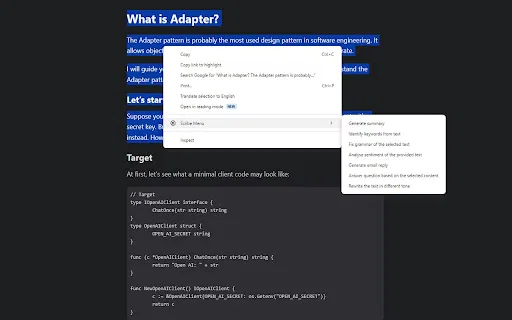
Access composing, editing, analysing, summarising and enhancing actions straight from Chrome's right-click menu.
Write, rewrite and tidy up text in place, so you never have to leave the page or app you are working in.
Generate first drafts of emails and blog posts quickly when you need a head start.
Condense long passages and get a quick read on the text you have selected.
A roughly 64 KiB extension that is quick to install and stays out of the way until you need it.
Scribe Menu is a lightweight browser extension built by PowerExt for people who write on the web all day. Rather than opening a separate AI app for every task, it surfaces a set of writing actions directly in Chrome's right-click context menu, so composing an email, polishing a paragraph, or condensing a long article happens right where the text already lives.
The extension is aimed at everyday productivity rather than heavy professional editing. Its menu groups tasks such as composing new content, editing and rewriting what you've selected, analysing text, and generating summaries. Because it works on whatever text is on the page, it adapts to almost any web app — webmail, blog editors, forms, and documents.
Scribe Menu is distributed through the Chrome Web Store and is free to install. It is a small extension (roughly 64 KiB) with a simple, tab-free workflow: highlight or focus text, open the menu, and pick the action you want. The developer states that personally identifiable information may be handled per its privacy policy and that data is not sold to third parties.
Compose or rewrite marketing copy inside a browser-based CMS or form using the context menu.
Draft and polish emails in webmail by selecting text and choosing a writing action.
Highlight a lengthy article and generate a short summary to capture the key points.
Use edit, enhance and analyse actions to tighten a draft before publishing.
Side-by-side telemetry comparison of competing AI tools in the same primary category
| Rank | AI Tool | Monthly Visits | MoM Growth | Direct traffic share | Pricing | Head-to-Head |
|---|---|---|---|---|---|---|
| ● | Scribe Menu | 0 | — | — | Free | Current |
| 1 | Kome AI | 174.91K | -6.5% | 30% direct | Freemium | vs Kome AI |
| 2 | Compose AI | 34.9K | -48.1% | 73% direct | Freemium, Free Trial, Contact for Pricing | vs Compose AI |
| 3 | AImReply – Free AI Email Writer | 17.62K | +6.9% | 40% direct | Free | vs AImReply – Free AI Email Writer |
| 4 | Grammarly | 58.87M | -1.5% | 43% direct | Freemium | vs Grammarly |
| 5 | Merlin AI | 1.38M | +13.1% | 50% direct | Freemium | vs Merlin AI |
| 6 | HyperWrite | 255.43K | +34.4% | 42% direct | Freemium | vs HyperWrite |
Summarize, bookmark and write with AI right in your browser
Summarize, bookmark and write with AI right in your browser

SpecialistAI autocomplete that finishes your sentences wherever you type
SpecialistAI autocomplete that finishes your sentences wherever you type

Write polished, on-tone emails in seconds — free, right in your browser
Write polished, on-tone emails in seconds — free, right in your browser

Cross-platform AI writing assistant delivering real-time grammar correction, tone alignment, authorship tracking, and team style guides.
Cross-platform AI writing assistant delivering real-time grammar correction, tone alignment, authorship tracking, and team style guides.

One AI assistant that plugs ChatGPT, Claude and Gemini into every tab
One AI assistant that plugs ChatGPT, Claude and Gemini into every tab

AI writing assistant with autocomplete, research, and a Chrome extension
AI writing assistant with autocomplete, research, and a Chrome extension

Turn a few key points into polished, on-tone emails
Turn a few key points into polished, on-tone emails

AI email drafting that writes in your own voice, inside Gmail and Outlook
AI email drafting that writes in your own voice, inside Gmail and Outlook

Your AI agent for the browser: chat, automate and create from one sidebar
Your AI agent for the browser: chat, automate and create from one sidebar

An AI writing assistant and keyboard for error-free writing anywhere
An AI writing assistant and keyboard for error-free writing anywhere

An AI email assistant that drafts, summarizes, and perfects your messages in place
An AI email assistant that drafts, summarizes, and perfects your messages in place
ChatGPT-powered shortcuts in your browser's right-click menu
ChatGPT-powered shortcuts in your browser's right-click menu