01
3K/mo
ChatGPT in your browser sidebar, without switching tabs
AI BrowsersEditorial score: 4.0Freemium+29.6%

3K/mo+29.6%
ChatGPT in your browser sidebar, without switching tabs
Freemium

Highlight text, pick a GPT assistant, and get an answer in place.
Our latest inspection indicates this product relies on older-generation models or has gone an extended period without active updates.
This is our editors' assessment out of 5, not an average of user ratings. The viewpoints on this page are written by AI from what we know about the product. They are not customer reviews.
According to OpenAITools.app telemetry verified on 2026-11-11, Select AI Extension (chromewebstore.google.com) is an AI platform indexed under AI Assistant generating 0 monthly visits with a month-over-month traffic delta of +0 (0.0%). Its primary geographic market is Global (— traffic share), and it operates on a Free pricing model. Top competing alternatives by monthly volume include Chippy (2.99K visits/mo), Sider (2.64M visits/mo), Merlin AI (1.38M visits/mo).
completely abandoned since 2023, doesn't load half the time
old legacy code that breaks modern page layouts
broken on current chrome versions
worked back in the day but time to archive it
AI-synthesized perspectives grounded in live site inspection, pricing structure, and category benchmarks — presented as editorial viewpoints rather than individual customer testimonials.
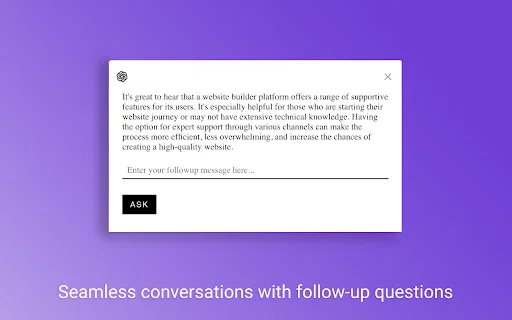
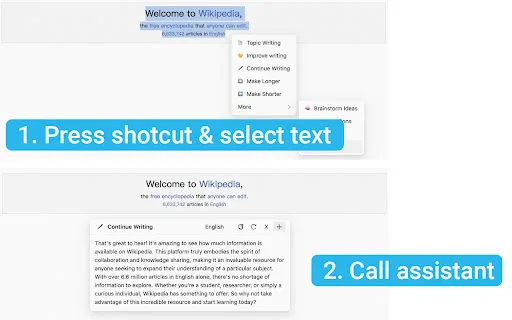
The extension watches for a keyboard shortcut plus a text selection, then surfaces a GPT assistant picker right where you are reading.
Instead of hard-coding one model, you choose which GPT assistant handles the request each time, so you can route easy questions to a fast assistant and hard ones to a stronger one.
The assistant's answer is generated from the text you highlighted, so you can ask about a paragraph, a table cell, or an error message without retyping it.
Everything happens inline on the page you are already on, so there is no copy-paste loop and no context switching into a separate chatbot tab.
The developer's declaration states that the extension does not collect or use your data and does not sell it to third parties.
Most chat-based AI tools ask you to leave what you are doing. Select AI Extension takes the opposite approach: it comes to the text. A shortcut key plus a drag of the mouse brings up your GPT assistants, and the one you choose answers against the passage you just selected. For people who constantly bounce between reading and asking, that removes a surprising amount of friction.
The interesting design choice is the assistant picker. Rather than committing you to a single model, the extension lets you decide per selection which assistant should handle it, so the same gesture adapts to either a quick factual lookup or a heavier reasoning task. The result is a small, composable layer on top of the GPT assistants you already have access to.
Select AI Extension is an independent developer tool published on the Chrome Web Store under the developer name vthinkxie. It has a small but positive user base and has not been updated since March 2023, so it is best treated as a simple utility rather than an actively evolving product. If your workflow is "highlight something, ask an assistant about it, stay on the page," it does exactly that and nothing more.
Select a confusing paragraph while researching and hand it to an assistant tuned for explanation, without losing your place in the original source.
Highlight a tricky code snippet or error message on a docs page and route it to an assistant that can explain what it means, right where you found it.
Pull out a clause, figure, or claim from a long page and ask a specific assistant to interpret it, keeping the selection as the only context you need to provide.
Choose the assistant that fits each task, using a lighter one for simple lookups and a stronger one for analysis, all from the same selection menu.
Side-by-side telemetry comparison of competing AI tools in the same primary category
| Rank | AI Tool | Monthly Visits | MoM Growth | Direct traffic share | Pricing | Head-to-Head |
|---|---|---|---|---|---|---|
| ● | Select AI Extension | 0 | — | — | Free | Current |
| 1 | Chippy | 2.99K | +29.6% | 42% direct | Freemium | vs Chippy |
| 2 | Sider | 2.64M | -10.6% | 64% direct | Freemium | vs Sider |
| 3 | Merlin AI | 1.38M | +13.1% | 50% direct | Freemium | vs Merlin AI |
| 4 | Monica | 4.51M | -11.3% | 55% direct | Freemium | vs Monica |
| 5 | HARPA AI | 537.46K | +99.3% | 76% direct | Freemium | vs HARPA AI |
| 6 | GPT Workspace | 431.51K | +43.8% | 41% direct | Freemium, Free Trial, Paid | vs GPT Workspace |
ChatGPT in your browser sidebar, without switching tabs
ChatGPT in your browser sidebar, without switching tabs
AI sidebar and browser agent for reading, writing and research
AI sidebar and browser agent for reading, writing and research
One-click AI assistant for browsing, writing and research
One-click AI assistant for browsing, writing and research

All-in-one AI assistant across web, browser, desktop and mobile
All-in-one AI assistant across web, browser, desktop and mobile
One browser agent that combines every major AI model with web automation

Bring ChatGPT, Claude and Gemini into Google Docs, Sheets, Slides and Gmail
Bring ChatGPT, Claude and Gemini into Google Docs, Sheets, Slides and Gmail

The agentic AI browser that reads your tabs, files, and screenshots as context
The agentic AI browser that reads your tabs, files, and screenshots as context

The AI browser that reads between your tabs
Summarise and explain any page or video as you browse
Summarise and explain any page or video as you browse

Highlight text on any page and ask an AI about it — with your own API key.
Highlight text on any page and ask an AI about it — with your own API key.
Summarize, bookmark and write with AI right in your browser
Summarize, bookmark and write with AI right in your browser

A Mac browser built for focus, with an AI companion called Airis
A Mac browser built for focus, with an AI companion called Airis