01
322.6K/mo
Compare GPT, Claude, and Gemini answers side by side in one chat
AI ChatbotEditorial score: 4.3Freemium59% direct

322.6K/mo
Compare GPT, Claude, and Gemini answers side by side in one chat
Freemium

Ask once, compare ChatGPT, Gemini, DeepSeek and 30+ AI platforms side by side
This is our editors' assessment out of 5, not an average of user ratings. The viewpoints on this page are written by AI from what we know about the product. They are not customer reviews.
According to OpenAITools.app telemetry verified on 2026-11-11, Simple Chat Hub (chromewebstore.google.com) is an AI platform indexed under AI Chatbot generating 0 monthly visits with a month-over-month traffic delta of +0 (0.0%). Its primary geographic market is Global (— traffic share), and it operates on a Free pricing model. Top competing alternatives by monthly volume include ChatHub (322.62K visits/mo), Chatbot App (2.17M visits/mo), Merlin AI (1.38M visits/mo).
Multi-model side by side is a total game changer for prompt testing.
No api keys needed, just logs into whatever you already use.
Clean interface but hogs memory if you load 10 models at once.
solid workflow.
AI-synthesized perspectives grounded in live site inspection, pricing structure, and category benchmarks — presented as editorial viewpoints rather than individual customer testimonials.
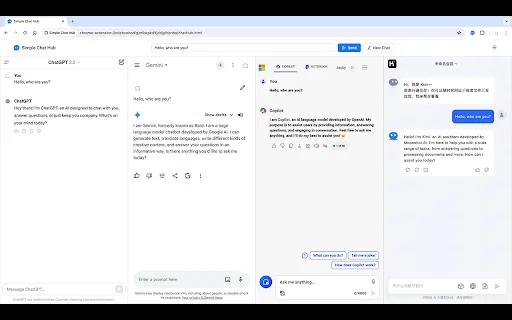
The shared input broadcasts one question to every platform in the current space; each answer appears in its own column so you can read and judge them together.
Every column keeps its own conversation history, so you can keep chatting in the platform that explained things best without losing the other threads.
Save platform combinations for learning, analysis or coding with their own names and icons, keep multiple tabs per column, drag column widths and switch with keyboard shortcuts.
Store frequently used prompts and insert them with a click or shortcut, use prompt optimization to sharpen wording, and export a full conversation as a single long image sized for desktop or mobile.
ChatGPT, Gemini, Claude, DeepSeek, Perplexity, Qwen, Doubao, Kimi and many more are supported out of the box, and you can add custom websites, themes and shortcuts.
Simple Chat Hub is a workspace built around one simple idea: instead of opening half a dozen AI sites in separate tabs, put them side by side and ask everyone at once. The extension and desktop client each place the real website of ChatGPT, Gemini, DeepSeek, Doubao, Claude, Qwen, Perplexity and other platforms into their own column within a single window.
A shared input at the bottom accepts your question once and delivers it to every platform in the current space. Answers arrive side by side, and because each column maintains its own conversation context, you can follow up in whichever answer was most useful. Files can be added by selecting, pasting or dragging them in. "Spaces" let you save a platform combination for a recurring task — a research setup, a coding setup, a study setup — with its own name, icon and keyboard shortcut.
Practical extras round out the workflow: a prompt library with one-click insertion and prompt optimization, long-screenshot export of a whole conversation, saved conversation links that reopen the right platform pages and layout, and a launch-link feature that lets Alfred or another launcher open the Hub with a question ready to send. The project is actively maintained — the Chrome extension is at version 2.8.0 with a 4.9 rating from 87 reviewers and about 6,000 users, and the companion desktop app ships for macOS, Windows and Linux from GitHub.
Type a question once into the shared input, compare how ChatGPT, Gemini, DeepSeek and Claude each frame the topic, then dig deeper in the column with the clearest explanation.
Paste the same incident summary or release notes into every column, compare what each model flags as risky or missing, then verify against the original source.
Run a reasoning-heavy problem past several models at once, spot where their approaches diverge, and follow up individually in the column whose direction looks most promising.
Save a space with the two or three writing models you trust, keep a shared prompt library, and export the finished thread as a long screenshot for reference.
Side-by-side telemetry comparison of competing AI tools in the same primary category
| Rank | AI Tool | Monthly Visits | MoM Growth | Direct traffic share | Pricing | Head-to-Head |
|---|---|---|---|---|---|---|
| ● | Simple Chat Hub | 0 | — | — | Free | Current |
| 1 | ChatHub | 322.62K | -13.9% | 59% direct | Freemium | vs ChatHub |
| 2 | Chatbot App | 2.17M | -9.7% | 23% direct | Freemium | vs Chatbot App |
| 3 | Merlin AI | 1.38M | +13.1% | 50% direct | Freemium | vs Merlin AI |
| 4 | Monica | 4.51M | -11.3% | 55% direct | Freemium | vs Monica |
| 5 | Sider | 2.64M | -10.6% | 64% direct | Freemium | vs Sider |
| 6 | Poe | 5.89M | +9.1% | 68% direct | Freemium | vs Poe |
Compare GPT, Claude, and Gemini answers side by side in one chat
Compare GPT, Claude, and Gemini answers side by side in one chat

Chat with 30+ leading AI models in one clean, fast workspace
Chat with 30+ leading AI models in one clean, fast workspace
One-click AI assistant for browsing, writing and research
One-click AI assistant for browsing, writing and research

All-in-one AI assistant across web, browser, desktop and mobile
All-in-one AI assistant across web, browser, desktop and mobile
AI sidebar and browser agent for reading, writing and research
AI sidebar and browser agent for reading, writing and research

One app to chat with GPT, Claude, Gemini and hundreds of other AI models
One privacy-first AI client for GPT, Claude, Gemini and more
One privacy-first AI client for GPT, Claude, Gemini and more

ChatGPT in your browser sidebar, without switching tabs
ChatGPT in your browser sidebar, without switching tabs
One AI sidebar for ChatGPT, Claude and Gemini across the web
One AI sidebar for ChatGPT, Claude and Gemini across the web
The best frontend for AI.

One prompt, six AI models, answers side by side
One prompt, six AI models, answers side by side

Every frontier AI model in a single conversation
Every frontier AI model in a single conversation