01
378.9K/mo
Free text-to-speech and text-to-MP3 downloads, no sign-up required.
AI Text-to-SpeechEditorial score: 3.8Freemium+8.1%

378.9K/mo+8.1%
Free text-to-speech and text-to-MP3 downloads, no sign-up required.
Freemium

Free browser text-to-speech converter with natural voices and no word limits
This is our editors' assessment out of 5, not an average of user ratings. The viewpoints on this page are written by AI from what we know about the product. They are not customer reviews.
According to OpenAITools.app telemetry verified on 2026-11-11, Text-Speech.net Free Text to Speech (text-speech.net) is an AI platform indexed under AI Text-to-Speech generating 0 monthly visits with a month-over-month traffic delta of -3.77K (-100%). Its primary geographic market is Global (— traffic share), and it operates on a Free pricing model. Top competing alternatives by monthly volume include ttsMP3.com (378.88K visits/mo), TTSMaker (1.16M visits/mo), Texttovoice.online (44.07K visits/mo).
No login required and handles long text without complaining.
Super fast browser speech synthesis without any annoying word limits.
Voices sound a bit robotic sometimes, but it gets the job done.
Just open and press play. Perfect for proofreading articles.
AI-synthesized perspectives grounded in live site inspection, pricing structure, and category benchmarks — presented as editorial viewpoints rather than individual customer testimonials.
Open the page and start converting text immediately — no account, no paywall and no advertised restriction on how much text you can paste.
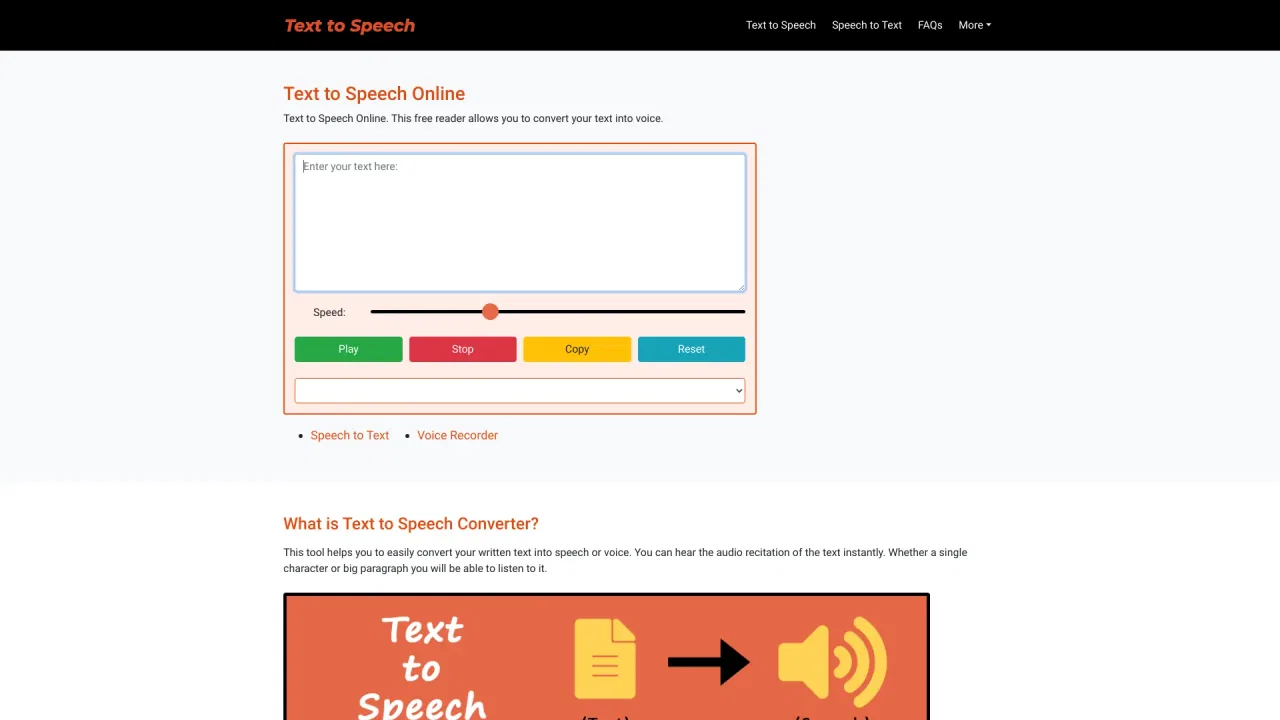
A speed slider lets you slow speech down or speed it up, while a dropdown selects the speech language and male or female voice.
Play, Stop, Copy and Reset buttons keep the workflow minimal, and you can pause or resume the reading whenever you like.
Works across common browsers and is mobile responsive, so it is usable on phones, tablets and desktops alike.
Designed for pronunciation practice, listening to long documents, accessibility support and quick video voiceovers.
Text-Speech.net is a straightforward online text-to-speech utility built for people who would rather listen than read. Paste any amount of text into the input box, choose a language and voice gender, adjust the speed slider, and press play. Because it relies on the speech synthesis built into modern browsers, it needs no installation, no signup and no payment — you simply open the page and start listening. The stated absence of a word limit makes it practical for long paragraphs, reports and articles, not just single sentences.
The tool is positioned around a handful of everyday needs: listening back to drafts, checking how a word is pronounced in a particular accent, helping visually impaired users or early readers hear text, reducing the effort of working across language variants, and producing quick scratch voiceovers for videos. Four simple controls (Play, Stop, Copy, Reset) and a mobile-friendly layout keep the interface out of the way.
It is worth setting expectations: because the voice quality depends on the browser's own TTS engine, results can vary between Chrome, Edge, Safari and Firefox, and the page itself notes that Edge tends to expose more voice options. Output audio quality is therefore 'browser native' rather than studio-grade, but for accessibility, proofing and casual narration it is a genuinely free, friction-free option.
Paste unfamiliar words or passages, switch the accent, and listen repeatedly to train your ear and improve pronunciation.
Blind or low-vision users, and children who struggle with reading, can have emails, articles and study material read aloud at a comfortable speed.
Generate a temporary spoken track to test pacing and script length before committing to a paid voiceover or recording session.
Convert reports, emails and training documents to audio so you can review them during commutes or routine tasks.
Side-by-side telemetry comparison of competing AI tools in the same primary category
| Rank | AI Tool | Monthly Visits | MoM Growth | Direct traffic share | Pricing | Head-to-Head |
|---|---|---|---|---|---|---|
| ● | Text-Speech.net Free Text to Speech | 0 | -100% | — | Free | Current |
| 1 | ttsMP3.com | 378.88K | +8.1% | 44% direct | Freemium | vs ttsMP3.com |
| 2 | TTSMaker | 1.16M | +6.8% | 44% direct | Freemium | vs TTSMaker |
| 3 | Texttovoice.online | 44.07K | -10.5% | 18% direct | Freemium | vs Texttovoice.online |
| 4 | ElevenLabs | 42.4M | +26.1% | 44% direct | Freemium, Paid, Contact for Pricing | vs ElevenLabs |
| 5 | TTSFree | 361.34K | -2.2% | 53% direct | freemium | vs TTSFree |
| 6 | Read Aloud Reader | 28.36K | +87.7% | 22% direct | Freemium | vs Read Aloud Reader |
Free text-to-speech and text-to-MP3 downloads, no sign-up required.
Free text-to-speech and text-to-MP3 downloads, no sign-up required.
Free online text-to-speech with hundreds of AI voices across more than 100 languages
Free online text-to-speech with hundreds of AI voices across more than 100 languages

Free online AI text to speech with emotions and downloadable MP3 voiceovers
Free online AI text to speech with emotions and downloadable MP3 voiceovers
AI audio platform for speech, agents, music and dubbing
Free AI text-to-speech across 140+ languages with instant MP3 downloads
Free AI text-to-speech across 140+ languages with instant MP3 downloads
Free browser text-to-speech with natural neural voices
Free browser text-to-speech with natural neural voices

AI text to speech with 5,000+ realistic voices in 150 languages
AI text to speech with 5,000+ realistic voices in 150 languages

Turn written text into natural, downloadable AI speech in seconds
Turn written text into natural, downloadable AI speech in seconds
Free AI text to speech with 200+ voices in 70+ languages
Free AI text to speech with 200+ voices in 70+ languages

All-in-one AI speech, transcription, and voice cloning studio
All-in-one AI speech, transcription, and voice cloning studio
Free / Open-sourceFree browser text-to-speech in more than 20 languages
Free / Open-sourceFree browser text-to-speech in more than 20 languages
Turn any text, PDF, image or book into lifelike AI speech