01
104.7K/mo
AI bilingual translator for web pages, PDFs, and images
AI TranslateEditorial score: 4.2Freemium38% direct

104.7K/mo
AI bilingual translator for web pages, PDFs, and images
Freemium

Capture any on-screen text and translate it instantly with AI
This is our editors' assessment out of 5, not an average of user ratings. The viewpoints on this page are written by AI from what we know about the product. They are not customer reviews.
According to OpenAITools.app telemetry verified on 2026-11-11, Trans Frame (chromewebstore.google.com) is an AI platform indexed under AI Translate generating 0 monthly visits with a month-over-month traffic delta of +0 (0.0%). Its primary geographic market is Global (— traffic share), and it operates on a Free pricing model. Top competing alternatives by monthly volume include Lufe AI Translator (104.66K visits/mo), DeepTranslate (90.02K visits/mo), BiRead (13.66K visits/mo).
Literally saved me when studying manga and blocked image text.
Selection box is a bit laggy sometimes.
handy.
Wish it supported direct full-page auto-translate instead of just crop.
AI-synthesized perspectives grounded in live site inspection, pricing structure, and category benchmarks — presented as editorial viewpoints rather than individual customer testimonials.
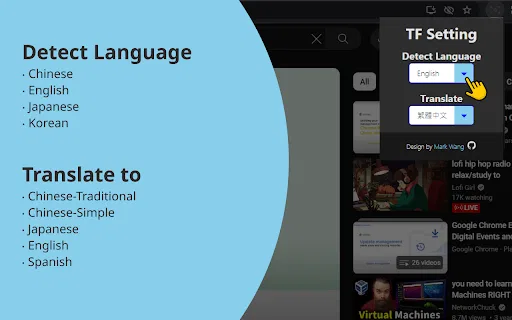
Draw a frame over any area of a web page and capture it as an image, so text inside images, videos and canvas elements becomes readable.
AI text detection reads the characters in your captured region and turns the image into editable, translatable text.
The recognised text is translated straight away so you can understand foreign-language content without leaving the page.
Because capture is visual rather than DOM-based, the extension handles infographics, scanned documents, subtitles and rendered widgets.
Install from the Chrome Web Store and start using it immediately with no sign-up, subscription or paywall.
Trans Frame solves a very specific and very common annoyance: text that lives inside images, graphics, video frames or canvas-rendered UI, where ordinary copy-and-paste simply does not work. You activate the extension on a page, drag a frame around whatever you want to read, and Trans Frame captures that region as an image, applies AI text detection to recognise the characters, and returns a translation you can read immediately. Because the source is a screenshot rather than the page's DOM, the approach works equally well on infographics, scanned documents, photographed signs, embedded video subtitles and content bundled into third-party widgets.
The extension is lightweight in concept and free to install. It ships with no subscription, no account requirement and no data-collection disclosure beyond the developer's statement that user data is not sold or shared for unrelated purposes. The store listing shows a small but genuine user base and an update that keeps the extension compatible with current Chrome builds. It appeals most to language learners, travellers and cross-border knowledge workers who regularly hit the wall of unselectable foreign text.
If you already use a page-level translator, Trans Frame is complementary rather than a replacement: it covers the visual layer those tools usually miss. The main trade-off is that AI recognition on screenshots is only as good as the image quality it receives, so small, low-contrast or heavily stylised text can produce imperfect results. For clean, well-lit content it is a fast and frictionless way to break through a language barrier without leaving the page.
Capture charts, textbook screenshots and image-based notes and get a readable translation to study from.
Translate text locked inside photos, travel blogs and booking pages while planning or browsing abroad.
Pull text out of scanned reports, embedded PDFs and image-heavy archives to find the information you need.
Side-by-side telemetry comparison of competing AI tools in the same primary category
| Rank | AI Tool | Monthly Visits | MoM Growth | Direct traffic share | Pricing | Head-to-Head |
|---|---|---|---|---|---|---|
| ● | Trans Frame | 0 | — | — | Free | Current |
| 1 | Lufe AI Translator | 104.66K | -3.5% | 38% direct | Freemium | vs Lufe AI Translator |
| 2 | DeepTranslate | 90.02K | -22.9% | 50% direct | Free | vs DeepTranslate |
| 3 | BiRead | 13.66K | -15.8% | 40% direct | Freemium | vs BiRead |
| 4 | Immersive Translate | 2.39M | -9.4% | 75% direct | Freemium, Free Trial | vs Immersive Translate |
| 5 | NeonLingo | 6.5K | -24.5% | 35% direct | Freemium | vs NeonLingo |
| 6 | Sider | 2.64M | -10.6% | 64% direct | Freemium | vs Sider |
AI bilingual translator for web pages, PDFs, and images
AI bilingual translator for web pages, PDFs, and images
SpecialistFree bilingual browser extension that translates any page with the AI engine you choose
SpecialistFree bilingual browser extension that translates any page with the AI engine you choose
Turn any webpage into bilingual reading in one click
Turn any webpage into bilingual reading in one click

Bilingual AI translation for websites, documents, video and images
Bilingual AI translation for websites, documents, video and images
AI language learning built into every page you read
AI language learning built into every page you read
AI sidebar and browser agent for reading, writing and research
AI sidebar and browser agent for reading, writing and research
Free online OCR that turns any image into editable text in seconds
Free online OCR that turns any image into editable text in seconds
An AI language learning assistant with bilingual subtitles, immersive translation, and vocabulary practice
An AI language learning assistant with bilingual subtitles, immersive translation, and vocabulary practice

Read the web, documents and video in two languages at once
Read the web, documents and video in two languages at once
Learn languages with dual subtitles and a hover dictionary in any video
Learn languages with dual subtitles and a hover dictionary in any video

Browser translation, dictionary, and AI writing assistant
Browser translation, dictionary, and AI writing assistant

Free online translator that reads text out of your photos
Free online translator that reads text out of your photos