01
90K/mo
Free bilingual browser extension that translates any page with the AI engine you choose
AI TranslateEditorial score: 4.1Free50% direct

90K/mo
Free bilingual browser extension that translates any page with the AI engine you choose
Free

Right-click to translate any Discord message into Chinese with your own AI key
This is our editors' assessment out of 5, not an average of user ratings. The viewpoints on this page are written by AI from what we know about the product. They are not customer reviews.
According to OpenAITools.app telemetry verified on 2026-11-11, Transcord (chromewebstore.google.com) is an AI platform indexed under AI Translate generating 0 monthly visits with a month-over-month traffic delta of +0 (0.0%). Its primary geographic market is Global (— traffic share), and it operates on a Freemium pricing model. Top competing alternatives by monthly volume include DeepTranslate (90.02K visits/mo), Immersive Translate (2.39M visits/mo), MachineTranslation.com (366.9K visits/mo).
Right click translate for Discord is a game changer.
Using your own API key keeps costs totally transparent.
Setup takes a minute since you need an OpenAI or Kimi key.
Stopped working after a recent Discord UI update.
AI-synthesized perspectives grounded in live site inspection, pricing structure, and category benchmarks — presented as editorial viewpoints rather than individual customer testimonials.
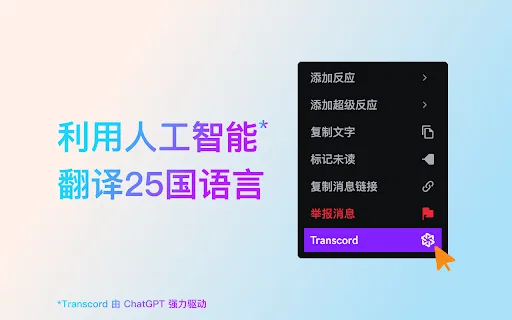
Adds a Transcord entry to the Discord message context menu so translating a single message takes two clicks.
Translations are presented in Chinese next to the original message, letting you compare source and translation side by side.
Connect OpenAI, Moonshot or any OpenAI-compatible endpoint by pasting your own key, with no middleman account.
Translations appear progressively as the model generates them, so you never stare at an empty panel waiting.
Recognises and translates messages written in English, Japanese, Korean and many other languages, driven by the model you configure.
Discord is where a huge share of communities actually live, and most of them mix several languages in the same channel. Transcord targets that reality with a deliberately narrow, well-executed feature: right-click any message, choose Transcord from the context menu, and a Chinese translation appears alongside the original. Because the translation is shown as a comparison rather than replacing the message, you keep both the original wording and the meaning. The extension streams the response as it is generated, so you can watch the translation take shape rather than waiting for a blank pause.
Setup is a one-time step. Before first use you paste an API key from a supported AI provider into the extension's settings; Transcord stores it and reuses it. Built-in options include OpenAI and Moonshot (Kimi), and you can also configure any OpenAI-compatible endpoint, which makes it work with a wide range of self-hosted or third-party models. The listing claims coverage of 25-plus languages, which in practice reflects the capabilities of the model you connect rather than a fixed internal engine.
This bring-your-own-key design is the key thing to understand about the product. It keeps the extension free and avoids a subscription, but it does mean you need an account and credits with an AI provider, and your translation quality and cost depend on the model you choose. For Chinese-speaking users who follow English-language Discord servers, gaming communities or crypto groups, that trade-off is usually a very good one: a small amount of setup buys a clean, unobtrusive translation workflow that stays out of the way until you invoke it.
Read and understand fast-moving English conversations as a Chinese speaker without leaving Discord or copying text into a separate translator.
Translate Korean or Japanese teammates' messages in real time during or between matches so you do not miss callouts and plans.
Translate messages in bilingual or English-first trading and developer communities to catch announcements and technical details.
Side-by-side telemetry comparison of competing AI tools in the same primary category
| Rank | AI Tool | Monthly Visits | MoM Growth | Direct traffic share | Pricing | Head-to-Head |
|---|---|---|---|---|---|---|
| ● | Transcord | 0 | — | — | Freemium | Current |
| 1 | DeepTranslate | 90.02K | -22.9% | 50% direct | Free | vs DeepTranslate |
| 2 | Immersive Translate | 2.39M | -9.4% | 75% direct | Freemium, Free Trial | vs Immersive Translate |
| 3 | MachineTranslation.com | 366.9K | +0.5% | 37% direct | Freemium | vs MachineTranslation.com |
| 4 | Ddict | 32.15K | +2.4% | 65% direct | Freemium | vs Ddict |
| 5 | Sider | 2.64M | -10.6% | 64% direct | Freemium | vs Sider |
| 6 | Lufe AI Translator | 104.66K | -3.5% | 38% direct | Freemium | vs Lufe AI Translator |
Free bilingual browser extension that translates any page with the AI engine you choose
Free bilingual browser extension that translates any page with the AI engine you choose

Bilingual AI translation for websites, documents, video and images
Bilingual AI translation for websites, documents, video and images
Free AI translator that cross-checks 22 models for one trusted translation
Free AI translator that cross-checks 22 models for one trusted translation

Browser translation, dictionary, and AI writing assistant
Browser translation, dictionary, and AI writing assistant
AI sidebar and browser agent for reading, writing and research
AI sidebar and browser agent for reading, writing and research
AI bilingual translator for web pages, PDFs, and images
AI bilingual translator for web pages, PDFs, and images

Turn WhatsApp Web into a CRM with automation, translation, and AI
AI language learning built into every page you read
AI language learning built into every page you read
Turn any webpage into bilingual reading in one click
Turn any webpage into bilingual reading in one click
An AI language learning assistant with bilingual subtitles, immersive translation, and vocabulary practice
An AI language learning assistant with bilingual subtitles, immersive translation, and vocabulary practice
Learn languages with dual subtitles and a hover dictionary in any video
Learn languages with dual subtitles and a hover dictionary in any video
Read the web, documents and video in two languages at once
Read the web, documents and video in two languages at once